Checked by CouponSwift on : worked
OneVPS Coupons & Promo Codes
Top OneVPS Coupon Codes for October 2026
About OneVPS & Latest Deals
Service Highlights
- Best For
- Forex Traders
- Support
- 24/7 Support
- Guarantee
- Instant Setup
- Feature
- High IOPS Storage
Coupon Insights
- Best Discount
- UP TO 50%
- Avg. Savings
- 36%
- Active Offers
- 4
- Verified
- 2
Get the latest Onevps coupons, promo codes, and deals. Verified and updated correctly.
Learn more about OneVPS and their latest offers.
How to use an OneVPS coupon code
Copy an OneVPS coupon or promo code, then paste it in the promo field at checkout.
- 1Choose a couponGrab the OneVPS offer that works best for you. It's listed above.
- 2Reveal the codeHit "Get Code" or "Get Deal" depending on the offer type. Popup opens. Click the copy icon inside—code goes to your clipboard.
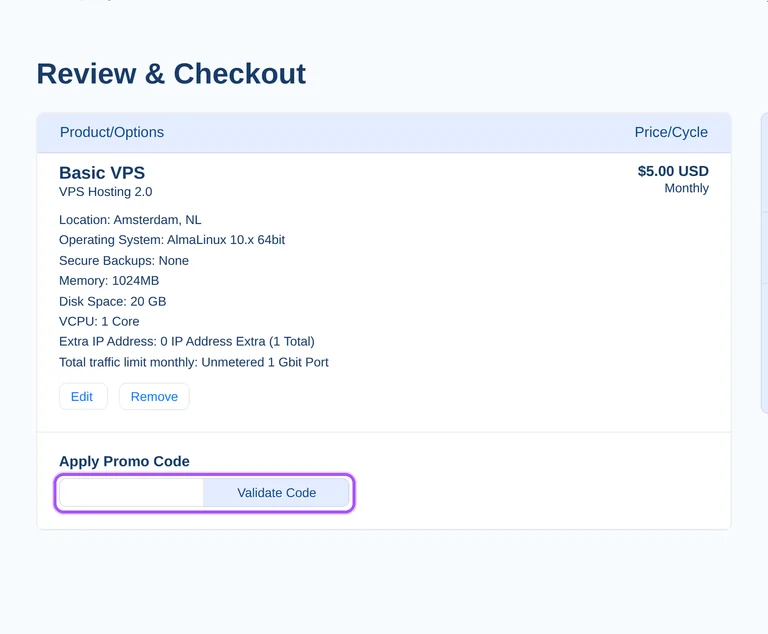
- 3Apply at checkoutNow head over to OneVPS's site. Pick your Forex VPS plan. Checkout page has a "Promo Code" field. Paste what you copied there.
Customer Reviews
No ratings yet
Be the first to rate this store
Login to Rate & Review
Join our community to verify coupons, earn coins, and help others save.
Sign In / RegisterOneVPS Coupon FAQ
Start with OneVPS's VPS Plans page, select a package, and follow its Order Now link to configure your purchase. The advertised standard VPS promotion gives 50% off the first month, so the saving concerns the opening billing period. OneVPS lets you modify the operating system and resources during configuration rather than treating the initial package selection as the complete order. The ordering catalogue separates Basic, Standard, Premium, Professional, Executive and Custom VPS packages. Select the package that fits your intended operating system before proceeding with the offers on this page. For a Windows purchase, start with Standard VPS or above: the catalogue lists Basic VPS as Linux only.
OneVPS supports VPS migrations between its available locations, and product transfers are excluded from its initial-purchase money-back guarantee. Its standard VPS promotion reduces the first month's price by 50%; that billing offer and a later server migration are separate purchase considerations. OneVPS lists locations including London, New York, Frankfurt, Tokyo, Singapore and Sydney, giving you named destinations to discuss with support. The VPS Plans ordering process lets you configure your server after selecting a package. For a location change after setup, contact the support team that handles migrations. Specify the destination city in that request, because OneVPS offers both London and Manchester, and both New York and Los Angeles.
A student considering OneVPS can compare the standard VPS offer that takes 50% off the first month. This is a first-month VPS promotion rather than a student-specific discount, so plan selection remains part of the purchase. OneVPS's ordering catalogue includes Basic VPS for Linux and Standard VPS with Linux or Windows options. The VPS Plans page directs buyers to select a package and modify the operating system and resources in the next step. The offers on this page should therefore be considered alongside the package you intend to configure. For coursework requiring Windows, follow the Standard VPS Order Now link rather than starting with the Linux-only Basic VPS.
OneVPS advertises 35% off the first month for its Hybrid VPS offer. Hybrid VPS has its own promotion, separate from the 50% first-month offer advertised for standard VPS hosting. Its configuration options are available at checkout, and the service includes dedicated resources with a maximum of eight clients per server. Hybrid customers also receive 24/7 priority support from the infrastructure team. These are the service details to weigh alongside the opening-month saving when selecting the offers on this page. Follow the Hybrid VPS ordering route for that product family. For a workload requiring dedicated CPU resources, the Hybrid comparison identifies dedicated CPU utilization, while standard VPS uses shared CPU resources.
Cancel your OneVPS subscription during the valid billing period to stop its automatic renewal after a promotional month. OneVPS charges your selected payment method when each service period ends and repeats the previous period's length. Its advertised standard VPS discount covers the first month, so that opening offer should be considered separately from continuing service. VPS subscriptions can be cancelled without a notice period, with a minimum billing duration of one month. Account termination requires notification and OneVPS's confirmation. For cancellation questions, the contact form asks for your first name, email and a brief description of the help required. State that your request concerns the VPS subscription and its next automatic renewal.
OneVPS's first-month promotion is a paid discount: its standard VPS offer reduces that month by 50%. VPS purchases are billed in advance, so the offer lowers an opening charge rather than replacing payment with a trial period. OneVPS's catalogue presents monthly packages, and its VPS Plans page lets you configure the operating system and resources after selecting one. The seven-day money-back guarantee excludes discounted products. That condition matters when deciding between a reduced opening price and an eligible full-price purchase. Follow the package's Order Now link to begin configuration. For a Windows setup, start with Standard VPS or a higher listed package, because Basic VPS is listed with a Linux system.
Start with Standard VPS or a higher listed package when considering a OneVPS discount for Windows hosting. The ordering catalogue lists Linux or Windows systems for Standard, Premium, Professional, Executive and Custom VPS, while Basic VPS lists Linux. OneVPS's VPS Plans page places operating-system and resource configuration after the initial package selection. That sequence lets you identify the Windows-capable product before proceeding with the offers on this page. The standard VPS promotion advertises a 50% reduction for the first month, rather than a continuing reduction for every billing period. Follow the Order Now link beside the Windows-capable package. For an adjustable configuration, Custom VPS lists Linux or Windows alongside configurable resources.
OneVPS excludes discounted products from its seven-day money-back guarantee. Eligible refunds cover fully paid VPS products on the initial purchase; upgrades, transfers and downgrades are excluded. Requests must reach support@onevps.cloud within seven days of the initial order and include your full name, email, telephone number and cancellation reason. This distinction affects the standard VPS first-month offer and the separate Hybrid VPS promotion advertised by OneVPS. The standard offer reduces the opening month by 50%, while the Hybrid offer reduces it by 35%. Treat the saving and refund eligibility as separate decisions before ordering. For an eligible initial-purchase refund request, send all four required account details together to support@onevps.cloud.
OneVPS advertises 50% off the first month for standard VPS and 35% off the first month for Hybrid VPS. The relevant offer depends on the product family you are ordering, rather than the percentage alone. Standard VPS packages let you configure the operating system and resources after choosing a plan. Hybrid VPS provides dedicated resources, limits each server to eight clients, and includes priority infrastructure support. Its checkout also provides configuration options. Compare the offers on this page against the service you intend to purchase, since both advertised reductions concern the opening month. For a purchase requiring dedicated CPU utilization, follow the Hybrid VPS route identified in OneVPS's comparison.
OneVPS accepts major credit and debit cards, PayPal, Alipay and Skrill for VPS purchases billed in advance. Its standard VPS promotion reduces the first month by 50%, so payment still forms part of the opening order. The VPS catalogue provides an Order Now link for each package, with configuration following the plan selection. Refunds issued for cryptocurrency payments become OneVPS account credit, and payment-provider transaction fees are nonrefundable. Discounted products themselves are nonrefundable under OneVPS's guarantee terms. For help with the payment step, live chat operates around the clock Monday through Friday, while email and ticket support run seven days a week. Use email or a ticket for a weekend payment query.
Yes. An OneVPS coupon and a promo code are the same thing: paste the code in the promo field at checkout before you pay.


