AMPforWP Coupon & Promo Codes
No active AMPforWP codes right now. The most recent ones are below.
Expired Offers (May still work)
About AMPforWP & Latest Deals
Professional WordPress tools and plugins.
Savings opportunities available through Ampforwp discount codes
AMPforWP speeds up your site, but their premium extensions are the real turbochargers. They charge for the advanced functionality like WooCommerce support. Don't let your bounce rate suffer. Accelerate for less.
Service categories frequently on promotion
The 'Personal' ($149) and 'Webmaster' ($249) plans are the frequent flyers. We see 20% off 'Membership' codes and special holiday 50% promotions (BFRIDAY50). Our deals help you unlock all extensions for the price of just one or two single licenses. Validate your mobile speed. Get the full toolkit on a discount.
Services usually excluded from promo codes
Custom development services are hourly billable. Installation support (included in higher tiers) is part of the plan price. Quality costs money. The plugin support is incredible; use our code to cut the subscription cost, but don't expect free custom coding.
Impact of billing cycle on promotional price
Annual billing is standard. Renewal discounts are rare (usually full price). Initial Discount + Annual Term = The Deal. You must use a coupon on the initial signup to secure the lower rate for Year 1.
Promo codes vs. automatically applied offers
GPL sites sell it cheap but risky. Be careful. Official support is vital for AMP errors. Use our verified code for the official license to get updates and support, which GPL sites lack.
How to use AMPforWP Discount Codes?
Copy an AMPforWP coupon or promo code, then paste it in the promo field at checkout.
- Choose a coupon
Grab the AMPforWP offer that works best for you. It's listed above.
- Reveal the code
Hit "Get Code" or "Get Deal" depending on the offer type. Popup opens. Click the copy icon inside—code goes to your clipboard.
- Apply at checkout
Now head over to AMPforWP's site. Pick your AMP for WP plan. Checkout page has a "Promo Code" field. Paste what you copied there.
AMPforWP Discount FAQs
How do I request support for a discounted AMPforWP membership?
AMPforWP membership includes technical support while the membership remains active. Its support page accepts requests through a form that distinguishes premium customers from other visitors. The form asks for your name, email address, premium-customer status, subject, and message. Membership gives access to current and upcoming extensions and themes, so a request can identify the specific extension involved rather than referring only to the bundle. The membership's cancellation guidance also explains that updates and technical support are provided to members, although extensions remain usable after cancellation. For a purchase made through the offers on this page, the support form provides a direct route to discuss the purchased product. The premium-status selector is labelled Are you a Premium Customer?, with Yes and No options.
Which AMPforWP membership price should I compare with a discount offer?
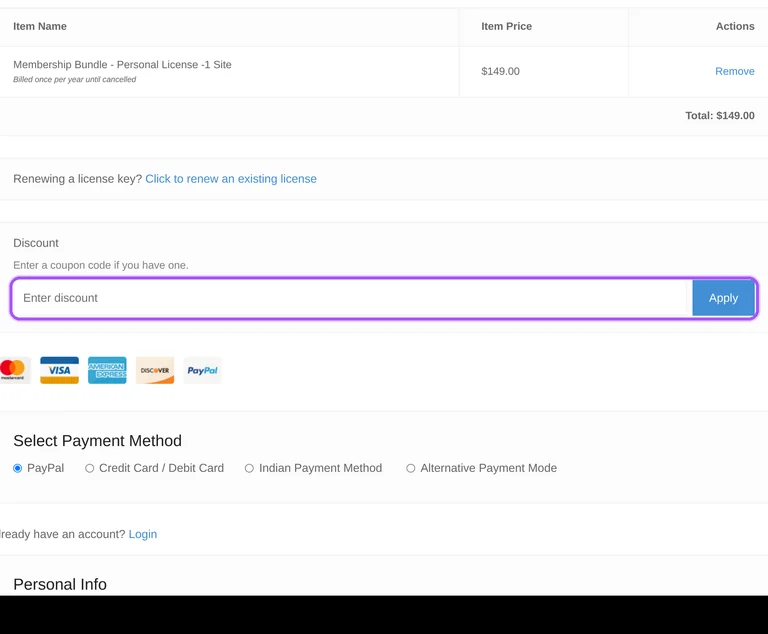
AMPforWP's Personal membership starts at $149 per year before a discount. The membership includes all current and upcoming extensions and themes, with higher tiers offering larger site allowances. Personal covers one site, Multiple covers three, Webmaster covers ten, and Freelancer covers twenty-five. In the order page, the Personal option appears as Membership Bundle - Personal License -1 Site, with an item price of $149.00 and annual billing until cancelled. The offers on this page should be compared with the membership and site allowance you intend to purchase. The checkout also provides a discount entry area and a separate payment selection. For a one-site membership purchase, the concrete comparison is the $149.00 item price shown beside that Personal license.
Can I get layout help after buying discounted AMPforWP Page Builder Compatibility?
AMPforWP provides layout assistance for its Page Builder Compatibility extension. The extension supports Elementor, Divi, Fusion Builder for Avada, and Avia Builder for Enfold, with technical help available when a design needs assistance. Its individual Personal license covers one site and is listed at $89 per year before any applicable offer. The product is also included in the All Access membership, so the purchase route can be an individual extension or the broader bundle. If CSS fails to load correctly after activation, the extension's support instructions direct buyers to contact the support team for a fix. For a discounted purchase intended for an existing design, the product page includes separate Divi Demo and Elementor demo examples to inspect before selecting Purchase.
Which payment options are available for a discounted AMPforWP order?
AMPforWP checkout offers PayPal, cards, and additional payment options. The order page lists PayPal, Credit Card / Debit Card, Indian Payment Method, and Alternative Payment Mode. Its discount entry area is separate from the payment selection, so the offer and the way you pay are handled in distinct parts of the order. For the Personal membership, the cart identifies the one-site license and annual billing until cancelled alongside the item price. The order also includes a renewal route for buyers who already hold a license key. A new license purchase leaves that renewal-key entry blank, following the checkout instructions. After reviewing the purchased license and discount entry, the payment choices are grouped under the exact label Select Payment Method.
Will cancelling a discounted AMPforWP membership stop my extensions from working?
AMPforWP allows continued use of its extensions after membership cancellation. Updates and technical support are reserved for members, so continued use and continued membership benefits are separate considerations. The annual Personal membership is billed once per year until cancelled, and the terms require cancellation before the subscription period ends to prevent automatic renewal. A cancellation request can be submitted to Magazine3 in writing. This matters when buying through the offers on this page because the initial purchase and the decision to continue paying for membership cover different periods. The membership includes access to current and upcoming extensions and themes while you are a member. The renewal deadline is the end of the applicable subscription period; the cancellation request needs to reach Magazine3 before that point.
What should I review if an AMPforWP coupon does not reduce my order?
The AMPforWP order page shows the selected license, its item price, and the order total. For Personal membership, the item is identified as Membership Bundle - Personal License -1 Site and carries annual billing until cancelled. The discount area opens through Have a discount code? Click to enter it, with an entry labelled Discount. An existing license renewal uses a separate link and license-key entry, while the instructions say to leave that key blank for a new purchase. These distinct order details give you specific information to include when asking about a purchase problem. The checkout directs buyers with technical issues while purchasing to contact AMPforWP. Its contact route is the contact us link beneath Do you have any technical issues while Purchasing?
When can I request a refund after a discounted AMPforWP purchase?
AMPforWP offers a complete refund within 30 days when its team cannot fix your product issue. The refund policy links eligibility to an unresolved issue after assistance from its developers. That condition matters for a discounted purchase just as the original purchase deadline matters: the stated window runs from the original purchase. AMPforWP's support page provides a request form with fields for your name, email address, premium-customer status, subject, and message. Describe the purchased product and the issue there so the support team can assist with the problem covered by the policy. A refund request should follow that support process rather than treating the policy as an unconditional trial. The concrete deadline is 30 days from your original purchase.
What happens at renewal after an AMPforWP introductory discount?
AMPforWP subscriptions renew automatically at the then-applicable fee unless cancelled before the subscription period ends. Its terms authorize collection of the applicable annual or monthly subscription fee, together with any taxes, through the payment mechanism on record. The Personal membership checkout describes the purchase as billed once per year until cancelled. An introductory purchase amount therefore needs to be considered alongside that recurring annual commitment. Existing license holders have a separate renewal option on the order page, where they can enter the license key they want to renew. Cancellation requests can be submitted to Magazine3 in writing. For an existing purchase, the relevant checkout link is Click to renew an existing license, rather than leaving the license-key field blank for a new license.
Can an individually purchased AMPforWP addon qualify for a refund after a discount?
An individually purchased AMPforWP addon can qualify when the team cannot fix the issue. Individual extensions are available separately from the All Access membership, including Page Builder Compatibility with its own license tiers and Purchase links. For that extension, AMPforWP directs buyers to contact support when CSS fails to load correctly or a design needs help. The general refund policy provides a complete refund when the team cannot resolve the issue, within 30 days of the original purchase. A discounted addon purchase therefore calls for the product support process and attention to that original purchase window. The support form includes a Subject field and a Your Message field for explaining the specific addon problem.
Does a discounted AMPforWP membership include unlimited websites?
AMPforWP's Agency membership is the annual tier labelled for unlimited websites. The other annual membership tiers have named site allowances: Personal for one, Multiple for three, Webmaster for ten, and Freelancer for twenty-five. All Access membership includes current and upcoming extensions and themes, so the tier determines the advertised site allowance for that bundle. The Agency tier is listed at $499 per year before an applicable discount, with its own Purchase link. An offer for Personal should therefore be considered alongside Personal's one-site designation when selecting the order. AMPforWP also lists a separate LifeTime Plan with unlimited websites, explicitly qualified as ten years. For an annual unlimited-site purchase, the relevant pricing heading is Agency Unlimited.
Does AMPforWP accept promo codes as well as coupons?
Yes. An AMPforWP coupon and a promo code are the same thing: paste the code in the promo field at checkout before you pay.


