Used
Event Espresso Coupon & Promo Codes
No active Event Espresso codes right now. The most recent ones are below.
Expired Offers (May still work)
About Event Espresso & Latest Deals
Get the latest Event Espresso coupons, promo codes, and deals.
Savings opportunities available through Event Espresso discount codes
Event Espresso sells WordPress event registration and ticketing. Use the offers on this page when choosing an annual plan.
Service categories frequently on promotion
Core and All Access are paid annual plans. Decaf costs $0 per year.
Services usually excluded from promo codes
Add-ons are sold à la carte with Core. Decaf does not support add-ons.
Impact of billing cycle on promotional price
As of October 2026, Core is $129 per year, reduced from $199. That annual price is the starting point for judging a Core deal.
Promo codes vs. automatically applied offers
An active subscription carries no Event Espresso per-ticket or per-event commission. Payment gateway processing fees still apply.
Accessing active codes for Event Espresso
Core covers one live site plus staging sites.
How to use Event Espresso Discount Codes?
Copy an Event Espresso coupon or promo code, then paste it in the promo field at checkout.
- Choose a coupon
Grab the Event Espresso offer that works best for you. It's listed above.
- Reveal the code
Hit "Get Code" or "Get Deal" depending on the offer type. Popup opens. Click the copy icon inside—code goes to your clipboard.
- Apply at checkout
Now head over to Event Espresso's site. Pick your Event Espresso 4 Core plan. Checkout page has a "Promo Code" field. Paste what you copied there.
Event Espresso Discount FAQs
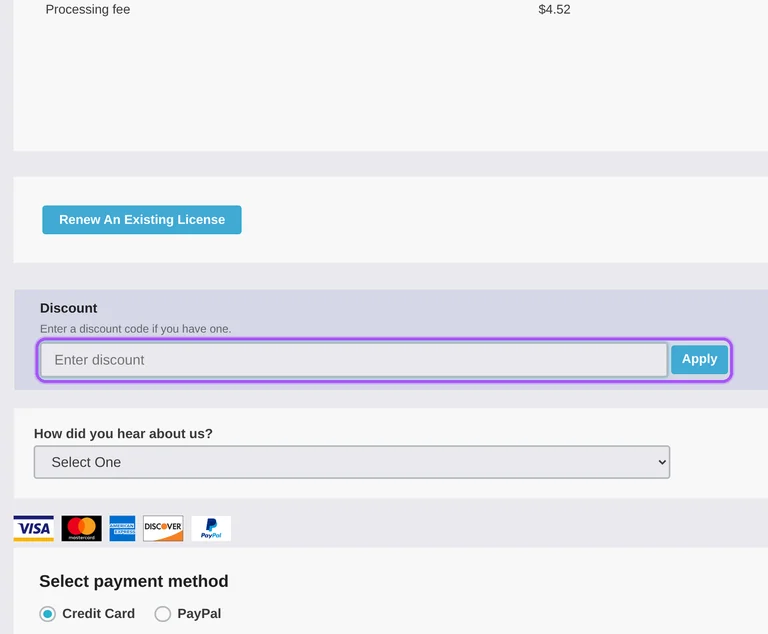
Event Espresso's nonprofit discount cannot be combined with other offers. It applies to the initial purchase by a nonprofit, NGO, or charitable organization, and it cannot be applied to past purchases. The checkout has a Discount field, while nonprofit discount requests go through the contact form with information about your organization. Request the nonprofit offer before purchasing rather than paying first and asking for the reduction afterward. Core is available as an annual license, and All Access includes the current add-ons plus new add-ons while the support license remains active. The nonprofit offer must stand separately from another promotion on that purchase. To request it, follow the contact link labeled Share information about your nonprofit organization.
Event Espresso offers an initial-purchase discount to nonprofit, NGO, and charitable organizations. The discount requires a request with information about the organization and cannot be applied to a purchase already completed. The request starts through the contact link labeled Share information about your nonprofit organization. This offer cannot be combined with another offer, so it needs to be arranged for the initial order rather than added to a separate promotion. Event Espresso sells annual subscriptions, with Core and All Access providing different levels of included functionality and support. All Access includes current add-ons and new add-ons while the license remains active. For the nonprofit request, provide the organization information through Event Espresso's contact form before purchasing.
Canceling Event Espresso's automatic renewal lets the license expire and ends access to subscription benefits. Once the support license expires, you lose the current pricing, support services, and downloads in your account. Automatic renewal can be turned off from the account page. The software continues working as-is, but Event Espresso moves to pay-as-you-go pricing after expiry. The legal terms specify a 3% per-transaction platform fee without an active license, compared with no Event Espresso transaction fee while the license is active. Payment gateway processing fees remain separate from those platform charges. This changes the ongoing cost of using a license originally bought at a discount. For cancellation, the subscription terms require notice at least 7 days before renewal.
You can contact Event Espresso support about a refund when plugin conflicts affect your purchase. Refund eligibility covers new customers and new installations within 30 days, subject to the refund exclusions. The customer portal provides a Contact Technical Support link for assistance with the purchased software. Compatibility with every third-party plugin, theme, or tool is not guaranteed, so a conflict does not establish an automatic refund entitlement. Hosting and server configuration issues are excluded, as are difficulties upgrading from versions earlier than the previous major version. Payment processing fees are also excluded from refunds. Contact support first about the conflict and the installation involved; the refund policy sets a 30-day purchase window for eligible new installations.
Event Espresso applies prorated credit toward an upgrade based on the time remaining in your current subscription. Core customers can upgrade to All Access, with existing purchases credited toward the upgrade. You can arrange the change through the account dashboard or by contacting support. All Access includes current add-ons and access to new add-ons while the support license is active, whereas Core add-ons are purchased separately. The credit reduces the cost of changing licenses; its amount depends on the remaining subscription time. A downgrade follows a different schedule, taking effect at the end of the billing cycle without a partial refund for unused time on the higher tier. To arrange an upgrade, open the account dashboard or contact Event Espresso support.
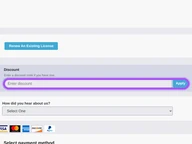
You can pay for an Event Espresso license with credit or debit cards or PayPal. Accepted card brands include Visa, Mastercard, Discover, and American Express. At checkout, Select payment method lists Credit Card and PayPal beneath the purchase details. The order includes an item price and a separate processing fee, so the license price and total are distinct amounts. Event Espresso subscriptions are billed annually until canceled, and the terms authorize annual charges to your payment method for the support license. After purchase, Event Espresso sends a receipt and a welcome email containing setup information. The discount entry is separate from payment selection: expand Have a discount code? Click to enter it to reach the Discount field.
An Event Espresso nonprofit discount is unavailable for past purchases or orders combining other offers. Eligibility covers the initial purchase for nonprofit, NGO, and charitable organizations. To request this discount, the contact link is labeled Share information about your nonprofit organization. Send the organization details before placing the purchase, because the reduction cannot be applied retrospectively. The purchase checkout also contains a Discount field for entering an offer, but the nonprofit request starts through contact with Event Espresso. These restrictions matter when an existing purchase or another promotion is involved; they are specific conditions of the nonprofit offer. For an eligible first purchase, submit the organization information through the contact form before completing the annual license order.
Event Espresso excludes payment processing fees from refunds. Its purchase checkout shows the license item price separately from the processing charge, making both parts of the order visible before payment. The relevant checkout labels are Item Price, Processing fee, and Total. Refund eligibility is limited to new customers and new installations within 30 days, with support assistance required first. Hosting and server configuration issues and certain older-version upgrade difficulties are excluded from refund eligibility. A refund for an unmanaged renewal also carries a separate 10% service fee under the terms. For a new purchase, the refundable amount therefore excludes the payment processing fee. The customer portal's Contact Technical Support link is the route to assistance before requesting a refund.
Event Espresso applies a 10% service fee to refunds for renewals that were not managed in advance. Payment processing fees are also excluded from refunds under the refund policy. Automatic renewal is controlled through the account page, where you can turn it off. The license subscription bills annually until canceled, and the terms require cancellation notice at least 7 days before renewal. Allowing a discounted license to expire also removes its current pricing, support services, and account downloads. The installed software continues as-is and moves to pay-as-you-go pricing after expiry. These renewal conditions differ from the refund eligibility for new customers and new installations. To stop the next annual charge, arrange cancellation at least 7 days before the renewal.
Event Espresso's refund policy covers eligible new customers and new installations within 30 days of purchase. You must contact support first for assistance, and payment processing fees are excluded from the refund. The customer portal includes a Contact Technical Support link for help with the purchase. Refunds are unavailable after 30 days unless required by law, and hosting or server configuration problems are excluded. Difficulties upgrading from a version earlier than the previous major version are also excluded, even within the refund period. These conditions make the type of installation relevant alongside the purchase timing; a new installation and an older-version migration have different eligibility. For a refund request involving a new installation, contact support within the 30-day purchase window.
Yes. An Event Espresso coupon and a promo code are the same thing: paste the code in the promo field at checkout before you pay.
Use that site limit when choosing an offer, then Scroll up for the current Event Espresso offers.


