Verified
Net Nanny Coupon & Promo Codes
Best verified offer: 10% off · 19 offers · last checked 28 Oct
Active Net Nanny coupon codes
11%OFF
Secure an 11% discount on your entire Net Nanny purchase by applying this promo code during checkout.
40%OFF
Save 40% off storewide at Net Nanny by using this coupon code during your next purchase today.
10%OFF
Take advantage of this coupon code to receive a 10% discount on all Net Nanny products and services available.
40%OFF
Apply this coupon to get 40% Off on the Family Protection Pass at Net Nanny, a great deal for your family.
30%OFF
Save 30% off your entire order at Net Nanny.com. Protect your family online with this site-wide discount.
10%OFF
Get 10% off storewide at Net Nanny.com. Secure your digital world with comprehensive online safety solutions.
About Net Nanny & Latest Deals
Get the latest Netnanny coupons, promo codes, and deals.
Savings opportunities available through Net Nanny coupon codes
Net Nanny sells parental control software, and this page helps you find offers to pay less for an annual subscription. One desktop costs $39.99 a year. The Family Protection Pass costs $54.99 for five devices or $89.99 for twenty. Device count sets the starting price for a Net Nanny coupon.
Service categories frequently on promotion
Three annual options carry reduced advertised prices: 1 Desktop, 5 Devices and 20 Devices. The desktop plan covers PC and Mac. Both Family Protection Passes cover PC, Mac and iOS, so an iPhone purchase belongs with a multi-device pass.
Services usually excluded from promo codes
Renewal is at the then-current non-promotional rate. A promotional first payment does not fix the price of later subscription terms.
Impact of billing cycle on promotional price
All three website subscriptions run for one year. The checkout charges the annual amount, rather than presenting those prices as monthly instalments. Each automatic renewal extends the subscription for another term of the same duration.
Promo codes vs. automatically applied offers
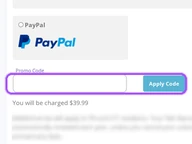
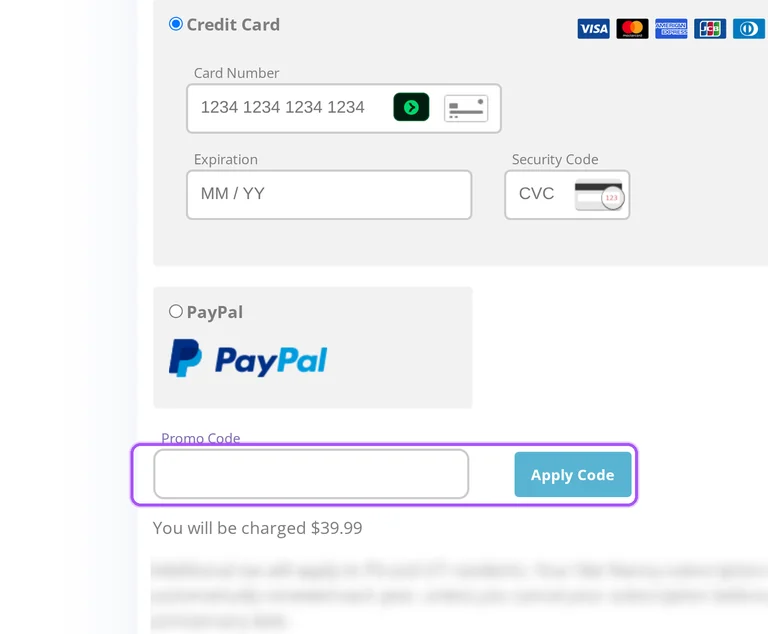
The advertised prices already appear in checkout without entering a coupon. A separate offer goes into the Promo Code field and is submitted with Apply Code. An accepted-code message shows the savings amount; an expired or product-ineligible code produces an error.
Accessing active codes for Net Nanny
The Promo Code control sits in the payment form beside credit card and PayPal options. Select the one-computer, five-device or twenty-device subscription for the offer you want to use.
How to use Net Nanny Discount Codes?
Copy a Net Nanny coupon or promo code, then paste it in the promo field at checkout.
- Choose a coupon
Grab the Net Nanny offer that works best for you. It's listed above.
- Reveal the code
Hit "Get Code" or "Get Deal" depending on the offer type. Popup opens. Click the copy icon inside—code goes to your clipboard.
- Apply at checkout
Now head over to Net Nanny's site. Pick your Parental Controls plan. Checkout page has a "Promo Code" field. Paste what you copied there.
Net Nanny Discount FAQs
Why does the Net Nanny checkout reject a promo code?
Net Nanny's checkout can reject a promotion because it has expired or is invalid for the selected product. The order page distinguishes the single Windows or macOS computer plan from the five-device and 20-device Family Protection Pass packages. Its Promo Code field submits the promotion through Apply Code, and the error identifies expiration or product eligibility as the issue. The selected package matters because each option is a different subscription product with its own device allowance. The five-device and 20-device packages cover iOS, macOS and Windows, while the single-computer package covers Windows or macOS. The checkout's specific error wording is Promo code expired or invalid for this product.
Are discounted Net Nanny packages billed monthly or annually?
Net Nanny's website packages are annual subscriptions. The purchase options cover one Windows or macOS computer, five devices or 20 devices, with the larger allowances sold as Family Protection Pass packages. Each checkout description identifies a one-year subscription rather than a monthly payment schedule. The subscription automatically renews each year unless you cancel before the anniversary date. At renewal, the terms apply the then-current non-promotional rate, so an initial discount does not establish the next year's charge. Turning off renewal leaves access available until the current subscription term ends. For a website subscription, the corresponding Account Settings provide the option to cancel automatic renewal before the next annual charge.
How long do I have to request a Net Nanny refund after using a discount?
Net Nanny offers a 14-day return window for direct purchases. Refund requests go to returns@contentwatch.com and must include the account email address or order number plus a detailed reason. This return policy is separate from ending automatic renewal on an annual subscription. Canceling renewal lets you use the subscription through the end of its current term, but the subscription terms do not provide a prorated refund for the remaining portion of that term. Purchases placed directly through Google Play or the App Store are handled under that store's return policy instead. For a direct discounted order you want refunded, the relevant deadline is the 14-day return window.
Can a discounted Net Nanny subscription cover a Mac?
Net Nanny's discounted desktop and Family Protection Pass packages support Macs. The single-desktop package covers one Windows or macOS computer, while the Family Protection Pass covers up to five or 20 devices. At checkout, the family packages include iOS, macOS and Windows devices under the same annual subscription. A household buying protection for a Mac and an iPhone therefore needs a family package rather than the single-computer option. The Mac system requirements list macOS 10.13 through 11.x and require a 64-bit system. An account is required before installing the child software. For installation after purchase, open install.netnanny.com on the child's device and follow the instructions for that device.
Who handles a Net Nanny refund for a discounted App Store purchase?
The App Store handles refund requests for purchases placed directly through it. Net Nanny's return policy assigns those orders to the App Store's own return rules and requires contacting that store directly. The same distinction applies to orders placed directly through Google Play. Net Nanny's 14-day website return process instead uses an email request to returns@contentwatch.com with account or order details and a detailed reason. Ending an app-store subscription is also handled through the applicable store's subscription management section. That cancellation stops renewal while allowing access through the current term under Net Nanny's subscription terms. For a purchase billed through the App Store, use its subscription management section to cancel renewal.
Which payment methods can I use for a discounted Net Nanny order?
Net Nanny accepts credit cards and PayPal for website purchases. The checkout collects your email, account password, name, country, ZIP code and phone number alongside the payment information. Under Payment Method, the Credit Card option asks for a card number, expiration and security code; PayPal is a separate option. The discount field is on the same checkout, so the payment method and promotional adjustment belong to the selected subscription order. Additional tax applies to Pennsylvania and Utah residents. Annual subscriptions renew automatically unless canceled before the anniversary date. Before submitting the purchase, the checkout displays the selected plan's charge above Place Order, with the coupon entry labeled Promo Code.
Where do I enter a Net Nanny coupon before paying?
Enter your Net Nanny coupon on the website checkout before placing the order. The checkout offers a single-computer subscription and Family Protection Pass subscriptions for five or 20 devices. The entry box is labeled Promo Code, with an Apply Code button beside the coupon step. A successful application displays an applied-code message and the saving; an expired or unsuitable promotion produces an error for the selected product. Credit Card and PayPal are the payment options on this checkout. The subscription is annual and renews each year unless canceled before its anniversary. After applying an offer, the amount to review is the selected subscription's You will be charged figure above Place Order.
Is a Net Nanny refund automatic after a discounted purchase?
A Net Nanny refund requires an emailed request. Net Nanny offers a 14-day return policy for purchases made directly through its website. Send your request to returns@contentwatch.com with the email address on your account, your order number, or both. The request must also include a detailed reason for wanting a refund, so the purchase details alone are not the complete submission. Orders placed directly through Google Play or the App Store follow the relevant store's return policy and require contacting that store directly. Subscription cancellation is a separate action from requesting your money back. For a website purchase, send the refund email within the 14-day return window.
Which Net Nanny discount offer fits my family's device count?
The appropriate Net Nanny offer depends on how many devices your family needs to protect. The discounted annual packages are $39.99 for one desktop, $54.99 for five devices and $89.99 for 20 devices. The one-desktop option supports a Windows or macOS computer; the Family Protection Pass options also cover iOS devices. These are annual subscription charges, and additional tax applies to Pennsylvania and Utah residents. The family passes are for consumer and home use. For a household protecting both computers and iOS devices, the family packages provide the relevant device coverage. At checkout, the two multi-device options are labeled Net Nanny 5-Device Family Protection Pass and Net Nanny 20-Device Family Protection Pass.
Does Net Nanny accept promo codes as well as coupons?
Yes. A Net Nanny coupon and a promo code are the same thing: paste the code in the promo field at checkout before you pay.
Scroll up for the current Net Nanny offers.


