ProWritingAid sells Premium and Premium Pro writing assistant plans, from $10.00 per month billed yearly, with a promo code field on the Pricing page.
Savings opportunities available through ProWritingAid promo codes
Writers buy ProWritingAid as Premium or Premium Pro, and the offers on this page cut what you pay for those plans. Premium costs $30.00 per month billed monthly or $10.00 per month billed yearly at $120. Premium Pro costs $36.00 per month billed monthly or $12.00 per month billed yearly at $144.
Service categories frequently on promotion
Subscription discounts are for first-time buyers of Premium and Premium Pro. Seasonal sale discounts cover new subscriptions and Story Credits, and a discounted annual subscription keeps its discount for the first year. Lifetime plans are one-time payments of $399.00 for Premium and $699.00 for Premium Pro.
Services usually excluded from promo codes
Renewals are excluded from subscription discounts. Only one discount applies to the initial purchase of a Premium or Premium Pro plan. Monthly subscriptions get no prorated discount on upgrades.
Impact of billing cycle on promotional price
Yearly billing is the lower monthly rate on both plans, and a discounted annual subscription renews at the standard price after the first year. Yearly subscriptions renew on the same calendar day every year, and lifetime plans never renew.
Promo codes vs. automatically applied offers
Unique or exclusive promo codes are typed in and not applied automatically. Seasonal sale discounts for new subscriptions and Story Credits apply automatically, as do prorated discounts for subscription upgrades. Students get a Student Beans discount on yearly plans: 25% on the Pricing page, 20% in the Help Center article.
Accessing active codes for ProWritingAid
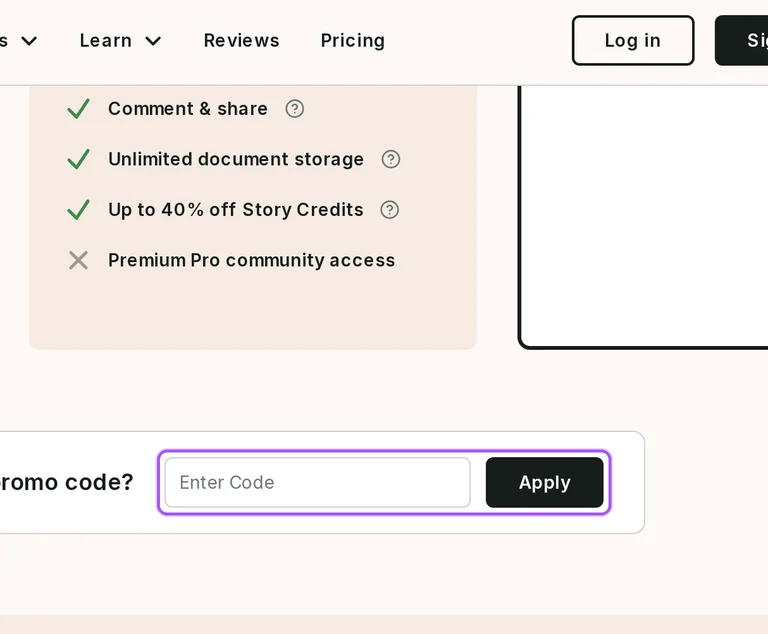
The code goes into the field that states “Enter code” in the “Have a promo code?” section of the Pricing page. A click on “Apply” brings the notification “Promo code applied”, and the price of the relevant plan changes.
How to use ProWritingAid Discount Codes?
Copy a ProWritingAid coupon or promo code, then paste it in the promo field at checkout.
Choose a coupon
Grab the ProWritingAid offer that works best for you. It's listed above.
Reveal the code
Hit "Get Code" or "Get Deal" depending on the offer type. Popup opens. Click the copy icon inside—code goes to your clipboard.
Apply at checkout
Now head over to ProWritingAid's site. Pick your Premium plan. Checkout page has a "Promo Code" field. Paste what you copied there.
Does a ProWritingAid promo discount continue at renewal?
No. Subscription discounts are for first-time buyers only, and they do not apply when you renew. The exception is a case where the terms and conditions state this directly or the Money-Back Guarantee applies to the purchase. A discounted annual subscription keeps its discount for the first year. After that, the subscription renews automatically at the standard price. All monthly and yearly subscriptions for Premium and Premium Pro renew automatically, and yearly ones renew on the same calendar day as the first purchase, every year. Lifetime subscriptions for Premium and Premium Pro do not renew because they are onetime payments, so no renewal price follows. Auto-renew can be turned off at any time from the user profile.
How long do I have to ask for a ProWritingAid refund on a yearly plan bought with a coupon?
Three days from purchase, on yearly and lifetime plans. Contact ProWritingAid at hello@prowritingaid.com within that window to request the refund. Canceling the subscription does not automatically generate a refund, so the request itself is still needed within the three days. Refunds are not possible for monthly paid plans. Purchases of Story Credits are nonrefundable, but Story Credits bought at the same time as a new subscription are refunded for any unused credits when the subscription is canceled under the three-day money-back guarantee. The help article route starts with the pink speech bubble icon in the bottom right-hand side of the window. The team may ask why you want a refund.
Why does ProWritingAid say incorrect voucher code when I apply a coupon?
It means the pricing page did not accept the promo code as valid. An invalid code brings the notification “You’ve entered an incorrect voucher code” at the top of the page, while a valid one brings “Promo code applied” instead. The first step is to check that the code was entered correctly and try again. If it still cannot be applied, send an email to hello@prowritingaid.com. The email should include a screenshot of the promotion that shows the promo code, or a link to the promotion’s web page. The code belongs in the “Have a promo code?” field next to the “Apply” button, and an accepted code changes the price of the relevant plan on that page.
How much do Premium and Premium Pro cost before a ProWritingAid coupon is applied?
Premium costs $30.00 per month billed monthly, $10.00 per month billed yearly at $120, or $399.00 as a one-time payment. Premium Pro costs $36.00 per month billed monthly, $12.00 per month billed yearly at $144, or $699.00 as a one-time payment. Those are the prices before any code. A valid promo code changes the price shown on the relevant plan on the Pricing page, and the message “Promo code applied” confirms it. Story Credits come with their own plan discounts: Premium members save up to 40%, and Premium Pro members save up to 65%. The yearly and lifetime plan cards also show a 3-day money back guarantee.
Where do I enter a ProWritingAid coupon code, and when does the discount show?
The code goes into the “Have a promo code?” section of the Pricing page. Scroll down the page to that section, where a field states “Enter code.” Click the field, paste or type the promo code, then click the “Apply” button. A valid code brings the notification “Promo code applied” at the top of the page. The discount then goes onto the relevant plan, and the price shown on the page changes to include it. Unique or exclusive promo codes are not applied automatically, so they have to be typed in this way. Seasonal sale discounts for new subscriptions are different: they apply automatically, and the reduced prices appear on the pricing page when you visit it.
Are ProWritingAid sale discounts applied automatically, or do I type a promo code?
It depends on the type of discount. Unique or exclusive promo codes and discounts are not applied automatically. Seasonal sale discounts for new subscriptions and Story Credits are applied automatically, and so are prorated discounts for subscription upgrades. To apply a discount that is not automatic, the code goes into the field on the Pricing page. Automatic seasonal discounts are available for new subscriptions only, and the discounts for a new subscription appear on the pricing page when you visit it. A discounted annual subscription keeps its discount for the first year, then renews at the standard price. A prorated upgrade discount shows on the My Account page after you log in.
Do I get a ProWritingAid discount when I upgrade from a yearly plan to lifetime?
Yes, as a prorated discount built into the prices on your account page. For an upgrade from a yearly subscription to a lifetime subscription for Premium or Premium Pro, those prices include prorated discounts. They are calculated from the date you subscribed to your current plan and your next renewal date. Prorated upgrade discounts are applied automatically, so no code is typed in; log in and open the My Account page to see yours. Monthly subscriptions are different, because their account page prices do not include prorated discounts. A lifetime upgrade from Premium to Premium Pro costs the difference between the two lifetime plans, and a lifetime Premium Pro plan cannot be upgraded further.
Does ProWritingAid offer a student discount on yearly plans?
Yes, on yearly plans, at 25% or 20% depending on the route. Students get 25% off yearly plans with Student Beans: university and college students need a verified Student Beans account, which unlocks the discount code. The Help Center article gives students a 20% discount on annual subscriptions through the Student App Centre. There, an academic email address creates the account, and an email with a link to subscribe with 20% off follows. Students without an academic email address can still create an account by providing evidence of their student status. Teachers at primary or secondary schools can get ProWritingAid for Education free for their students.
Is there a ProWritingAid discount for teams or schools?
Yes. ProWritingAid offers discounts for group plan purchases, which means tailored plans and pricing with discounted rates for professional teams in the writing industry, such as editing agencies, publishers, and agents. ProWritingAid Teams is designed for teams of 2-100 people in the writing industry. To buy it, scroll down the Teams page to the “Plans and Pricing” section, enter the number of team members under “Teams,” and click the “Purchase Teams” button. Schools are covered separately: K-12 educational organizations can enjoy premium features for free, and a verified teacher at a formally accredited primary or secondary school can receive ProWritingAid for Education free for their students. It includes all the expert editing features of the Premium plan.
Why is my ProWritingAid coupon code not working on my purchase?
Several documented rules can block a coupon. Subscription discounts are for first-time buyers only. A discount cannot be applied when you renew a subscription, unless the terms and conditions state this directly or the Money-Back Guarantee applies to the purchase. Only one discount applies to the initial purchase of a Premium or Premium Pro plan, so a second discount cannot be added on top. A unique or exclusive promo code is not applied automatically, so it has to be entered in the “Have a promo code?” field on the Pricing page. If you believe you qualify for a discount that you cannot apply, ProWritingAid asks you to contact them.
Does ProWritingAid accept promo codes as well as coupons?
Yes. A ProWritingAid coupon and a promo code are the same thing: paste the code in the promo field at checkout before you pay.