FREE
The PurpleMark Free plan costs $0 and includes 5 browser profiles, 1 super administrator and core profile and proxy management. It is meant for personal evaluation and light use; no code is needed.
1 offer listed
The PurpleMark Free plan costs $0 and includes 5 browser profiles, 1 super administrator and core profile and proxy management. It is meant for personal evaluation and light use; no code is needed.
PurpleMark coupons and deals for a desktop antidetect browser, sold as subscription business software for multi-account teams.
PurpleMark sells a desktop antidetect browser, also called a fingerprint browser, as subscription business software for multi-account management and team collaboration, and the offers on this page help you pay less for its paid plans. The app runs on Windows and macOS. Each PurpleMark profile gets its own browser, device and fingerprint settings, with more than 20 fingerprint dimensions and 4 proxy protocols in one console.
The PurpleMark Free plan costs $0 and is meant for personal evaluation and light use. It includes 5 browser profiles, 1 super administrator and core profile and proxy management, and no credit card is required.
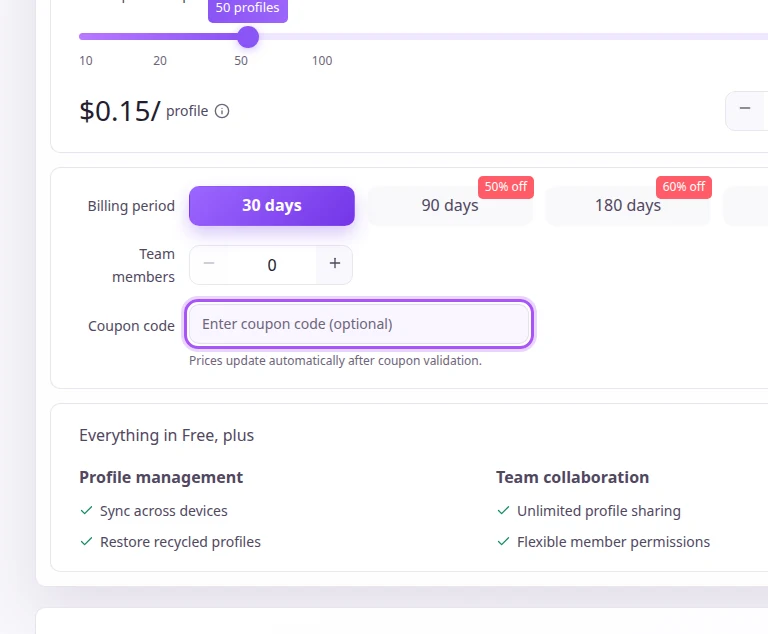
Paid PurpleMark plans are set by profile capacity: Professional covers 10 to 199 profiles, Business 200 to 4,999 and Enterprise 5,000 to 100K. They add profile management, sync across devices, restoring recycled profiles, team collaboration, unlimited profile sharing and flexible member permissions to everything in Free. Business includes assisted data migration, while Enterprise comes with dedicated support and custom development.
PurpleMark builds its price estimate from browser profile capacity, billing period and additional team members, and the Coupon code field follows those choices. Billing periods run for 30, 90, 180 or 360 days.
Copy a PurpleMark coupon or promo code, then paste it in the promo field at checkout.
Grab the PurpleMark offer that works best for you. It's listed above.
Hit "Get Code" or "Get Deal" depending on the offer type. Popup opens. Click the copy icon inside—code goes to your clipboard.
Now head over to PurpleMark's site. Pick your Isolated Profiles plan. Checkout page has a "Promo Code" field. Paste what you copied there.
Valid discounts from brands similar to PurpleMark.


