Used
SentryPC Coupon & Promo Codes
No active SentryPC codes right now. The most recent ones are below.
Expired Offers (May still work)
10%OFF
Get 10% off select items at SentryPC with this special offer. Discount applied at checkout.
Used
About SentryPC & Latest Deals
Get the latest Sentrypc coupons, promo codes, and deals.
Savings opportunities available through SentryPC discount codes
SentryPC sells monitoring software licensed per device; use the offers on this page to look for a lower yearly total. Each monitored device requires one license. Devices used only to access the cloud account need none. Compare the offers listed on this page with the yearly plans before choosing a license.
Service categories frequently on promotion
SentryPC supports Android, Chromebook, Mac, and Windows. Chromebook and Chromium-based systems support browser activity only.
Services usually excluded from promo codes
Plans differ by license count and included screenshot storage. Extra storage is available in 500-screenshot increments.
Impact of billing cycle on promotional price
SentryPC prices Basic Plan and Business 50 subscriptions yearly. Updates are included while the subscription remains active.
Promo codes vs. automatically applied offers
Business 50 includes storage for 500 screenshots in its yearly price. When screenshot storage fills, the oldest screenshots are removed as new ones are added.
Accessing active codes for SentryPC
Choose the SentryPC plan and license count that fit your purchase.
How to use SentryPC Discount Codes?
Copy a SentryPC coupon or promo code, then paste it in the promo field at checkout.
- Choose a coupon
Grab the SentryPC offer that works best for you. It's listed above.
- Reveal the code
Hit "Get Code" or "Get Deal" depending on the offer type. Popup opens. Click the copy icon inside—code goes to your clipboard.
- Apply at checkout
Now head over to SentryPC's site. Pick your Activity Monitoring plan. Checkout page has a "Promo Code" field. Paste what you copied there.
SentryPC Discount FAQs
Can I add device licenses when buying SentryPC Basic with a coupon?
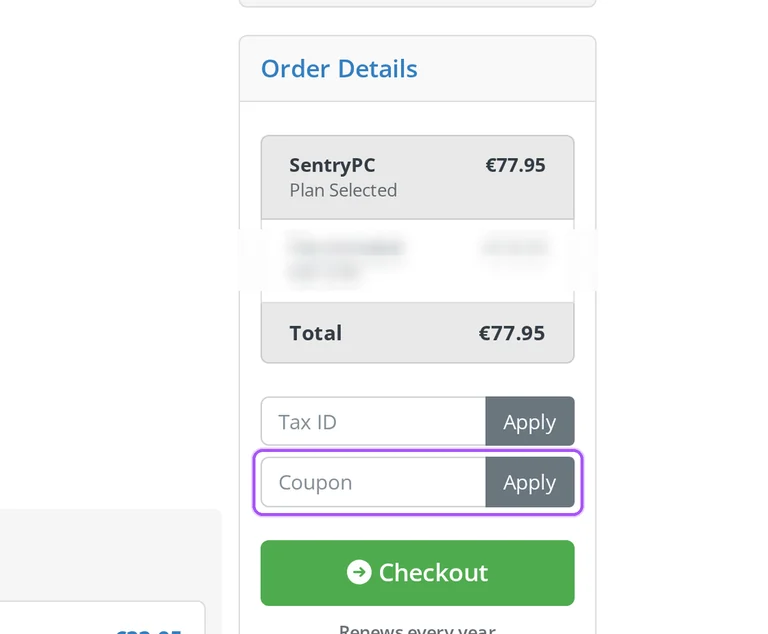
You can choose additional licenses during a SentryPC Basic purchase. Basic includes the first license at a listed $69.95 per year, with each additional license listed at $29.95 per year. Each device you monitor requires one license, regardless of how many user accounts it contains. Devices used only to access your online cloud account do not require a monitoring license. Open Basic through Buy Now, choose the required license count, and apply an applicable offer through the Coupon box. The order summary shows the selected plan, additional items and any Coupon Savings before the Total including tax. Business plans provide larger license bundles for larger deployments. Enter your monitored-device count in the Sales Quote Calculator and press Calculate Now to compare the available purchase cost.
Can I add screenshot storage to a discounted SentryPC order?
SentryPC lets you add screenshot storage while ordering or later through your online account. Extra storage is sold in increments of 500 screenshots at a listed $29.95 per year per increment. The allowance is the maximum number of screenshots held in your account at one time. When it fills, a newly added screenshot replaces the oldest one. Basic and Business 50 each include 500 screenshots, while larger Business plans include higher storage allowances. During a discounted purchase, the checkout summary lists additional items separately from the selected plan and shows any applicable reduction under Coupon Savings. Its Total includes tax, so storage additions belong in the purchase amount you review. Add storage in 500-screenshot increments to match the number of recent screenshots you need to retain.
Will my discounted SentryPC subscription renew automatically?
SentryPC subscriptions renew automatically unless you cancel renewal through your online account. The service uses annual billing, and SentryPC sends a reminder when your subscription is approaching its end. That reminder covers the upcoming charge and any need to update your payment information. At checkout, the subscription summary shows the renewal interval and a Next charge amount alongside its scheduled charge date. The Coupon Savings line describes the reduction on the current order, so the separate renewal information matters when buying through the offers on this page. Cancellation stops automatic renewal while leaving your account and software functioning until the paid period ends. Before completing a discounted purchase, use the Next charge amount in the subscription summary to assess the upcoming renewal payment.
What support comes with a discounted SentryPC plan?
Every SentryPC purchase includes free support through its online ticket system. The subscription also includes free software updates for its active lifetime, and your cloud account and software are available immediately after purchase. These benefits are included across the plans, whose differences are the license count and screenshot storage allowance. For assistance with a discounted purchase, open Contact Us and describe the order or installation issue in Questions / Comments. The form includes Department, OS Version and Order ID fields so you can identify the purchase and relevant device setup. SentryPC asks for detailed information to help its staff provide a quicker, more accurate response. If you need your username for account access, retrieve it from the order confirmation email before submitting a support request.
How do I stop renewal after buying a discounted SentryPC subscription?
You stop automatic renewal by cancelling the subscription through your SentryPC online account. Cancellation leaves the account and software functioning for the remainder of the current paid subscription period. At the end of that period, the subscription stops renewing and the account is terminated unless renewed. SentryPC also allows you to give notice through its Contact Us page to cancel use of the service. The service terms explain that a terminated account is disabled and access to its files or other content may end. For a purchase made through the offers on this page, stopping renewal concerns the next annual payment rather than a refund of the current order. Download the activity logs you need from your cloud account before the paid subscription period expires.
Where do I enter a SentryPC coupon before paying?
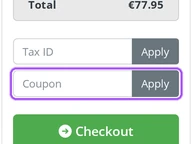
You enter a SentryPC coupon on the purchase checkout page. Start with the plan that matches the number of devices you want to monitor, since SentryPC requires one license per monitored device. The checkout has a Coupon box and an Apply button, followed by the Checkout button. An applied reduction appears in the order summary under Coupon Savings, while Total shows the amount including tax. The Basic Plan starts with one license, and Business plans provide larger license bundles. Additional licenses and screenshot storage can also affect your order amount. Use the offers on this page with your selected purchase, then review the Coupon Savings line before proceeding with the Checkout button.
Does a discounted SentryPC Basic purchase include screenshot storage?
The SentryPC Basic Plan includes storage for up to 500 screenshots. It also includes one monitoring license, with the same software features offered by the Business plans. The screenshot allowance holds the most recent images rather than an unlimited archive: the oldest screenshot is removed when a new one arrives after the limit is reached. SentryPC also purges activity logs older than one month each day. When buying Basic through the offers on this page, start with its Buy Now button and review any added storage in the checkout summary alongside the plan. Additional storage is available during ordering or later in your account, in annual increments of 500 screenshots. Download and archive logs locally from your account when you need records older than one month.
What annual price should I compare against a SentryPC Business 50 discount?
SentryPC lists Business 50 at $1,495 per year before any applicable coupon reduction. That package provides 50 licenses for up to 50 devices, with a listed annual cost of $29.90 per license. Its included screenshot storage holds up to 500 screenshots, and its software features match those of the other plans. Start the order through the Buy Now button beneath Business 50, then enter an applicable offer in the Coupon box and press Apply. The order summary separates Coupon Savings from the Total, which includes tax. This lets you compare the reduction with the package amount rather than treating the per-license figure as the whole payment. For a different device count, SentryPC's Sales Quote Calculator has a Calculate Now button.
Is a discounted SentryPC Basic Plan billed yearly?
SentryPC bills the Basic Plan annually. The listed starting amount is $69.95 per year for one license, with additional licenses listed at $29.95 per year each. The subscription includes access to software updates without an additional update charge throughout its active period. Begin with the Basic Plan's Buy Now button and choose the number of licenses required for the devices you will monitor. An applicable coupon goes into the Coupon box, and Apply updates the order summary with the reduction. The resulting Total includes tax, while the subscription details show the next scheduled charge separately. Your cloud account and software become available immediately after purchase. For this plan, count monitored devices rather than user accounts: one license covers all user accounts on a single device.
Can I request a refund after a discounted SentryPC purchase?
SentryPC decides refund requests at its discretion. Its refund policy makes all product sales final and states that refunds are neither guaranteed nor promised. If SentryPC grants a refund, it may prorate the amount to reflect subscription usage up to the refund. To ask about a discounted order, use the Contact Us form and provide the ordering details and a clear explanation of your request. The form includes Order ID and Questions / Comments fields, followed by Submit Request. Cancelling automatic renewal is a separate action: your account and software continue working until the current subscription ends. This distinction matters when you want to stop a future payment while asking about an earlier purchase. Include the purchase's Order ID in the named field when submitting your request.
Does SentryPC accept promo codes as well as coupons?
Yes. A SentryPC coupon and a promo code are the same thing: paste the code in the promo field at checkout before you pay.
Compare the offers listed above with the yearly plan total, then Scroll up for the current SentryPC offers.


