Verified · Used
Flycart Coupon & Promo Codes
Best verified offer: 40% off · 8 offers · last checked 9 Nov
Active Flycart coupon codes
Verified · Used
Verified · Used
Verified
40%OFF
Save 40% off storewide at Flycart when you apply this promotional code during checkout today.
Verified · Used
Verified
Used
Used
Expired Offers (May still work)
About Flycart & Latest Deals
Get the latest Flycart coupons, promo codes, and deals.
Savings opportunities available through Flycart discount codes
Flycart sells WooCommerce plugins, and this page helps you find coupons and discounts for a plugin or bundle purchase. Bundle choices combine two to four premium plugins. AOV Boost Bundle pairs Discount Rules with UpsellWP; Loyalty Bundle pairs Discount Rules with WPLoyalty.
Service categories frequently on promotion
Bundle promotions cover fixed plugin combinations. Growth Bundle contains Discount Rules, WPLoyalty and UpsellWP. Ultimate Sales Booster adds Spark Editor. A custom combination uses individual plugin purchases instead.
Impact of billing cycle on promotional price
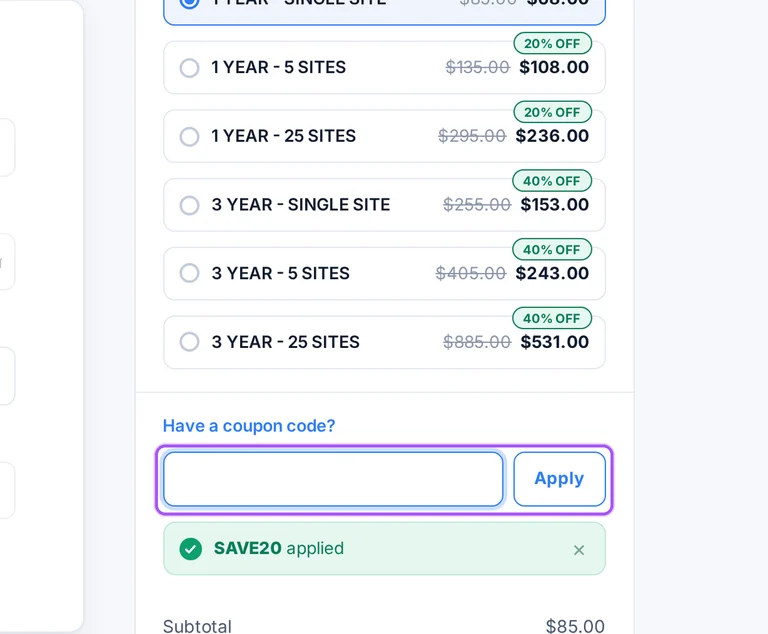
Discount Rules PRO has separate one-year and three-year promotional license options. Both offer Single Site, 5 Sites and 25 Sites selections. The term and site count define the license being purchased.
Promo codes vs. automatically applied offers
A bundle coupon can be entered at checkout. Flycart’s Get Bundle buttons carry the coupon into checkout already applied, so that route handles the coupon entry for you.
Accessing active codes for Flycart
The Get Bundle purchase route carries the coupon into checkout. Manual coupon entry is also available for a qualifying bundle.
How to use Flycart Discount Codes?
Copy a Flycart coupon or promo code, then paste it in the promo field at checkout.
- Choose a coupon
Grab the Flycart offer that works best for you. It's listed above.
- Reveal the code
Hit "Get Code" or "Get Deal" depending on the offer type. Popup opens. Click the copy icon inside—code goes to your clipboard.
- Apply at checkout
Now head over to Flycart's site. Pick your Discount Rules for WooCommerce plan. Checkout page has a "Promo Code" field. Paste what you copied there.
Flycart Discount FAQs
A conflict caused by a third-party theme is excluded from Flycart's individual-plugin refund grounds. The same exclusion covers technical issues caused by other plugins, add-ons or snippets when the purchased plugin works correctly. An unresolved bug within the purchased plugin follows a different condition: the purchase must be less than 15 days old. Flycart also requires customers to cooperate with its team during troubleshooting. Discount Rules includes one year of technical support with an annual licence, so a theme conflict can still be raised with support for assistance. The distinction is the cause of the issue rather than the discounted purchase amount. Send a message and email address through the support form using Create a ticket and send your message.
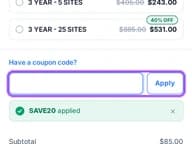
Enter a Flycart bundle coupon in the checkout's order summary. The advertised bundle promotion applies to qualifying bundles, and Flycart also provides purchase links with the offer already applied. Under Your order, expand Have a coupon code?, enter the offer in Coupon code and select Apply. The AOV Boost order summary separates the $160 subtotal from the $64 discount and shows a $96 total. That breakdown lets you see the discount before submitting the payment. Billing details and payment options appear on the same checkout, with Stripe and PayPal available. When a bundle link has already added the promotion, the checkout displays Coupon code applied successfully above the account and billing steps.
Flycart's bundle checkout accepts card payments through Stripe and payments through PayPal. The PayPal option also allows payment by credit card without a PayPal account. The checkout collects an email address for the licence key, followed by billing details and the payment method. Businesses can add a company name and VAT or GST number through the business details option. For the advertised AOV Boost offer, the order summary shows a $160 annual subtotal, a $64 reduction and a $96 total. The same checkout states that the subscription renews yearly at the same price and can be cancelled from the account. The final payment button is labelled Pay — Get instant access, beneath the payment options.
Misunderstanding a plugin's features is excluded from Flycart's individual-plugin refund grounds. The policy also excludes requests for functionality that was not part of the software sold and mistaken purchases. For Discount Rules, the money-back condition instead concerns an existing feature that fails and a support ticket unresolved within 48 hours. Flycart provides product documentation, a free version and a live demo for Discount Rules, giving buyers ways to examine its functions before a paid purchase. Pre-sales questions can also go through the support page when a particular requirement needs clarification. These options help establish whether the discounted licence covers the functionality your store needs. The Discount Rules product page provides both Live demo and Try Free version links.
Yes, Discount Rules includes a conditional 14-day money-back guarantee. An existing feature must fail to work as expected, and Flycart must be unable to resolve the support ticket within 48 hours. The individual-plugin refund policy also requires a purchase less than 15 days old and cooperation with troubleshooting. A request for a feature that the software does not include is excluded from refund eligibility. This makes the guarantee relevant to unresolved problems with the purchased plugin rather than a change of mind about buying it. For help with a discounted Discount Rules purchase, submit the problem through Flycart's support desk. The product's refund terms give the support team 48 hours to resolve the ticket.
Yes, Flycart's bundle purchase links can apply the advertised discount for you. The bundle promotion covers qualifying packs, and the bundle buttons take you to the store with the coupon pre-applied. The AOV Boost link opens a checkout showing the bundle, its annual subtotal and the discount as separate entries. Its order summary shows $160 before the $64 reduction and a $96 total. This route lets you select the named bundle before entering your account email, billing details and payment information. AOV Boost includes Discount Rules and UpsellWP, with one year of updates and priority support. The confirmation message above the checkout steps reads Coupon code applied successfully when the linked offer has been added.
Flycart's individual-plugin refund eligibility requires a purchase less than 15 days old. The purchase must also involve a bug that Flycart cannot resolve in the plugin you bought. Discount Rules advertises a 14-day guarantee and specifies a refund when an existing feature fails and the support ticket remains unresolved after 48 hours. Reporting an issue alone does not meet every condition: cooperation with troubleshooting is required under the refund policy. Mistaken purchases, changed requirements and requests for additional features are excluded grounds. A discounted initial purchase therefore needs both the qualifying technical problem and the purchase timing to meet these conditions. Submit an eligible request through the helpdesk within the stated purchase window of less than 15 days.
Flycart subscriptions renew automatically unless you cancel before the renewal payment. The AOV Boost Bundle checkout states that the subscription renews yearly at the same price. Automatic renewal payments are non-refundable under Flycart's refund policy, and a reminder email arrives two weeks before the renewal date. For Discount Rules, an active annual licence provides continued access to support, updates and Pro downloads. Cancelling its subscription leaves support and updates available until the licence expires, one year after purchase. The installed plugin continues working with its Pro features after expiry, but access to those subscription services ends. Discount Rules subscribers can cancel automatic renewal from the My Downloads page before their next annual payment.
Flycart offers discounts on four predefined plugin bundles. AOV Boost combines Discount Rules and UpsellWP, while Loyalty combines Discount Rules and WPLoyalty. Growth contains all three of those plugins, and Ultimate Sales Booster adds Spark Email Editor to that combination. Every bundle includes one year of updates and priority support, with a single-site licence for each plugin by default. The AOV Boost checkout shows a $160 annual subtotal, a $64 discount and a $96 total for the advertised offer. Bundle selection therefore determines both the included plugins and the purchase amount. For more than one store, Flycart directs buyers to support for agency pricing rather than the default single-site bundle licence.
Submit an eligible individual-plugin refund request through Flycart's helpdesk. Eligibility requires a purchase less than 15 days old and an unresolved bug in the purchased plugin. Flycart asks customers facing technical issues to raise a support ticket first and cooperate with troubleshooting. Its support form accepts your message and email address so the team can respond about the issue. Refund exclusions include mistaken purchases, a change of mind, misunderstood functionality and requests for features outside the software sold. Automatic renewal payments are also excluded, so they follow a different rule from an eligible initial purchase. On the support page, the button is labelled Create a ticket and send your message; Live Chat is at the bottom right.
Yes. A Flycart coupon and a promo code are the same thing: paste the code in the promo field at checkout before you pay.
Scroll up for the current Flycart offers.


