Used
JoomlArt Coupon & Promo Codes
No active JoomlArt codes right now. The most recent ones are below.
Expired Offers (May still work)
Used
30%OFF
Save 30% off storewide at JoomlArt.com when you apply this special code at checkout for maximum savings.
About JoomlArt & Latest Deals
Get the latest Joomlart coupons, promo codes, and deals.
Service categories frequently on promotion
JA Extensions covers all JoomlArt extensions. JA Starter adds access to 300+ JoomlArt templates and GeoReport.
Services usually excluded from promo codes
New releases, updates and technical support continue with a renewed membership. Factor that ongoing access into the value of any JoomlArt discount.
Impact of billing cycle on promotional price
The billing term changes by membership. All plans include one year of updates and support, so compare a discount against the term you will actually buy.
Promo codes vs. automatically applied offers
JoomlArt One appears beside a struck-through comparison price. Use its displayed plan price as the baseline when considering a separate promo offer.
Accessing active codes for JoomlArt
All plans include unlimited domains. PayPal is available worldwide; Stripe accepts Visa, Mastercard and American Express.
How to use JoomlArt Discount Codes?
Copy a JoomlArt coupon or promo code, then paste it in the promo field at checkout.
- Choose a coupon
Grab the JoomlArt offer that works best for you. It's listed above.
- Reveal the code
Hit "Get Code" or "Get Deal" depending on the offer type. Popup opens. Click the copy icon inside—code goes to your clipboard.
- Apply at checkout
Now head over to JoomlArt's site. Pick your Joomla Templates plan. Checkout page has a "Promo Code" field. Paste what you copied there.
JoomlArt Discount FAQs
Can I cancel a discounted JoomlArt subscription before it renews?
You can cancel a discounted JoomlArt subscription from your member area before its next automatic renewal. Cancellation leaves access in place until the end of the paid period. JoomlArt automatically renews subscriptions at the end of their billing cycles to maintain access to updates and support. JA Starter, JA Template and JoomlArt One are listed with annual terms, while JomSocial Pro has a six-month term. Cancelling renewal and requesting a refund are separate actions: the refund policy excludes membership renewals and limits eligible initial purchases to seven days. The member area is where you manage cancellation rather than the coupon field used for the original order. JoomlArt sends a reminder email 14 days before each automatic renewal.
Which support comes with a discounted JoomlArt membership?
Support for a discounted JoomlArt membership depends on the selected plan and requires active membership. JA Starter and JA Extensions list forum support, while JA Template lists helpdesk support and JoomlArt One lists priority support. The support scope covers bug fixes, help achieving the demo appearance and guidance within the template concept. Limited customization support is reserved for developer members; broader customization is outside the standard support scope. The JA Template checkout separately offers Premium Ticket Support at $39, reduced from $49, for faster dedicated help. That optional service appears under Addons rather than within the coupon discount line. For a display problem, the support team requests site details; for a bug, it requests steps to reproduce it. JoomlArt lists support hours as Monday to Friday, 8:30 AM to 5:30 PM.
Can I get a refund on a discounted JoomlArt membership?
Qualifying discounted JoomlArt purchases paid through PayPal have a seven-day refund window. The refund equals the membership fee minus any discount, so it covers the amount paid rather than the undiscounted price. Membership renewals and the Ultimate Developer bundle are excluded, and refund requests must arrive within seven days of purchase. JoomlArt can also refuse requests involving policy abuse, including abnormally high download activity during that period. The JA Template order form offers PayPal alongside Credit Card (Stripe), making the payment choice relevant to refund eligibility. Submit an eligible request through the refund form; weekday requests receive a response within 48 hours, while weekend requests receive a response from Monday. The policy page links to the form through Request a refund.
Does a discounted JoomlArt membership include T4 Page Builder?
JA Template includes T4 Page Builder Pro, while JoomlArt One includes the Premium version. The membership selected for a discounted purchase therefore determines which builder edition comes with it. JoomlArt lists Premium as exclusive to JoomlArt One, with advanced features and client content update permission alongside its expanded block collection. JA Template members can upgrade to JoomlArt One if their project needs that edition. The upgrade process starts with a ticket in the member area, and JoomlArt states that an administrator processes the upgrade within 24 hours. This is a membership upgrade rather than a separate coupon entry in the initial JA Template order form. For an upgrade request, the documented path is JA Template to JoomlArt One.
Where do I enter a JoomlArt coupon before paying?
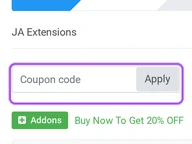
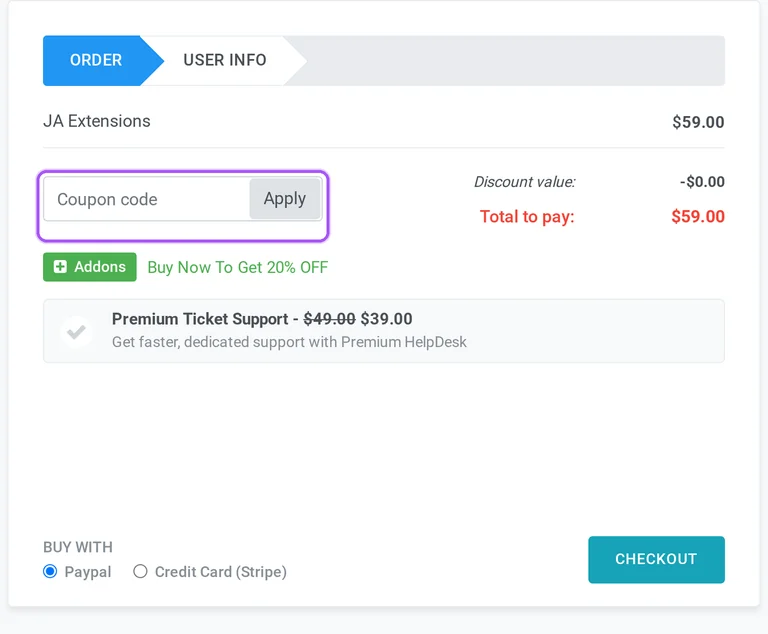
Enter your JoomlArt coupon in the order form before proceeding to payment. For JA Template, the form first shows the selected membership, its price and the order summary. The coupon area is labelled Got Coupon? and has an Apply control beside the entry area. Applying an eligible offer updates the Discount value and Total to pay figures for the order. Optional Premium Ticket Support and Quickstart Installation Service are listed below, followed by PayPal and Credit Card (Stripe). The form also provides I have an account and Don't have account options for the user information stage. Existing customers have Email or Username and Password fields, while new customers supply email, username and password. The payment step is reached through the Checkout control.
What happens when my discounted JoomlArt membership expires?
Renewal is required to retain technical support and download access after your discounted JoomlArt membership expires. That access includes new releases, product updates and newly released templates and extensions. Paid-product support is limited to active members, so an expired membership changes the help available for your purchase. JA Template has a one-year update period, while JomSocial Pro has a six-month update period in the plan comparison. Subscriptions renew automatically at the end of their billing cycle unless cancelled through the member area. Cancellation preserves the plan until the paid period ends, rather than ending access immediately. If you want to continue receiving releases and technical support, JoomlArt provides a one-click renewal process in the member area. Its automatic renewal reminder arrives 14 days before renewal.
Can I use a discounted JoomlArt membership for client websites?
JoomlArt permits its products on unlimited domains, including personal and client websites. Its terms allow active members unlimited product usage during their membership period and permit modifications for their own purposes. Buying with an offer still involves choosing the membership that includes the templates or extensions needed for those projects. JA Template includes JoomlArt, Gavick and Shape5 templates, while JoomlArt One adds broader developer access across the listed clubs. Installation permission does not include unrestricted redistribution or resale of the original product files, which requires written consent. Demo imagery and commercial third-party extensions also require separate purchases where applicable. You can alter a product for your project, but the terms require copyright notices in file headers to remain in place.
How does renewal work after a JoomlArt introductory offer?
JoomlArt subscriptions renew automatically at the end of the selected billing cycle. Renewal maintains technical support, downloads of updates and new releases, and access to newly released templates and extensions. JA Starter, JA Template and JoomlArt One have annual billing terms, whereas JomSocial Pro is listed for six months. The member area provides a one-click renewal process and the option to cancel automatic renewal. Cancellation leaves the subscription usable through the end of the paid period. Renewal purchases are excluded from the seven-day refund policy, so that rule matters when deciding whether to continue a membership originally bought through an offer. JoomlArt sends a reminder email 14 days before each automatic renewal, giving a specific point to review the subscription in your member area.
How much does a JoomlArt coupon reduce my order total?
The reduction appears in your JoomlArt order summary after you apply an eligible coupon. The JA Template order starts at $149 before a coupon, with any optional services listed separately. Its summary displays Discount value and Total to pay, so the discount amount and the payable amount are separate figures. The same checkout offers Premium Ticket Support and Quickstart Installation Service at $39 each, reduced from $49 each. Those listed add-on reductions are distinct from the coupon amount shown in the order summary. PayPal and Credit Card (Stripe) are available beneath the optional services. For the offers on this page, the useful figure is the resulting total for your selected purchase. The order summary labels that final amount Total to pay.
Which payment methods can I use for a discounted JoomlArt order?
JoomlArt accepts PayPal and credit cards through Stripe for discounted membership orders. Supported cards include Visa, Mastercard and American Express, and PayPal is available worldwide. The JA Template order form places PayPal and Credit Card (Stripe) under Buy with, beneath the optional services. Its coupon area and payable total appear earlier in the order, allowing the selected purchase and discount to be reviewed before proceeding to payment. Payment choice also affects the published refund conditions: the seven-day policy applies only to qualifying PayPal purchases and excludes renewals and Ultimate Developer. Some purchases undergo a manual antifraud review involving PayPal or Stripe, with payment details sent by email. For the card route, the checkout option is labelled Credit Card (Stripe).
Does JoomlArt accept promo codes as well as coupons?
Yes. A JoomlArt coupon and a promo code are the same thing: paste the code in the promo field at checkout before you pay.
Scroll up for the current JoomlArt offers.


