Get the latest Mochahost coupons, promo codes, and deals.
Savings opportunities available through MochaHost coupon codes
MochaHost sells web hosting, and this page helps you find offers and discounts for your purchase. Managed WordPress hosting starts at $1 for the first month. Hosting products have no setup fees.
Service categories frequently on promotion
Two purchase incentives stand out: the introductory managed WordPress month and a first-year domain with annual cPanel hosting. The domain inclusion covers eligible extensions, not every domain choice.
Services usually excluded from promo codes
The free-domain offer excludes extensions outside its eligible selection. Those extensions cost extra. A reduced fee for a different extension requires MochaHost’s agreement in advance.
Impact of billing cycle on promotional price
Annual cPanel billing brings the first-year domain inclusion. MochaHost also offers discounts for prepayments. Cancelling early does not entitle you to a refund of unused prepaid months.
Promo codes vs. automatically applied offers
The service price payable is the price shown in the order steps when you place your order. The $1 managed WordPress introduction covers the first month, while the free-domain offer comes with annual cPanel hosting. A reduced fee for a different domain extension requires advance agreement from MochaHost.
Accessing active codes for MochaHost
Annual cPanel offers depend on the hosting term and eligible domain extension. The domain’s included registration period is one year; later renewals use the regular renewal rate.
How to use MochaHost Discount Codes?
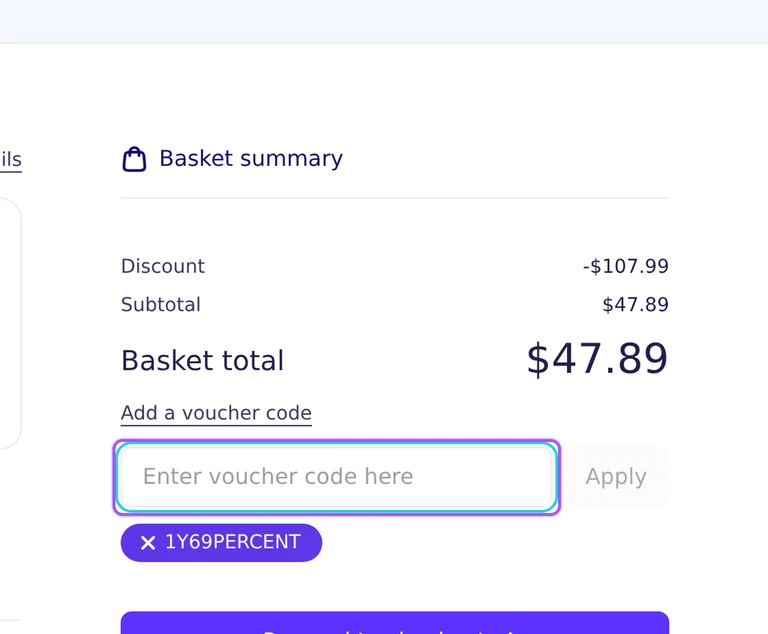
Copy a MochaHost coupon or promo code, then paste it in the promo field at checkout.
Choose a coupon
Grab the MochaHost offer that works best for you. It's listed above.
Reveal the code
Hit "Get Code" or "Get Deal" depending on the offer type. Popup opens. Click the copy icon inside—code goes to your clipboard.
Apply at checkout
Now head over to MochaHost's site. Pick your Web Hosting plan. Checkout page has a "Promo Code" field. Paste what you copied there.
How do I request a refund after a discounted MochaHost hosting purchase?
Request an eligible MochaHost refund through the product cancellation process. The money-back guarantee covers qualifying first-term purchases for 30 days and can be exercised only once. It excludes domains, servers and certain third-party products, with domain registration fees and other non-refundable expenses deducted where applicable. In the Hosting Panel, locate the product, select Manage and open its Billing tab. The Renewal & Subscription Settings section contains Cancellation request, where you specify timing and a reason. MochaHost's terms require the refund request in the cancellation notes and allow seven working days to process a refund. Immediate cancellation requires a billing ticket and removes retained product data, so save needed data before requesting immediate cancellation.
Where can I review a MochaHost coupon purchase?
You can review your MochaHost purchase in the Hosting Panel's order history. MochaHost's public ordering instructions start with selecting a hosting package or domain and following the online order steps. The service price is the amount indicated on the order pages when you order, and applicable tax is detailed during those steps. After ordering, open Billing in the Hosting Panel and select My Orders to find the purchase. That tab supports searching, filtering and sorting orders, and View opens an order's details. Invoices are managed separately under Billing and then Invoices, where View opens an individual invoice. For the purchase record itself, the specific tab to open is My Orders.
How should I compare MochaHost coupon offers across billing terms?
Compare MochaHost offers against the payment cycle and service price attached to your order. MochaHost supports monthly billing and cycles of 3, 6, 12, 24 and 36 months. Its terms describe discounts for prepayments, while the order pages establish the price for the service you purchase. A longer commitment also affects cancellation: prepaid months are not refunded simply because you end the service early, outside the applicable money-back guarantee. Annual hosting can include a first-year domain registration or transfer on eligible packages and extensions, with regular domain renewal charges afterward. These conditions make the hosting term and domain selection relevant to the purchase total. The documented longest payment cycle is 36 months.
Will sales tax affect my discounted MochaHost order total?
Applicable sales tax forms part of your MochaHost purchase calculation. Whether sales tax, GST or VAT applies depends on your location and the services you order. MochaHost details that tax during the order steps, while the service price is the amount indicated on the order pages when you place the order. All amounts due for the services are payable at ordering. If an applicable tax rate changes between ordering and service delivery, MochaHost adjusts the tax unless you have already paid in full before that change takes effect. After purchase, invoices are available in the Hosting Panel under Billing and then Invoices. The three-dot menu beside an invoice includes Download for saving that invoice.
Does a discounted MochaHost hosting plan include a free domain?
Eligible annual MochaHost hosting packages include a free domain for the first year. The offer covers registration or transfer on selected domain extensions, rather than every available extension. Other extensions carry additional costs, and later domain renewals use the regular renewal rate. When ordering hosting, the domain extension and the hosting term therefore both affect the amount payable. MochaHost provides the service price on its order pages and details applicable sales tax during the order steps. The domain also matters if you request a hosting refund, because domain registration fees are deducted from an eligible refund. The free registration period is one year, so budget separately for the domain's next renewal.
Can my MochaHost renewal price change after an introductory offer?
MochaHost's terms allow price changes to take effect when a fixed term renews. Price changes are communicated by email to the address registered on your account. For a fixed-term contract, an alteration takes effect at the end of the current term and at renewal. A domain included free with eligible hosting also has its own renewal condition: the free registration period lasts one year, with later renewals charged at the regular rate. These are separate charges to account for when assessing an introductory hosting purchase. MochaHost sends invoices in advance, and you can view them in the Hosting Panel under Billing and then Invoices. The View option opens an individual invoice's details.
Can I use MochaHost's money-back period to try discounted hosting?
Eligible MochaHost hosting purchases have a 30-day money-back period. This guarantee applies to the first term and can be exercised only once, rather than covering subsequent extended terms. Domains, servers and certain third-party products are excluded, and domain registration fees or other non-refundable expenses are deducted from an eligible refund. Payment is due at ordering, so the guarantee concerns a paid purchase and a later refund request. To request it, open the relevant product in the client area and submit a cancellation request with the refund request in the cancellation notes. MochaHost's terms allow seven working days for refund processing. Submit the cancellation notice within 30 days of purchase to use this guarantee.
Which plan should I select for a discounted MochaHost Java hosting purchase?
Select a Java Tomcat plan for MochaHost hosting that supports Tomcat applications. MochaHost offers Tomcat on its specific Java plans, while standard Linux cPanel hosting supports PHP, Node.js and Python. That distinction matters when selecting a package for an offer on this page: the order needs to be for the hosting environment your application requires. The Java hosting range supports JSP and servlets and provides a web-based Tomcat manager. MochaHost's ordering instructions begin with selecting the hosting package, then following the online order steps. The amount payable is the service price indicated on those order pages, with applicable tax detailed during ordering. The relevant product category is Java Tomcat Hosting.
Which payment methods can I use for a discounted MochaHost order?
MochaHost accepts credit and debit cards, PayPal and bank transfers for purchases. Payment is due when you order, and MochaHost requires payment before providing the service. In the Hosting Panel, open Billing and then Payment Methods to manage a card for your account. The Add payment method option lets you enter credit or debit card details and save them. PayPal and bank transfer details cannot be saved there for future billing, but both methods remain available when completing an order. Your order price comes from the order pages, with applicable sales tax detailed during the purchase steps. For a saved card, the documented final button is Add payment method.
Is migration included when I buy discounted MochaHost web hosting?
MochaHost web hosting includes free site migration. Its web hosting service includes transfers handled by its team, including email transfers, while migration timing depends on the sites and access involved. After purchasing the destination hosting, open Manage support tickets in the Hosting Panel and select Open Support Ticket. Enter Site migration request as the subject and select Migrations as the department. The request should identify the destination service, domains, SSL certificates and access details such as cPanel, FTP or SSH credentials. MochaHost aims to migrate websites within 72 hours under its terms, without guaranteeing that timeframe. For an existing cPanel backup, provide the uploaded backup's filename and full directory path in the ticket.
Does MochaHost accept promo codes as well as coupons?
Yes. A MochaHost coupon and a promo code are the same thing: paste the code in the promo field at checkout before you pay.