Get the latest Outofthesandbox coupons, promo codes, and deals.
Savings opportunities available through Out of the Sandbox coupon codes
Out of the Sandbox sells premium Shopify themes, and this page helps you pay less with offers for eligible direct purchases. Flex presets cost $495 USD before an eligible discount. Each live shop needs its own theme copy, so the discount applies to a purchase with a one-shop license.
Service categories frequently on promotion
Four eligible themes. Flex, Superstore, Turbo and Vino fall within the direct-purchase discount policy. Individual offers can have eligibility requirements and quantity limits; the theme name alone does not guarantee eligibility.
Services usually excluded from promo codes
Other themes sold on outofthesandbox.com are excluded from discounts. So are themes or app plans bought through the Shopify Theme Store or Shopify App Store, and Priority Support subscriptions.
Impact of billing cycle on promotional price
Theme Updater subscription charges recur automatically until canceled, and its fees are nonrefundable. Cancel through the app at least 24 hours before renewal to stop the next subscription charge.
Promo codes vs. automatically applied offers
A promo code must be applied during the purchase. Completed orders cannot receive a discount adjustment afterward, and each order allows only one discount.
How to use Out of the Sandbox Discount Codes?
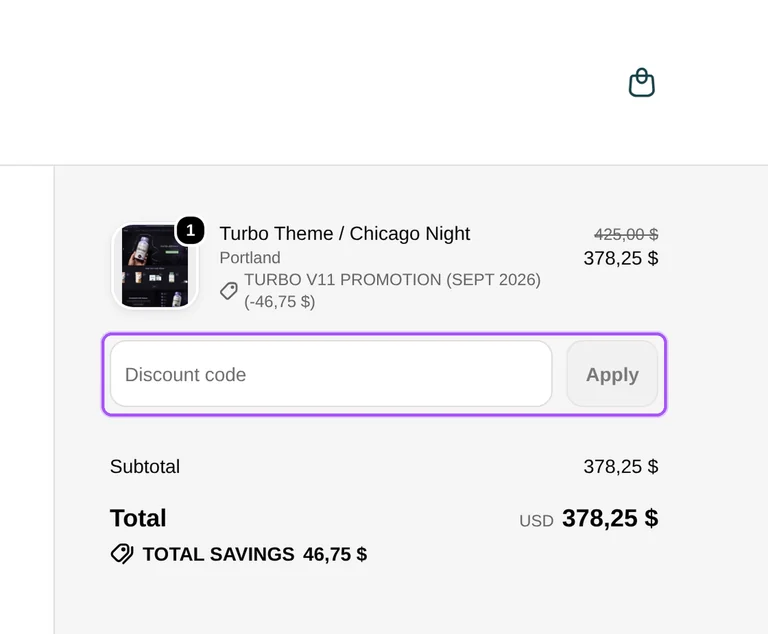
Copy an Out of the Sandbox coupon or promo code, then paste it in the promo field at checkout.
Choose a coupon
Grab the Out of the Sandbox offer that works best for you. It's listed above.
Reveal the code
Hit "Get Code" or "Get Deal" depending on the offer type. Popup opens. Click the copy icon inside—code goes to your clipboard.
Apply at checkout
Now head over to Out of the Sandbox's site. Pick your Turbo Theme plan. Checkout page has a "Promo Code" field. Paste what you copied there.
What trial does Out of the Sandbox offer for Theme Updater?
Out of the Sandbox offers a seven-day free trial of Theme Updater & Backups. This app trial covers a separate service from the theme purchase, so it should not be confused with the refund window for Turbo, Flex, Superstore or Vino. The app page provides a Start 7-day trial link for installation through Shopify. Theme Updater can carry theme settings and content into an updated version, while custom code that cannot transfer automatically is flagged for manual work. Paid Theme Updater subscriptions renew automatically and their subscription fees are nonrefundable. Cancellation takes place within the app. To stop a renewal, cancel at least 24 hours before the subscription renewal date and time.
Why might an Out of the Sandbox discount code be rejected?
An Out of the Sandbox discount code can fail because the purchase does not meet its eligibility requirements. Discounts apply to eligible direct purchases of Flex, Superstore, Turbo and Vino rather than every product sold by the company. Out of the Sandbox-issued codes are valid on its own website, not the Shopify Theme Store. Codes are nontransferable, can be quantity controlled and can be modified or discontinued without notice. A purchase must also respect the limit of one discount per order. These conditions make the product, purchase channel and individual offer relevant to eligibility. For a Turbo order, the product page starts the direct purchase through Add to cart; apply the eligible offer before completing payment.
Can I combine two Out of the Sandbox discount codes?
Out of the Sandbox limits each order to one discount. Two codes therefore cannot be used together to reduce the same theme order. The discount policy covers eligible purchases of Flex, Superstore, Turbo and Vino made directly through Out of the Sandbox. Individual codes can also have eligibility requirements and quantity limits, and they are nontransferable. A code intended for the direct store cannot be redeemed through the Shopify Theme Store instead. For a Turbo purchase, Add to cart begins the order from the product page. The discount must be used during the purchase because completed orders cannot receive a later discount adjustment. Apply one eligible offer before paying rather than planning to add another afterward.
Are theme updates included after using an Out of the Sandbox discount?
Theme purchases include entitlement to released updates for the commercial lifespan of the theme. Out of the Sandbox separates those updates from paid automated transfers through Theme Updater Pro. The free updater option provides registration, notifications when new versions become available and access to the latest theme version in its default state. Pro handles transfers of theme editor content, customizations and settings into that version. After purchasing with an eligible offer, register the theme to access the latest compatible release. In Theme Updater, open Themes, find the theme under Unlinked and select Register, then provide the store email. Successful registration adds a Linked label and moves the theme into the Registered tab.
Which presets come with a discounted Out of the Sandbox Turbo purchase?
A Turbo purchase includes all of its built-in presets. Out of the Sandbox lists seven presets with the theme, and the preset selected for purchase determines the initial visual style when the theme is uploaded. The Turbo product page offers Portland, Dubai, Florence, Chicago Day, Chicago Night, Seoul and Tennessee through its Options selector. After payment, the theme is delivered as a ZIP file containing its built-in styles. An eligible discount must be applied during the direct purchase, because Out of the Sandbox cannot adjust the completed order afterward. Turbo also qualifies for the direct-store refund window of 14 calendar days. The Options selector is where the starting preset is chosen before Add to cart.
When should I redeem an Out of the Sandbox coupon?
Redeem an Out of the Sandbox coupon during the purchase before payment is completed. Discount adjustments cannot be made after the order has been completed, so a later request cannot add the offer retroactively. On a Turbo product page, select the starting preset through Options and use Add to cart to begin the direct order. Out of the Sandbox-issued codes are valid on its own website rather than the Shopify Theme Store. Eligible direct-store theme purchases include Flex, Superstore, Turbo and Vino, subject to the particular offer requirements. Each order is limited to one discount, and codes are nontransferable. The concrete deadline for redeeming the offer is completion of the original purchase.
Does a discounted Out of the Sandbox theme include automated updates?
Automated content transfers require the separate Theme Updater Pro plan. Out of the Sandbox distinguishes access to theme releases from the app features that move existing content, customizations and settings into a new version. The free updater option includes theme registration, new-version notifications and access to the latest default theme version. Pro adds transfers of theme editor content, customizations and settings, along with a comparison of changes. Buying a theme with a discount therefore involves a separate decision about the updater service. The app displays the current plan and associated charges within Shopify admin, with pricing dependent on store and account configuration. Open the Plan page in Theme Updater to see which subscription is active.
How much does Out of the Sandbox refund after a discounted theme purchase?
Out of the Sandbox refunds the original amount paid for an eligible theme purchase. The refund is issued in US dollars, so a discounted purchase is refunded at its actual purchase price rather than a later regular price. Flex, Superstore, Turbo and Vino purchased directly from Out of the Sandbox qualify for refund requests within 14 calendar days. Other themes, Shopify Theme Store purchases and Priority Support subscriptions fall outside that refund eligibility. Once a refund is issued, the theme license becomes void and every copy must be deleted from Shopify stores, including unpublished copies. There is a limit of one refund per customer or agency. Submit the refund request within the 14-calendar-day window.
Can I transfer an Out of the Sandbox theme bought with a discount to another store?
You can move the theme after closing the original store if you still own it and delete its copies. Out of the Sandbox requires the theme to be deleted completely from the closed store before it is used on the new one. A single license permits installation on one domain, so this move does not provide a license for two stores at once. Registration can be declined when a theme remains associated with a previous store. The registration guide directs license-transfer requests to Shopify Support. For registration, the quick form asks for the purchase email, order number, Shopify domain and theme. The order number comes from the order confirmation or theme receipt.
Does Out of the Sandbox accept promo codes as well as coupons?
Yes. An Out of the Sandbox coupon and a promo code are the same thing: paste the code in the promo field at checkout before you pay.
Similar SaaS & Business Coupons
Valid discounts from brands similar to Out of the Sandbox.