Verified
AnyRecover Coupon & Promo Codes
Best verified offer: 63% off · 3 offers · last checked 11 Nov
Active AnyRecover coupon codes
Expired Offers (May still work)
About AnyRecover & Latest Deals
Professional Anyrecover services and solutions.
Savings opportunities available through Anyrecover discount codes
AnyRecover sells digital hope: restoring lost files. They charge for the deep scan technology. The 'Lifetime License' is the smart buy here. Don't rent your recovery tool. Own it forever.
Service categories frequently on promotion
The 'Lifetime License' for Windows/Mac is the discount champion. We consistently see coupons (e.g., GETBACK2, SAVE$72) that drop the price to ~$80. Our deals apply to the full suite, restricted only by device count (3 PCs). Validate your data loss. Restore everything for a reduced one-time fee.
Services usually excluded from promo codes
1-Month licenses are often competitively priced but lack deep discounts. Remote recovery services are extra. Quality costs money. The peace of mind is the value; use our code to buy the lifetime key, so you are ready for the next crash.
Impact of billing cycle on promotional price
Lifetime vs Annual. Annual is a subscription trap. Lifetime + Our Code = One & Done. Never pay a yearly fee for file recovery software.
Promo codes vs. automatically applied offers
Auto-applied 'sales' vs Manual Codes. Be careful. Sometimes a manual code (like GETBACK2) overrides a weaker automatic sale. Always try the manual code at checkout.
How to use AnyRecover Discount Codes?
Copy an AnyRecover coupon or promo code, then paste it in the promo field at checkout.
- Choose a coupon
Grab the AnyRecover offer that works best for you. It's listed above.
- Reveal the code
Hit "Get Code" or "Get Deal" depending on the offer type. Popup opens. Click the copy icon inside—code goes to your clipboard.
- Apply at checkout
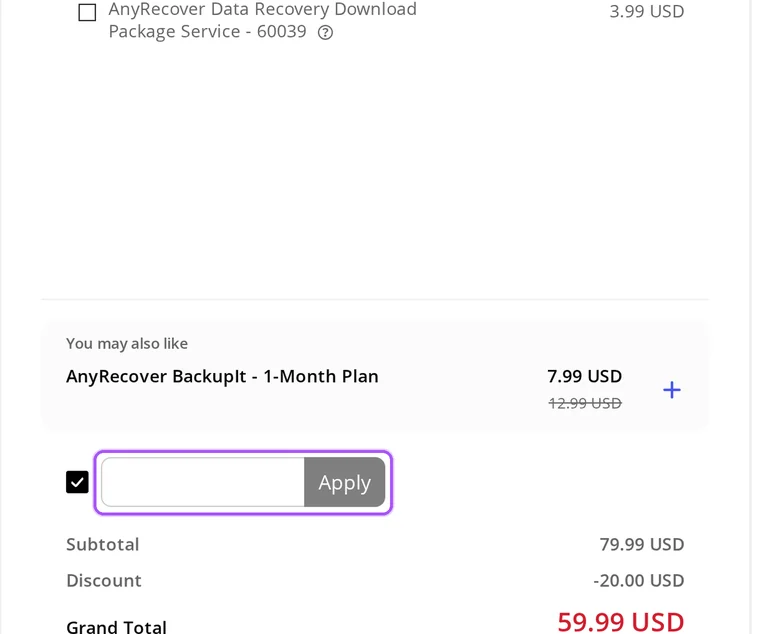
Now head over to AnyRecover's site. Pick your Windows Recovery plan. Checkout page has a "Promo Code" field. Paste what you copied there.
AnyRecover Discount FAQs
Can I try AnyRecover before buying a discounted license?
AnyRecover offers free scanning and previews before you buy a full license. The trial lets you inspect recoverable files, while the paid version provides the full recovery functionality described for your selected product. This gives you a way to assess the files found before committing to a monthly, annual or lifetime purchase. AnyRecover also provides technical support for trial users, so recovery questions can go to support before payment. When moving to a paid license, the product FAQ describes an email containing account details and a download link after successful payment. For external storage, connect the device before scanning. Install AnyRecover on a different drive from the one containing the lost files to reduce the risk of overwriting them.
What can prevent an AnyRecover coupon discount from applying?
AnyRecover's advertised coupon offer cannot be combined with another discount. That restriction matters when the selected purchase already carries a separate promotion. Its coupon instructions start with choosing a plan on the special-offer page, followed by entering the offer during checkout. The checkout control is labeled I have a coupon; the coupon belongs in that step rather than the software's activation process. Data Recovery is sold with monthly, annual and lifetime terms, so identify the selected license before applying the offers on this page. For a purchase question that remains unresolved, AnyRecover's Support Center includes Sales FAQs and a contact route. Send support the selected product, license term, steps taken and exact error message so the inquiry describes the affected order.
Can a discounted AnyRecover license recover files from an encrypted drive?
AnyRecover requires an encrypted disk to be unlocked before scanning. Its recovery FAQ instructs you to enter the disk password or disable disk encryption before using the tool. Buying a discounted license therefore still requires access to the encrypted disk; the purchase does not replace that preparation. The drive must also be readable and detectable by the computer for AnyRecover to extract data from it. You can scan and preview recoverable files with the free trial before choosing a paid license. If an external drive remains unrecognized, AnyRecover directs customers to support@anyrecover.com. Before buying the full version for this drive, enter its password and run the free scan to preview the files AnyRecover finds.
How do I get support after buying AnyRecover with a discount?
AnyRecover provides support for full-version purchases through its support team. Technical help is also available for the trial version, so a purchase is not required to ask about a recovery problem. The Support Center separates Sales FAQs, Order FAQ and product-specific help for PC, iOS and Android recovery. For an account upgrade problem after payment, contact AnyRecover support; its purchase FAQ gives a response time of within 24 hours. A refund inquiry needs the product name, purchase email, order reference and reason for the request. For technical assistance with your discounted purchase, send the system information, the steps that led to the problem and the exact error message to support@anyrecover.com.
What does AnyRecover cost with its advertised Data Recovery offers?
AnyRecover advertises Data Recovery at $59.99 monthly, $79.99 annually or $99.99 for a lifetime license. The corresponding crossed-out prices are $79.99, $99.99 and $159.99. These are different license terms: the annual amount covers one year, while the lifetime purchase has no expiry date. Monthly and annual licenses renew automatically, and the lifetime option is a one-time payment. Taxes can increase the amount charged when the order is placed, so the advertised software price and the payable order amount can differ. For a coupon offer, AnyRecover's instructions place entry after plan selection during checkout. The checkout option is called I have a coupon; the separate Lifetime Plan is labeled One-time purchase.
Will my discounted AnyRecover subscription renew automatically?
AnyRecover's monthly and annual subscriptions renew automatically. The monthly license renews after one month, and the annual license renews after one year; AnyRecover sends a notification email before renewal. The Lifetime Plan is a one-time purchase instead of a recurring subscription. For membership products, subscription management is available in the AnyRecover Member Center. Open My Product, select the purchased product and follow Cancel Subscription to stop the subscription. For a product activated through a registration license rather than a membership account, customer service handles cancellation. A purchase discount and the subscription term are separate considerations when selecting your license. For ongoing-charge control, the individual Lifetime Plan is explicitly labeled One-time purchase.
Does AnyRecover refund a discounted purchase made by mistake?
AnyRecover excludes purchase mistakes and changes of mind from its refund conditions. Examples include buying incorrect software, downloading the wrong version and having insufficient disk space on the computer. Misunderstanding the product's features is also excluded, so the 30-day guarantee is subject to specific eligibility conditions. An exchange may be available for software you no longer need, and duplicate purchases have a separate refund or exchange provision. A discount does not replace these distinctions between an accidental product choice and an eligible duplicate payment. Send exchange or refund inquiries to support@anyrecover.com with the product name, purchase email, order reference and reason. Before purchasing, the free trial lets you scan and preview recoverable files.
Which payment methods can I use for a discounted AnyRecover purchase?
AnyRecover accepts PayPal and major cards for software purchases. Its purchase pages display Visa, Mastercard, American Express, JCB, Maestro, Discover and Diners Club among the accepted options. The sales FAQ also lists these card methods for customers buying licenses. Payment follows selection of the product and license duration; Data Recovery has monthly, annual and lifetime options. AnyRecover's coupon instructions put the discount entry at checkout after choosing the plan. Taxes can add to the advertised software price when you place the order, so the license price alone may not equal the amount charged. If the same product is paid for twice because of a payment-platform technical issue, AnyRecover's refund policy provides for returning the additional payment. The coupon entry control is labeled I have a coupon.
How many computers can a discounted AnyRecover license cover?
AnyRecover's individual licenses cover two or three PCs, depending on the plan. The monthly and annual Data Recovery plans each include two PCs plus three devices, while the Lifetime Plan includes three PCs plus five devices. Those allowances belong to the selected license, so the billing term also affects how many computers your purchase covers. AnyRecover's license policy restricts use to the number of computers purchased; a one-PC license cannot be used across additional computers. Business buyers can request a customized license through customer service. Before applying an offer, identify the required computer allowance under the plan's Support Devices label: the individual Lifetime Plan lists five devices plus three PCs.
Does AnyRecover accept promo codes as well as coupons?
Yes. An AnyRecover coupon and a promo code are the same thing: paste the code in the promo field at checkout before you pay.


