Acronis sells True Image backup and cyber protection in Essentials, Advanced and Premium 1-year subscriptions, with a 30-day free trial.
Savings opportunities available through Acronis discount codes
True Image is the home backup and cyber protection software from Acronis, and the offers on this page cut what you pay for it. It is sold in three editions: Essentials, Advanced and Premium. Each one is a 1-year subscription, and the licenses come for 1, 3 or 5 machines.
Service categories frequently on promotion
The three editions differ in what a discounted purchase gets you. Essentials is local backup, cloning and ransomware protection. Advanced adds cloud backup with 50GB of cloud storage included, and Premium includes 1TB.
Services usually excluded from promo codes
Cloud storage upgrades extend the included amount. They go up to 500GB on Advanced and up to 10TB on Premium.
Impact of billing cycle on promotional price
Every edition runs for 1 year, so the price at checkout covers one subscription year. After that you need to renew to keep using the product. Subscriptions bought on the Acronis website have automatic renewal enabled by default.
Promo codes vs. automatically applied offers
The perpetual upgrade offer is its own purchase path. It is bought through an in-product notification or the in-app store, and the new Upgrade key must sit in the same account as your previous Standard perpetual license. Downgrades are not available: a 3-machine license is offered 3 or 5 machines.
Accessing active codes for Acronis
Choose the edition and the 1, 3 or 5 machine license first. Subscription owners get free, 24-hour technical support. Annual billing products carry a 30-day refund window from the purchase date.
How to use Acronis Discount Codes?
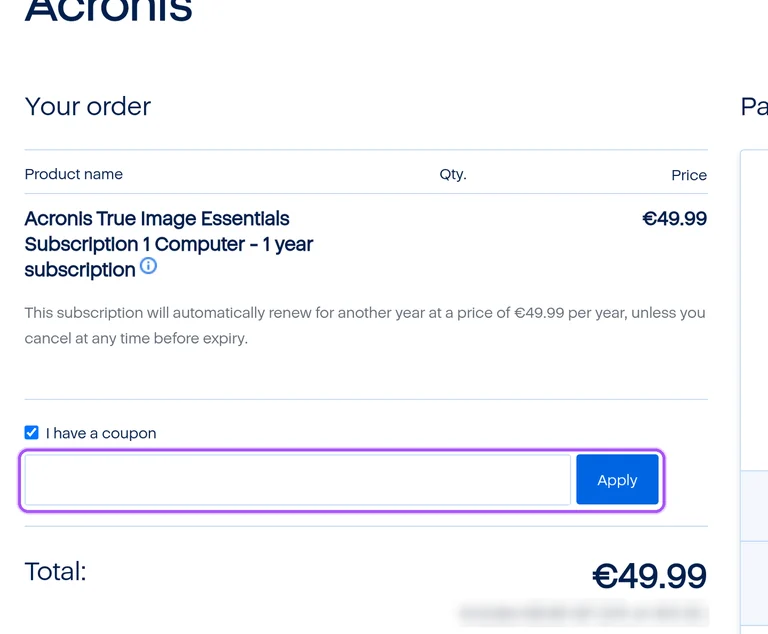
Copy an Acronis coupon or promo code, then paste it in the promo field at checkout.
Choose a coupon
Grab the Acronis offer that works best for you. It's listed above.
Reveal the code
Hit "Get Code" or "Get Deal" depending on the offer type. Popup opens. Click the copy icon inside—code goes to your clipboard.
Apply at checkout
Now head over to Acronis's site. Pick your Essentials plan. Checkout page has a "Promo Code" field. Paste what you copied there.
Does cancelling auto-renewal on a discounted Acronis subscription refund my last order?
No. Cancelling only stops future charges. In Acronis products, cancelling a subscription means turning off automatic renewal, and the subscription stays active until the end of the current billing period. Cancellation stops future renewal charges but does not result in a refund of your recent order. A refund is a separate request under the personal products refund policy, which covers automatic subscription renewal purchases made from Acronis. For annual billing products that request must be made within thirty days of the purchase date, and for monthly billing products within seven days. Orders placed in another store or through a partner are not auto-renewed at all.
Which Acronis plans can I buy with a discount offer, and for how many machines?
Essentials, Advanced and Premium. All three editions are available as 1, 3 and 5 machines licenses, and each license can be installed on any combination of PCs and Macs within the limit of machines it allows. A 3 machines license, for example, can run on 3 PCs, 3 Macs, or 1 PC and 2 Macs. Each license also covers an unlimited number of mobile devices on iOS and Android. The licensing row for each edition reads 1-year subscription, so a discounted purchase covers one year of the edition you pick. Essentials is basic local backup, cloning and ransomware protection, Advanced adds cloud backup, and Premium adds up to 10TB of cloud storage.
Do I need a discounted Acronis plan to get new True Image versions?
No, an active subscription already includes them. With a subscription plan you get all updates and new version releases during the active subscription period. If you hold an active subscription to older versions of True Image, a new version build becomes available to download for free in your account after release. The new version will be active until your current subscription expiration date. Users of True Image 2021 Standard and earlier versions can instead buy any subscription plan through the Acronis in-app store under the Account tab inside the product. The in-app route is a purchase, while the free build comes with the subscription you already hold.
Which payment methods work for a discounted Acronis plan?
Credit and debit cards, PayPal and localized payment methods where available. Acronis supports all major payment methods, and the online store on the Acronis website is provided by Cleverbridge. Once the purchase is complete, you receive an email with a direct download link and your activation key. During installation you are prompted to sign in to your Acronis account or enter your product key. Subscriptions bought on the Acronis website renew automatically by default, and you are automatically charged for the next subscription period unless you turn automatic renewal off. Cancelling means turning off automatic renewal, and the subscription remains active until the end of the current billing period.
Can I get a refund on an Acronis plan I bought with a discount?
Yes, for any reason, inside the refund period. Acronis accepts a full refund request for a True Image license purchase or an automatic subscription renewal purchase. Annual billing products and perpetual license products need the request within thirty days of the purchase date, and monthly billing products within seven days. Returns submitted after the 30-day period cannot be accepted. The online store on the Acronis website is provided by Cleverbridge, so refunds for those orders go through it. Purchases made at retail outlets or from resellers cannot be refunded by Acronis and must go back to the reseller or retail outlet.
How does the Acronis perpetual upgrade offer work for existing license owners?
It is an Upgrade perpetual license, bought using an in-product notification or the in-app store. The in-app store is available in True Image 2018-2021, Cyber Protect Home Office 2024 and True Image 2025. Downgrades are not available: if you have a license for 3 machines, you are offered options to upgrade for 3 or 5 machines. You can purchase several Upgrade perpetual licenses, and the number of machines covered will sum up. To activate the new license, the previous Standard perpetual license and the new Upgrade key must both be in the same account. A direct upgrade from True Image 2020 or earlier is not supported.
Which discounted Acronis plans include cloud storage?
Advanced and Premium do, Essentials does not. The comparison reads cloud storage as NO for Essentials, 50GB included for Advanced and 1TB included for Premium. Advanced can be increased to 500GB, and Premium has 1TB, 2TB, 3TB, 4TB, 5TB and 10TB quotas. The quota is shared among all the machines registered in the account, so a 3 or 5 machine license draws on one pool. Cloud storage upgrades run up to 500GB on Advanced and up to 10TB on Premium. Local-to-cloud backups are marked NO for Essentials and YES for the other two editions, so Essentials stays a local backup choice.
What happens to my cloud backups if a discounted Acronis subscription expires?
Backups stay reachable for a short window, then the cloud copy is destroyed. When the subscription expires, all product functionality is blocked until further subscription renewal, however, the backed up data is still accessible. For 5 days you can continue making backups, including backups to Acronis Cloud storage on Advanced and Premium. Within 30 days you can restore data from Cloud Storage. Thirty days after expiration, the data in Acronis Cloud storage is destroyed. Local backups remain available for restore. Cloud storage comes with Advanced at 50GB and with Premium at 1TB, so only those two editions hold a cloud copy to lose.
Does a discounted Acronis subscription renew automatically after the first year?
Yes, when it was bought on the Acronis website. Subscription-based products purchased there have automatic renewal enabled by default, so you are charged for the next subscription period and the subscription is extended. A purchase made in another store or through an Acronis Partner does not auto-renew, and no automatic charge happens. Every True Image edition is a 1-year subscription, so the renewal point comes after one year. To renew by hand, start the True Image application, sign in, open the Account tab and select the Renew button. Then follow the instructions on screen. An automatic subscription renewal purchase can also be refunded within the applicable refund period.
Can I move a discounted Acronis license to a new computer?
Yes. Sign out of your Acronis account on the old machine and activate the license on the new one. During installation you are prompted to sign in to your Acronis account or enter your product key, and once verified, the license is automatically activated and synced to your device. The machine limit depends on the license you purchased: 1, 3 or 5 machines, in any combination of PCs and Macs, and some plans allow multiple installations, so check your plan details for the machine count. On a 3 machines license the product can run on 3 PCs, on 3 Macs, or on a mix of the two. Every edition covers an unlimited number of mobile devices on iOS and Android next to the computers.
Does Acronis accept promo codes as well as coupons?
Yes. An Acronis coupon and a promo code are the same thing: paste the code in the promo field at checkout before you pay.