Used
BlueVPS Coupon & Promo Codes
1 offer listed
Active BlueVPS coupon codes
Expired Offers (May still work)
About BlueVPS & Latest Deals
Virtual private server hosting solutions.
Savings opportunities available through Bluevps discount codes
BlueVps sells global locations. They charge for unmetered bandwidth and SSD storage. Plans start at $4/mo. Don't pay full price for a VPS in a rare location.
Service categories frequently on promotion
KVM VPS (SSD/NVMe). Our deals help you deploy in London or Cyprus for the same price as Dallas. Validate the bandwidth. Unmetered is huge value; use the discount to lock it in.
Services usually excluded from promo codes
Windows license fees are widely excluded. Management services are extra. Quality costs money. The wide location choice is the value; use our code to get the infrastructure cheap.
Impact of billing cycle on promotional price
Quarterly/Annual. Discounts often scale with time. A 50% off 'Lifetime' deal usually requires an annual commitment. It's worth it for the recurrence.
Accessing active codes for Bluevps
BlueVPS lists VPS offers for its plans; choose a location and configuration that fits your workload. Its terms guarantee minimum speeds of 10 Mbit per 1 Gbit VPS and 100 Mbit per 10 Gbit VPS, with about 30 Mbit per VPS in Cyprus. The 7-day refund applies to unused service periods, and cryptocurrency payments are non-refundable.
How to use BlueVPS Discount Codes?
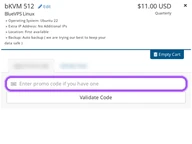
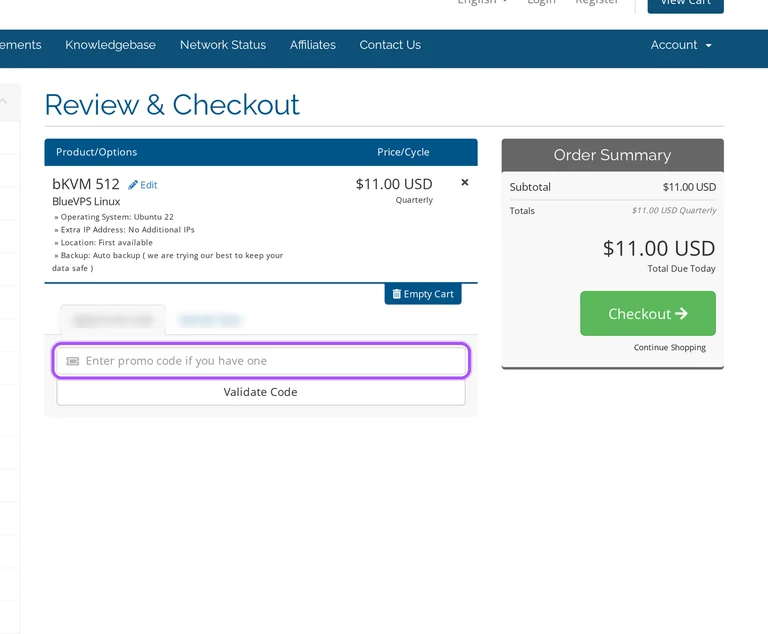
Copy a BlueVPS coupon or promo code, then paste it in the promo field at checkout.
- Choose a coupon
Grab the BlueVPS offer that works best for you. It's listed above.
- Reveal the code
Hit "Get Code" or "Get Deal" depending on the offer type. Popup opens. Click the copy icon inside—code goes to your clipboard.
- Apply at checkout
Now head over to BlueVPS's site. Pick your KVM VPS plan. Checkout page has a "Promo Code" field. Paste what you copied there.
BlueVPS Discount FAQs
Can I buy BlueVPS through an offer without committing to a long-term contract?
BlueVPS offers VPS hosting without requiring a long-term contract, allowing you to buy server capacity without that commitment. Its service provides KVM virtual servers with scalable resources, and its About page describes options for developers, businesses and IT professionals. The available software choices include Windows, Ubuntu, CentOS, Debian and FreeBSD, with control panels such as cPanel, DirectAdmin and ISPManager. Server provisioning carries no fee, which is a separate saving from any promotional reduction. The offers on this page should be considered alongside the server configuration you need. For help selecting that configuration before purchase, BlueVPS provides technical assistance through its ticket system 24 hours a day.
What bandwidth conditions should I review before buying a BlueVPS VPS offer?
BlueVPS advertises unlimited traffic, while its terms set minimum bandwidth speeds that depend on the VPS category and location. The guaranteed minimum is 10 Mbit for each 1 Gbit VPS and 100 Mbit for each 10 Gbit VPS. High Load VPS plans have a 50 Mbit minimum, while Cyprus VPS service provides around 30 Mbit per VPS. Higher VPS plans receive higher bandwidth priority. These figures describe transfer speed rather than a monthly traffic allowance, so the port specification and unlimited traffic claim answer different buying questions. Before paying for the offers on this page, identify the selected VPS category and location, especially the separate speed provision for Cyprus.
How do I request a refund after a discounted BlueVPS VPS purchase?
Request a BlueVPS VPS refund within its seven-day refund period through a ticket to the Sales Department. Refunds cover unused service periods, and the request must include your refund reason and identity verification. Additional installation-assistance fees are non-refundable, and purchases paid with cryptocurrency are excluded from refunds. BlueVPS issues refunds through PayPal or debit and credit cards, with possible transfer fees remaining outside its responsibility. The refund policy also excludes customers who have violated the service terms or user agreements. For a purchase made through the offers on this page, submit the Sales Department ticket within seven days and provide the required reason and identity verification.
Will a BlueVPS offer leave me paying a provisioning fee?
BlueVPS charges no provisioning fee, so server provisioning does not add a separate charge to your VPS purchase. Its VPS service uses KVM virtualization, with Windows and Linux operating systems and pre-installed control panels available. Installation assistance is a separate consideration: additional fees for that assistance are non-refundable. This distinction matters when calculating the cost of the offers on this page, because provisioning and optional installation work are different services. BlueVPS provides technical assistance through its ticket system around the clock. Before requesting paid installation assistance, ask BlueVPS support to identify the work and its fee; that installation charge is excluded from the refund policy.
Who can help when my BlueVPS promo code is not working?
Contact BlueVPS through its billing contact or Live Chat for help with a promo code that is not working. BlueVPS lists billing@bluevps.com for billing enquiries and provides Live Chat assistance with server selection. Its sales telephone number is +44 7488 811 581, while the support number is +372 610 4263. When asking about the offers on this page, describe the server configuration you selected and the discount problem you encountered so the enquiry concerns your intended purchase. For a Spain VPS order, include that location choice because BlueVPS requires Spain to be selected during checkout. The named billing email gives you a direct contact for the purchase enquiry.
Can I change the location after ordering a BlueVPS VPS offer?
BlueVPS does not offer a location change after an order is confirmed, so select the required location before completing your purchase. The same terms state that the main IP address cannot be changed during the billing cycle. An additional IP address can be ordered separately if you need another one. For a Spain VPS purchase, BlueVPS directs buyers to select Spain during checkout, and its Spain service is based in Madrid. The offers on this page should therefore be used with the location you intend to retain for that order. If Madrid is your intended deployment, confirm the Spain selection at checkout before confirming the server order.
How do I fund my BlueVPS account before purchasing a discounted VPS?
BlueVPS lets you add account funds through Billing, then Add funds, in its client area before making your purchase. After signing into the client area, open Billing in the left corner and select Add funds from the menu. Enter the amount you want to add, select the payment option and press the Add Funds button. This process places money in your BlueVPS account; the amount you enter is the funding amount, rather than a discount percentage. When preparing to buy through the offers on this page, you can view that account balance through Notifications in the top right corner. Open Notifications to see the balance after adding funds.
Does a BlueVPS Spain Windows VPS offer require a separate Windows license payment?
BlueVPS includes the Windows license in the server price for its Spain Windows VPS service. That service provides licensed Windows without an additional license payment, alongside administrator access and unlimited bandwidth. BlueVPS offers both Windows and Linux servers in Spain, so the operating system is part of the server choice you make before ordering. Its Windows VPS service supports Remote Desktop Protocol and VNC access for managing the server remotely. When using the offers on this page for a Spain order, select the Windows configuration and confirm Spain as the checkout location. BlueVPS specifically instructs buyers to select Spain during checkout when ordering a server there.
What DirectAdmin license choice affects the total of a BlueVPS VPS offer?
BlueVPS sells the DirectAdmin license as a separate checkout add-on, with Personal Plus, Lite and Standard tiers available. The tier you select depends on the number of accounts and domains you need. DirectAdmin itself comes pre-installed and pre-configured on the VPS, so selecting a license and manually installing the panel are separate matters. Its management tools include domain management, a file manager, website statistics and bandwidth usage monitoring. For a purchase using the offers on this page, the server configuration and selected license tier are both relevant to the order you are placing. Match the Personal Plus, Lite or Standard license to your required account and domain counts before checkout.
Is a discounted BlueVPS order refundable when paid with cryptocurrency?
A BlueVPS purchase paid with cryptocurrency is non-refundable, including a purchase made through the offers on this page. BlueVPS accepts crypto payments and provides a Bitcoin payment gateway for settling server invoices. Its crypto VPS service supports scalable CPU, RAM and storage, so you can select resources for your workload before paying. Other advertised payment options include PayPal, Webmoney, Alipay, Stripe and bank transfer. The payment method matters independently of the server configuration: the cryptocurrency exclusion applies to the purchase itself. If refund eligibility is part of your buying decision, select a card or PayPal payment rather than cryptocurrency; BlueVPS issues eligible refunds through those two methods.
Does BlueVPS accept promo codes as well as coupons?
Yes. A BlueVPS coupon and a promo code are the same thing: paste the code in the promo field at checkout before you pay.
Scroll up for the current BlueVPS offers.


