How long does an eligible Fxvps Pro refund take after an offer purchase?
An eligible Fxvps Pro refund can take up to seven business days to process. Eligibility comes first: the terms exclude discounted products and dedicated servers from refunds. For a purchase that qualifies, the satisfaction provision covers the first three days and provides a partial refund after applicable product setup fees are deducted. The seven-business-day processing period is separate from that initial three-day window. Fxvps Pro also excludes prorated refunds, so unused subscription time does not create a prorated refund entitlement under this policy. Customer service is available through the Customer Portal and at support@fxvps.pro for assistance with the account. The relevant processing allowance is up to seven business days, rather than seven calendar days.
How do I renew a Fxvps Pro subscription bought with an offer?
You can renew your Fxvps Pro subscription through the Customer Portal. Renewal invoices are generated and emailed approximately 14 days before payment is due, and paying an automatically generated invoice extends the associated service. The portal section for these payments is called My Invoices. Subsequent payments fall on the service subscription anniversary according to the billing cycle selected for the purchase. Fxvps Pro requires payment in advance of service delivery, and subscribers only need to renew when they want to continue using the hosting service. An unpaid renewal can lead to service suspension, so the renewal invoice matters when continuing a subscription bought through an offer. The stated invoice lead time is approximately 14 days.
What refund conditions apply after buying a Fxvps Pro discount offer?
Fxvps Pro excludes discounted products from its refund provision. Its terms also make dedicated servers nonrefundable and exclude prorated refunds across the refund policy. The separate three-day satisfaction provision covers eligible purchases with a partial refund after applicable product setup fees are deducted. These conditions matter when selecting both an offer and a billing term, because the subscription requires payment before service delivery. Cancelling an account is a separate action: Fxvps Pro accepts cancellation requests through the Customer Portal or support@fxvps.pro. Cancellation immediately terminates hosted data and services and ends eligibility for benefits or guarantees. Before requesting account cancellation, retain a current copy of the VPS files; maintaining that copy is the subscriber’s responsibility.
How do Fxvps Pro billing-term discounts apply without a promo code?
Fxvps Pro offers lower Basic VPS monthly rates for longer billing terms. The Basic configuration associates each saving with a billing-cycle option, allowing the term itself to determine the listed rate. Under Choose Billing Cycle, quarterly billing displays a 5% saving, semiannual billing 10%, annual billing 20% and biennial billing 30%. Monthly billing is listed at $6.99 USD per month, while the biennial option is listed at $4.89 USD per month. These figures describe the Basic plan configuration and its selected billing term. Service payments are required in advance, so the displayed monthly rate belongs to the term being purchased. The Basic form labels the two-year option Biennially.
Does the Fxvps Pro money-back guarantee cover discounted products?
The Fxvps Pro money-back guarantee excludes discounted products. For eligible purchases, dissatisfaction within the first three days qualifies for a partial refund after applicable product setup fees are deducted. The homepage describes this as a three-day partial money-back guarantee when the service does not meet expectations. Dedicated servers have their own explicit nonrefundable status, and prorated refunds are excluded by the terms. Those conditions determine the refund position of the purchase alongside the offer you select. An eligible refund can take up to seven business days to process, which is separate from the initial satisfaction window. The concrete deadline for the partial-refund provision is within your first three days.
Can latency qualify a discounted Fxvps Pro VPS for a refund?
A discounted Fxvps Pro VPS is nonrefundable under the refund terms. The general satisfaction provision offers eligible customers a partial refund within their first three days, after applicable product setup fees are deducted. That provision sits alongside the explicit exclusions for discounted products and dedicated servers. For a latency-sensitive purchase, Fxvps Pro provides a broker latency tool before ordering. It accepts a broker trading server address, a public IPv4 or IPv6 address, or a domain and compares connectivity from its VPS data center locations. This gives the buyer a specific way to assess location before committing to the discounted service. The tool includes results for New York, London and Singapore.
Can I receive a full refund on a discounted Fxvps Pro order?
Discounted Fxvps Pro products are nonrefundable. The three-day refund provision applies to eligible purchases and provides a partial refund after any applicable product setup fees are deducted. Dedicated servers are also nonrefundable, and the terms exclude prorated refunds. A discounted purchase therefore has a different refund position from an eligible purchase covered by the partial money-back provision. The advertised three-day guarantee should be considered together with that discounted-product exclusion before paying for an offer. Fxvps Pro provides customer service through its Customer Portal and at support@fxvps.pro for account assistance. For an eligible refund, processing can take up to seven business days; the satisfaction window is the first three days.
When is payment due for a discounted Fxvps Pro VPS?
A discounted Fxvps Pro VPS requires payment before service delivery. Establishment of the service depends on Fxvps Pro receiving the payment, and later subscription payments follow the billing cycle you select. The Basic order form groups the available terms under Choose Billing Cycle, with monthly, quarterly, semiannual, annual and biennial options. After configuration, the checkout presents an Order Summary and a Total Due Today amount. These steps separate the term you select from the amount payable for the order. The Basic configuration also offers a private IPv4 option at no additional charge and a public IPv4 option with a monthly charge. The public IPv4 option is listed at $2.00 USD per month.
Which Fxvps Pro settings affect a discounted Basic VPS order total?
The Basic billing term, IP option and location affect your Fxvps Pro order. The configuration offers monthly through biennial terms, with lower listed monthly rates attached to the longer billing cycles. The Dedicated IP setting includes one private IPv4 at $0.00 USD or one public IPv4 at $2.00 USD per month. The VPS Location setting lists London, New York, Singapore and Mumbai with a $1.00 USD charge beside each option. These configuration choices belong to the Basic purchase and should be considered alongside the offers on this page. After configuration, the checkout displays the Order Summary and Total Due Today. The button for moving on from the Basic configuration is Continue.
Which payment methods can I use for a discounted Fxvps Pro VPS?
Fxvps Pro accepts credit cards, PayPal and cryptocurrency payments. Its listed cryptocurrency options include USDT and USDC, alongside the broader cryptocurrency payment category. The service must be paid for before delivery, and initial setup depends on receipt of the subscription payment. The checkout separates the Order Summary from the Total Due Today amount, while the Basic configuration lets you select the billing cycle before continuing. Subsequent subscription payments are due on the service anniversary according to that selected cycle. Renewal invoices are emailed approximately 14 days before payment is due and can be paid through the Customer Portal. For a later renewal payment, the portal section to open is My Invoices.
Does Fxvps Pro accept promo codes as well as coupons?
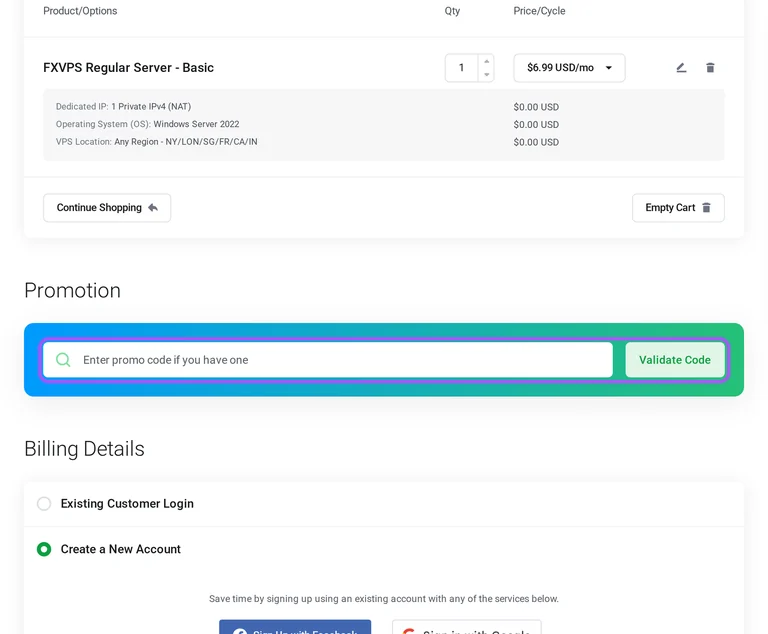
Yes. A Fxvps Pro coupon and a promo code are the same thing: paste the code in the promo field at checkout before you pay.