Savings opportunities available through Intego promo codes
Intego sells Mac shielding. They charge for the specialized malware database. It protects macOS where others fail. Don't assume Macs don't get viruses.
Service categories frequently on promotion
Mac Premium Bundle X9. We see the 'Bundle' (Antivirus + Firewall + Cleaner) discounted heavily (often 60%+) to upsell you from the basic antivirus. Our deals help you get the full suite for ~$30/year. Validate the PC protection. Intego also sells Windows antivirus now; bundle discounts often apply there too.
Services usually excluded from promo codes
VPN standalone plans are cheap ($4/mo) but rarely further discounted. Renewals are full price. Quality costs money. The Mac-specific focus is the value; use our code to get the first year cheap.
Impact of billing cycle on promotional price
Multi-Device / Multi-Year. Buying a 2-year license for 3 Macs maximizes the coupon value. You can apply a 30% discount to a $150 cart for a massive $50 saving.
Promo codes vs. automatically applied offers
Dual Discounts. Be careful. Intego sometimes allows stacking a coupon code on top of a sale price. Try codes like 'INTEGO30' even if the price already looks discounted.
How to use Intego Discount Codes?
Copy an Intego coupon or promo code, then paste it in the promo field at checkout.
Choose a coupon
Grab the Intego offer that works best for you. It's listed above.
Reveal the code
Hit "Get Code" or "Get Deal" depending on the offer type. Popup opens. Click the copy icon inside—code goes to your clipboard.
Apply at checkout
Now head over to Intego's site. Pick your Mac Premium Bundle X9 plan. Checkout page has a "Promo Code" field. Paste what you copied there.
Can I request an Intego refund when my discounted subscription automatically renews?
Intego’s 30-day guarantee covers software renewed directly through its website. Send Intego Support a ticket within 30 days of the renewal purchase, with your subscription information and the reason for the refund request. Stopping automatic renewal is a separate action and does not itself refund the charge you have already paid. In your account, open My Account, then Subscription and Billing, and select Cancel Subscription to stop the next renewal. The cancellation requires a second confirmation in the alert window before it takes effect. Your subscription remains active until its expiration date after automatic renewal is disabled. The final cancellation step is the green Cancel Subscription button, and Intego sends a confirmation to the email address on the subscription.
How do I request Intego’s money-back guarantee after a discounted purchase?
Intego provides a 30-day money-back guarantee for software bought directly from its website. The guarantee also covers direct renewals, while purchases through another provider can have different terms. Submit a ticket to Intego Support within 30 days of the purchase, including relevant subscription information and your reason for requesting a refund. An eligible request is processed within 14 days. Once the refund is processed, you agree to delete and uninstall every copy of the Intego software from your devices. Business software can have different conditions, so business customers should contact their Intego Sales Account Manager about their purchase. For a direct personal purchase, the concrete deadline is 30 days from the purchase date to submit the support request.
How long is an Intego promotional subscription’s protection period?
Intego ONE offers one-year and two-year protection periods. The selected period defines the subscription term you buy, while automatic renewal continues the subscription at the end of that term unless cancelled. The plan selector labels this choice Period of protection and offers 1-year and 2-years options. A discounted purchase therefore needs to be considered together with the selected term and the renewal conditions attached to that subscription. Intego sets subscriptions to renew automatically by default, and you can disable that renewal before the next renewal date. The renewal email includes the expected amount, renewal date and information for updating payment details or cancelling. That email is sent to the address on your subscription 7–10 days before renewal.
Can an Intego discount purchase cover several family Macs?
Intego offers subscriptions with coverage for one, three or five Macs. The device allowance belongs to the package you purchase, so the seat count matters alongside the offer price. On the Intego ONE purchase page, select the number of Macs before using Buy Now for your chosen plan. Three-seat and five-seat options let you share access with friends or family, with invitations sent later from your Account page. Recipients do not need your login details or their own account to accept that shared access. For an existing X9 license, your Intego account shows its active licenses and attached devices. Open Devices and use the Seats column to see how many devices are attached to that license.
How can existing Intego customers handle renewals after a promotional purchase?
Existing Intego customers can renew through NetUpdate or manage automatic renewal in their account. For X9 and X8 software, NetUpdate opens the online store for the selected subscription. Select the subscription line and press Renew, then choose the subscription period and continue with Enter Payment Details. A purchase discount does not carry over to renewal; the package renews at its original MSRP, plus applicable taxes. Automatic renewal charges the renewal fee before the subscription expires, and Intego emails the expected amount and renewal date beforehand. If an automatic renewal has failed, the Sales Team can reactivate the subscription and provide a custom renewal order link. The renewal notification arrives 7–10 days before the renewal date.
How do I replace an Intego promotional offer already entered at checkout?
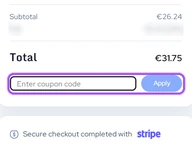
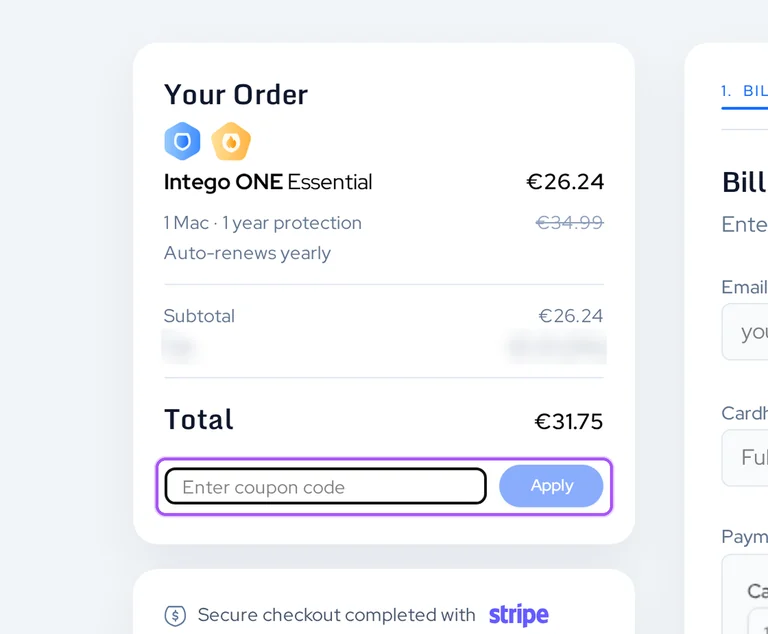
Intego lets you replace a prefilled promotional code during ordering. During a sales promotion, the order form can already contain the promotion’s code. In Coupon Code, replace the existing entry with your alternative and press Next to continue. The resulting coupon discount appears at the top of the Confirmation Order page, giving you the amount associated with the replacement entry. This is the documented way to change the promotion used for that order. Once payment authorization is received, Intego provides the purchase confirmation, order information and download link. The same information is sent to the email address supplied on the order form. Retain that confirmation email because it contains both your software serial number and the product download link.
Where do I apply an Intego promo code during an online order?
Intego accepts promotional codes during its online ordering process. A sales promotion can already have a code entered when you reach the order form. The entry field is called Coupon Code, and changing its contents followed by Next updates the order for the confirmation step. Your discount appears at the top of the Confirmation Order page. Start with the product you intend to purchase in Intego’s Buy Now section, then complete the order form and payment information. After credit card authorization, Intego displays a purchase confirmation and sends the order information by email. The confirmation email includes the serial number and product download link. The place to see the applied coupon discount is the top of the Confirmation Order page.
Why does my Intego renewal cost more after an introductory discount?
Intego purchase promotions do not carry over to subscription renewals. A discounted subscription renews at the original MSRP for the package, with any taxes required in your region added. In your Intego account, open My Account and find Subscription and Billing, then use Manage Subscription under Payment Method to see upcoming renewal pricing. That amount relates to your existing subscription rather than the introductory price available when you first bought it. Intego gives advance notice of subscription fee changes, and those changes take effect at renewal rather than during an existing subscription. You can stop automatic renewal through the account if you do not want the next charge. Cancel Subscription stops an upcoming renewal but does not refund a recent payment.
Can I purchase a discounted Intego subscription using PayPal?
Intego accepts PayPal for software purchases. Paying through PayPal automatically associates your Intego order and account information with the email address registered to that PayPal account. This matters when arranging access to the subscription bought through the offers on this page, because the PayPal address becomes the associated Intego address. If you need to change that address, Intego provides an account email update process through its support center. If you cannot access the PayPal email address, contact Intego Support for assistance with your account. A separate checkout condition applies when you need to enter a VAT ID for a FastSpring purchase: that option requires the credit card payment route. FastSpring’s PayPal route does not provide the VAT ID entry option.
Which discounted Intego ONE plan includes Mac cleanup tools?
Intego ONE Advanced and Complete include SmartClean for Mac cleanup. Essential provides antivirus protection, while Advanced adds the firewall and SmartClean, and Complete also includes VPN and iPhone coverage. In the purchase selector, choose the plan, protection period and device count before pressing Buy Now. SmartClean removes junk files, caches and leftover files, and can uninstall apps together with hidden files. It also analyzes storage and monitors memory and CPU usage. Those inclusions distinguish the cleanup plans from the Essential option when selecting an offer. The purchase options cover one, three or five Macs, with Complete pairing those Mac allowances with matching iPhone allowances. For cleanup coverage, the named tool to look for in the selected plan is SmartClean.
Does Intego accept promo codes as well as coupons?
Yes. An Intego coupon and a promo code are the same thing: paste the code in the promo field at checkout before you pay.