Verified
MacKeeper Coupon & Promo Codes
Best verified offer: 50% off · 14 offers · last checked 11 Nov
Active MacKeeper coupon codes
Verified · Used
Verified
Verified · Used
Verified
Verified
Verified
Verified
Verified
Verified · Used
Verified
Verified · Used
Used
Expired Offers (May still work)
About MacKeeper & Latest Deals
Professional Mackeeper platform and services.
Savings opportunities available through MacKeeper promo codes
MacKeeper sells Mac hygiene. They charge for the cleaning tools. It stops your MacBook overheating. Don't let junk files slow you down.
Service categories frequently on promotion
12-Month Plan. We see the 12-month subscription heavily discounted (often advertised as '$5.95/month'). Monthly plans are expensive ($14.95+). Our deals help you lock in that ~$70 annual rate instead of paying ~$180 monthly. Validate the stack. You can sometimes stack a '75% Off' link with a '30% Off' promo code in card. Try it.
Services usually excluded from promo codes
Human expert support is premium. VPN-only tiers are rare. Quality costs money. The all-in-one privacy suite is the value; use our code to get the full license for the price of a coffee.
Impact of billing cycle on promotional price
Multi-Device Discounts. Buying for 3 Macs is usually only ~$15 more than for 1 Mac. If you have a family, using the coupon on the '3 Mac' plan yields the best per-device cost ($25/year per Mac).
Promo codes vs. automatically applied offers
Exit Intent. Be careful. if the price looks high, try moving your mouse to close the tab. MacKeeper often triggers a 'Wait! 15% Off' popup. Catch it.
Accessing active codes for Mackeeper
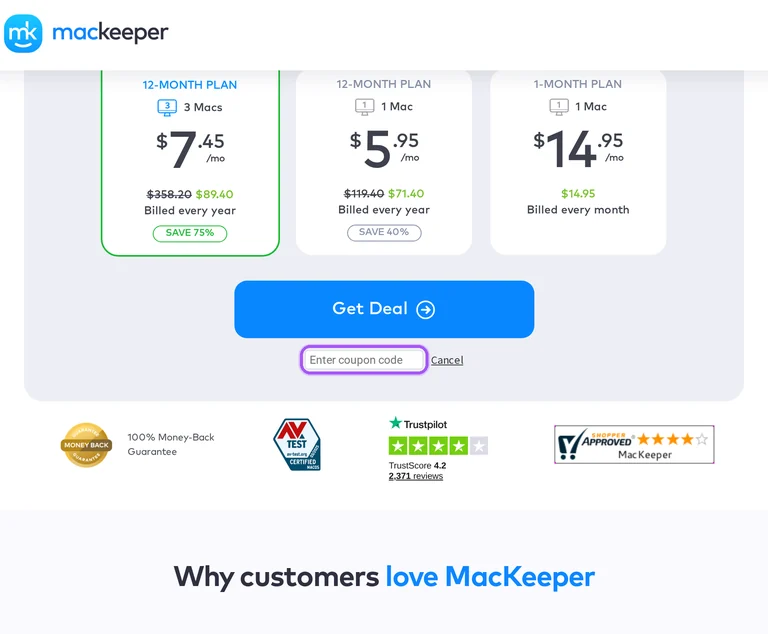
MacKeeper’s purchase page has a Have a coupon code? option and an Enter coupon code field. Plan choices include a 1-month subscription for one Mac and 12-month subscriptions for one or three Macs. The payment page shows whether taxes are included after you choose your MacKeeper plan.
How to use MacKeeper Discount Codes?
Copy a MacKeeper coupon or promo code, then paste it in the promo field at checkout.
- Choose a coupon
Grab the MacKeeper offer that works best for you. It's listed above.
- Reveal the code
Hit "Get Code" or "Get Deal" depending on the offer type. Popup opens. Click the copy icon inside—code goes to your clipboard.
- Apply at checkout
Now head over to MacKeeper's site. Pick your Antivirus plan. Checkout page has a "Promo Code" field. Paste what you copied there.
MacKeeper Discount FAQs
What refund window applies after buying MacKeeper with a discount?
MacKeeper's refund window depends on the subscription term you purchase. Annual and semi-annual subscriptions qualify for a full refund when requested within 30 days of the initial purchase. Monthly subscriptions qualify when the request is made within 14 days of purchase. A MacKeeper license used for more than six months becomes non-refundable, and requests outside the stated periods are considered at the company's discretion. Submit the request through the online form or email billing@mackeeper.com. Approved refunds are processed within five to 15 business days, depending on your bank, and processing fees are non-refundable. After a refund, the license is voided and the software must be uninstalled. The online form opens through REFUND REQUEST.
Can I try MacKeeper before buying a discounted subscription?
Yes, MacKeeper provides a free scan and one free fix per tool, excluding VPN Private Connect. Continued use of the tools requires a paid license, so the free version gives you a way to evaluate the software before subscribing. MacKeeper brings security, cleaning, performance and privacy tools together, including Antivirus, Safe Cleanup and Memory Cleaner. Find & Fix scans for junk, viruses, security threats and performance items in one place. To move to a paid subscription, open the app and select Unlock Full Version, then choose a plan and enter your payment details. After purchase, your license activation details arrive by email. The message containing them is titled Your MacKeeper order.
Will my MacKeeper introductory discount continue at renewal?
MacKeeper promotional discounts do not automatically carry over to renewals. An offer's own terms determine whether its reduced rate extends beyond the initial subscription period. Subscriptions are billed in advance and renew automatically at the end of each billing period unless canceled beforehand. MacKeeper communicates changes in subscription fees in advance, and those changes apply to subsequent billing cycles. Your account's license card identifies the subscription type, renewal status and next billing date. With automatic renewal enabled, that date is when the next period is charged. Turning renewal off changes the field to Valid to, showing how long your paid access remains available. The license card's Next billing date identifies the next scheduled charge.
How can I stop a discounted MacKeeper subscription from renewing?
You can turn off automatic renewal in your MacKeeper account before the next billing date. Your subscription remains usable for the days left in the paid period after renewal is canceled. Open the license card and click Manage subscription, followed by Turn off your auto-renewal protection. Select a reason, click Continue, and complete the process with Turn Off Auto-renewal. Cancellation is also available through the confirmation email's cancellation link or contact instructions, or by emailing billing@mackeeper.com. MacKeeper offers a live chat route for subscription requests as well. The chat icon is in the website's bottom-right corner, where the specific option for this request is Subscription Cancellation/Refund.
Where do I enter a MacKeeper coupon before purchasing?
MacKeeper has a coupon entry field on its purchase page. The offers on this page lead to subscriptions with a specified duration and number of covered Macs. On the purchase page, the coupon area is labeled Have a coupon code?, and the input is labeled Enter coupon code. An applied discount is identified by the message Your additional discount applied. The annual options are billed yearly, so their monthly equivalent represents part of an annual payment. After choosing your plan, the payment page shows whether taxes are included for your country. The coupon belongs in the purchase page's Enter coupon code field; the activation key delivered after purchase is used to activate the software.
What should I do if payment for my discounted MacKeeper order is declined?
Contact your bank about a declined MacKeeper card payment or confirm the transaction through your PayPal account. An incorrect card number, insufficient funds or an expired card can prevent the order from completing. MacKeeper accepts Visa, Mastercard, American Express and JCB credit or debit cards, along with PayPal. Another card or a PayPal account provides an alternative payment route when your original method is declined. To purchase through the website, open Pricing, choose your plan and proceed to the payment details. The payment tutorial identifies Submit Order as the final purchase button. For a completed purchase, the invoice arrives in the confirmation email; support@mackeeper.com can help if that email cannot be found.
Which MacKeeper deal covers three Macs at the same time?
MacKeeper's 12-month plan for three Macs provides coverage for three devices at the same time. The other purchase options cover one Mac for either one month or 12 months. All three options provide full access to MacKeeper features, so the three-Mac choice changes the coverage rather than adding a separate set of tools. Its subscription is billed annually, with the monthly figure expressing the annual charge's monthly equivalent. MacKeeper's Family Plan includes individual licenses that can be shared with family members or friends. Those licenses cannot be combined or exchanged to extend their duration, and using fewer than all three does not qualify for a partial refund. The purchase option is labeled 12-month plan, 3 Macs.
Can I move a discounted MacKeeper license to a replacement Mac?
Yes, you can transfer your MacKeeper license between your own devices through your account. The transfer must stay within the number of devices allowed by your license, and a license cannot be transferred to another person. In your MacKeeper account, hover over Additional options and select Assign or Reassign. The device list contains Macs logged in to the app with your account's email address. Sign in to the MacKeeper app on the replacement Mac, select that device in the account list, and click Assign. If the desired device is missing from the list, the account tutorial provides another route: select Unlink license and click Reassign. Additional options is the account menu for starting this transfer.
What information does MacKeeper need for a discounted purchase refund request?
MacKeeper requires your purchase reference and identifying details when you submit a refund request. The online form asks for your full name, email address, country, phone number, order reference, request summary and explanation. Open the refund request form, fill the required fields and select Submit at the bottom. Your order confirmation email contains the nine-digit reference number needed to identify the purchase. An email request to billing@mackeeper.com should include your full name, order reference and reason for requesting a refund. Billing questions can also go through the app's built-in chat or the website's Live Chat button. Once a refund is issued, MacKeeper automatically cancels the subscription and stops further billing. Your confirmation email supplies the nine-digit order reference.
How does the billing term affect a MacKeeper subscription offer?
MacKeeper's longer plans reduce the average monthly cost but require an upfront payment. The monthly figure advertised for a longer subscription is a monthly equivalent rather than a separate monthly installment. The one-month plan is the exception to upfront billing for longer terms. MacKeeper offers 12-month subscriptions covering either one Mac or three Macs, alongside a one-month option covering one Mac. Each of these plans provides access to all MacKeeper features; their differences are coverage and duration. Subscriptions then renew according to the billing period unless canceled before renewal. For an annual offer, the purchase page labels the charge Billed every year, identifying the payment schedule behind the displayed monthly equivalent.
Does MacKeeper accept promo codes as well as coupons?
Yes. A MacKeeper coupon and a promo code are the same thing: paste the code in the promo field at checkout before you pay.
Scroll up for the current MacKeeper offers.


