Kadence WP Coupon & Promo Codes
1 offer listed
Active Kadence WP coupon codes
Expired Offers (May still work)
About Kadence WP & Latest Deals
Get the latest Kadence Wp coupons, promo codes, and deals.
Learn more about Kadence WP and their latest offers.
How to use Kadence WP Discount Codes?
Copy a Kadence WP coupon or promo code, then paste it in the promo field at checkout.
- Choose a coupon
Grab the Kadence WP offer that works best for you. It's listed above.
- Reveal the code
Hit "Get Code" or "Get Deal" depending on the offer type. Popup opens. Click the copy icon inside—code goes to your clipboard.
- Apply at checkout
Now head over to Kadence WP's site. Pick your Kadence Theme plan. Checkout page has a "Promo Code" field. Paste what you copied there.
Kadence WP Discount FAQs
How do I activate Kadence WP after a discounted purchase?
You activate your discounted Kadence WP purchase with your subscription's Unified License Key. Activation requires an active subscription, an available site slot, and at least one premium plugin installed on your WordPress site. Download the plugin file from Downloads in your Liquid Web account, then install and activate it in WordPress. In the WordPress dashboard, open Settings, then Liquid Web Products, and enter the Unified License Key. Select Activate to open the account portal, add your website URL under My Sites, and return to WordPress to refresh the page. The connected site then receives the premium functionality and updates included in your subscription. The portal's Sites Management usage counter shows how many available site slots are already in use.
What billing term applies to a Kadence WP deal?
The current Kadence WP Pro and Elite plans use annual billing. Pro is listed at $299 per year, while Elite is listed at $499 per year, with plans priced per site. The Pro shopping cart also identifies the subscription as an annual purchase before any applicable coupon reduction. Under the purchase terms, recurring fees are charged annually unless another arrangement is agreed in writing, and fees may increase at renewal. The service term starts on the order date unless the order provides otherwise. Automatic renewal continues for the period specified in the order unless notice is given before the next renewal term. For the purchase amount and billing interval together, the cart's Kadence - Pro line displays $299.00 / year.
How do I request a refund for a discounted Kadence WP purchase?
You request a refund for a discounted Kadence WP purchase through Account Services. Your software purchase carries a seven-day money-back guarantee with a full refund and no questions asked. Refund eligibility follows the terms and refund window associated with your original purchase, and Account Services reviews requests manually. In the customer portal, open Support from the sidebar, user profile menu, or License page support card to submit your request. Provide the invoice number, purchase date, charge amount, product name, subscription tier, and reason for requesting the refund. Approved refunds can take several business days to appear, depending on your bank or payment provider. Your invoice is available to download or print from Invoices in the portal sidebar.
Can I upgrade a discounted Kadence WP subscription later?
You can upgrade an active Kadence WP subscription through the customer portal. Upgrade charges are prorated according to your current billing cycle, and the existing Unified License Key updates automatically. Open the Subscription page, scroll to Actions, and select Upgrade Plan to compare the available tiers. The Change Plan page shows included features, site allowances, and pricing differences, including the features inherited from the previous tier. After selecting the new tier, use Confirm & Checkout to complete the purchase. Some newly included premium add-ons require manual installation on your WordPress site. If your license still displays the previous tier after the upgrade, refresh its status from your WordPress site's license settings to synchronize the subscription information.
How should I compare Kadence WP offers for Pro and Elite?
Compare Kadence WP offers against the tier that includes the tools you intend to buy. Pro includes the premium theme, Blocks, starter templates, Shop Kit for WooCommerce, security, backups, and memberships. Elite includes everything in Pro and adds A/B testing, conversion tools, white label branding, and Kadence Central for managing multiple sites. Both tiers are sold with annual billing, and plans are priced per site. A discount therefore needs to be considered alongside the tier and number of sites covered by the purchase. The plan comparison lists shared features beside the additional Elite tools, making the difference visible before you open the cart. The purchase buttons are labelled Get Pro and Get Elite.
Do staging sites count toward the site allowance on a discounted Kadence WP plan?
Approved staging and local development sites do not count toward your Kadence WP site allowance. The exemption depends on using one of the supported development or staging domain patterns for the non-production site. This lets you develop a site without using another active website slot from the subscription you purchased through an offer. Supported local patterns include domains ending in .test, .local, and .localhost, while staging patterns include addresses beginning with staging. or sandbox. Only active production sites count toward the allowed installation limit. Site allowances still apply to those production installations, so the staging exemption is separate from buying additional capacity. For a local development installation, 127.0.0.1 is also included among the approved environments.
Does a discounted Kadence WP subscription include support?
An active paid Kadence WP subscription includes premium support. Support is available to the customer named on the order, and assistance with third-party products is excluded unless otherwise provided. After buying through the offers on this page, you can request help from the Support section at the bottom left of the customer portal dashboard. The form asks what you need help with so your request reaches the appropriate department. Include your license key to let the team locate your subscription, then add the relevant account or product details. You receive a ticket confirmation after submitting the request and can reply to it with screenshots or further information. Each support form field has a maximum of 250 characters.
Where can I see the renewal charge after a Kadence WP discount?
Your account displays the next Kadence WP renewal charge in its renewal breakdown. New subscriptions added between renewal dates are prorated so they join the same renewal cycle as your existing products. That shorter initial charge covers the remaining time until renewal rather than a separate full subscription year. Open License in the customer portal sidebar to view the account summary and upcoming charges. The Renewal Breakdown table lists each product with its site count, plan, and renewal price. Its Subtotal and Total rows show the combined amount due across the account. Every product on the Unified License Key renews together, so this table is the concrete place to compare your initial discounted purchase with the next charge.
How does Kadence WP calculate volume discounts when I add a subscription?
Any Kadence WP volume discount is recalculated from your total site count when you add a subscription. If you already have an active subscription, the final amount is also prorated to match your existing renewal date. In the customer portal, open Subscriptions and select + Add a new subscription, then select Kadence and the tier you want. Adjust the required site count with the plus and minus controls; the Your Selection sidebar updates as the count changes. Tax is calculated at checkout and added to the total. After payment, the new product joins your existing Unified License Key, and future renewals align with your existing renewal date. The full annual price applies at the next renewal.
Where do I apply a Kadence WP coupon before paying?
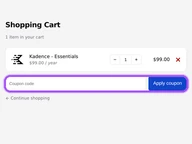
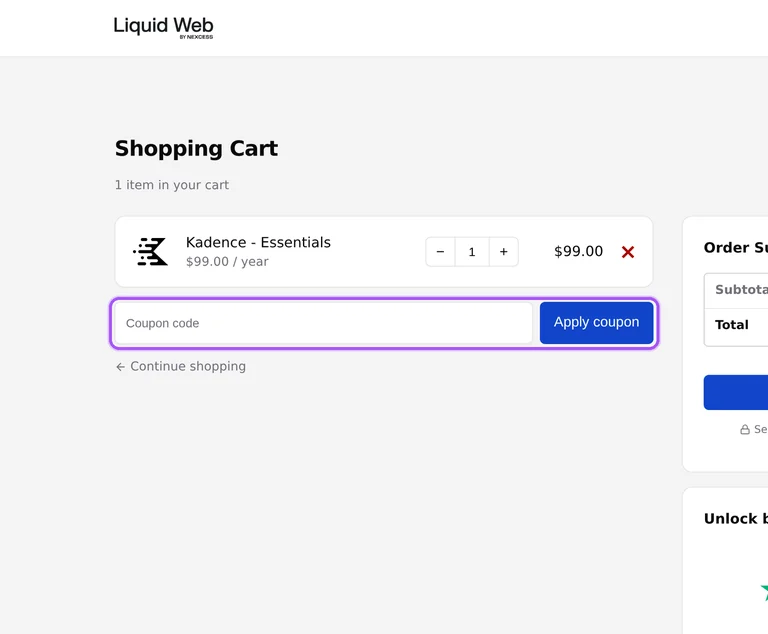
You apply a Kadence WP coupon in the shopping cart before proceeding to checkout. Adding the Pro plan opens a cart that identifies the product as Kadence - Pro and shows its annual billing term. The entry field is labelled Coupon, with an Apply coupon button beside it. Enter an offer from this page there and apply it before moving to payment. The Order Summary contains separate Subtotal and Total amounts, so the amount due is visible alongside the selected subscription. Pro appears at $299 per year before any applicable reduction in the cart. The next step is the Proceed to checkout button beneath the order summary.
Does Kadence WP accept promo codes as well as coupons?
Yes. A Kadence WP coupon and a promo code are the same thing: paste the code in the promo field at checkout before you pay.


