Verified · Used
LogicServers Coupon & Promo Codes
Best verified offer: 20% off · 3 offers · last checked 18 Nov
Active LogicServers coupon codes
About LogicServers & Latest Deals
LogicServers provides game server hosting for Minecraft, ARK, Palworld and other multiplayer games.
Savings opportunities available through LogicServers promo codes
LogicServers sells game server hosting, and the offers on this page help you look for a lower purchase price. Minecraft Coal costs £4.40 per month; Iron is £6.60 per month. These service prices exclude VAT.
Service categories frequently on promotion
Minecraft packages provide concrete starting prices for a LogicServers deal: Gold costs £8.80 per month and Lapis £13.20 per month. Additional conditions can apply to an offer and are presented at the relevant point.
Impact of billing cycle on promotional price
Coal, Iron, Gold and Lapis carry monthly prices. A minimum term, when applicable, remains payable in full even if payments are monthly; a lower order price should be considered alongside that commitment.
Promo codes vs. automatically applied offers
The Shopping Basket sets out the total order cost before submission. Any additional conditions attached to an offer are presented at the relevant point in the purchase.
Accessing active codes for LogicServers
Minecraft’s Rent Now links lead to the client area for your selected package. An order requires an account and a registered credit or debit card.
How to use LogicServers Discount Codes?
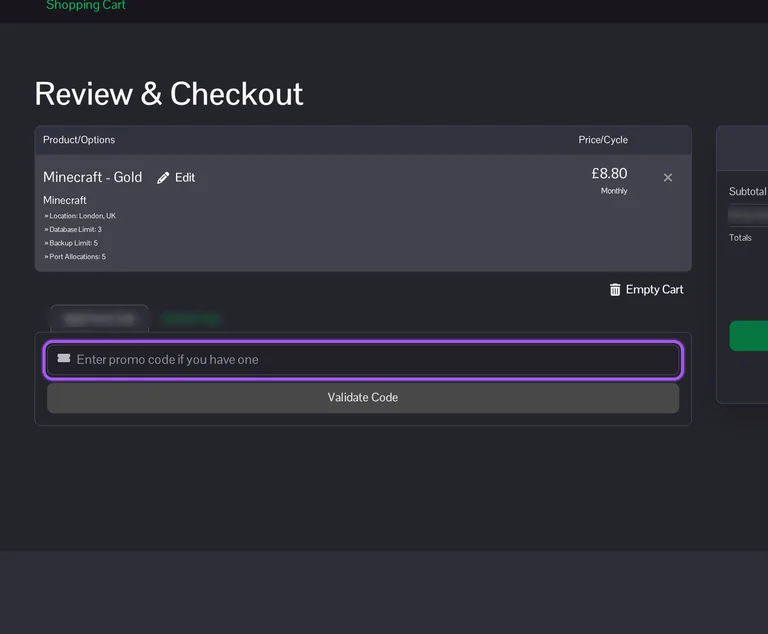
Copy a LogicServers coupon or promo code, then paste it in the promo field at checkout.
- Choose a coupon
Grab the LogicServers offer that works best for you. It's listed above.
- Reveal the code
Hit "Get Code" or "Get Deal" depending on the offer type. Popup opens. Click the copy icon inside—code goes to your clipboard.
- Apply at checkout
Now head over to LogicServers's site. Pick your Minecraft Hosting plan. Checkout page has a "Promo Code" field. Paste what you copied there.
LogicServers Discount FAQs
Which discounted LogicServers Minecraft package supports modpacks?
LogicServers lists Gold for small modpacks and Lapis for modpacks needing more headroom. Gold includes 4GB of RAM, while Lapis provides 6GB; Coal is described as vanilla Minecraft only. Iron sits between them with 3GB for light plugins or small packs, making the intended workload relevant when using an offer. The Minecraft control panel includes a modpack browser and more than 800 one-click modpack installers. Supported sources include CurseForge, ATLauncher, Feed The Beast and Modrinth, with manual installation available for other packs. Package selection and modpack installation are separate steps, so the memory allocation still needs to fit what you plan to run. For small modpacks, the named Gold package supplies 4GB of RAM.
Where can I host a LogicServers Coal server purchased through an offer?
The LogicServers Coal configuration lists locations across Europe, North America, Asia, Australia and Brazil. European choices include London, Stockholm and Frankfurt, while the United States options include New York, Los Angeles, Dallas and Chicago. The Location selector also lists Sydney, Singapore and São Paulo for groups based farther from those regions. Location is chosen during server configuration alongside the billing cycle and optional resource limits, before proceeding to the basket. LogicServers recommends a location close to the server’s intended players, which connects the hosting choice to the group using it. The Minecraft service also provides a latency-testing tool for comparing connections. For that comparison, the Minecraft hosting page’s named tool is Run Latency Test.
Does a discounted LogicServers Minecraft plan include DDoS protection?
Yes, LogicServers includes DDoS protection with its Minecraft hosting plans. Coal, Iron, Gold and Lapis each list protection alongside backups and file access, so the package includes more than server memory. Coal provides 2GB of RAM for vanilla Minecraft, while Iron provides 3GB for light plugins or small packs. Gold has 4GB for small modpacks, and Lapis has 6GB for modpacks needing more headroom. These package differences matter when matching the offers on this page to the server you intend to run. Automated network protection is also listed among the included Minecraft service features. For a vanilla server, Coal is the named starting package with 2GB of RAM and DDoS protection.
How do I get support for a discounted LogicServers order?
LogicServers handles order and service enquiries through its support ticket system. The ticket page separates General Support from Sales, allowing a purchase question to go to the sales department. For an active game server, the client area provides access through Services and the control panel login button on the individual service page. Panel login details are emailed after provisioning, and Minecraft, Hytale and Vintage Story services use the Pterodactyl panel. The knowledgebase also provides instructions for backups, game switching, file access and other server tasks. These routes give a discounted purchase the same documented places to request order help or locate service controls. If panel access is missing after 15 minutes of active service, submit a ticket including the service name.
Where can I redeem a LogicServers coupon before paying?
You can redeem a LogicServers coupon in the shopping basket before checkout. Start with the desired game package and configure its billing cycle, location and any paid options before continuing to the basket. The Review & Checkout screen contains an Apply Promo Code area and a Validate Code button. That screen also separates the subtotal, VAT, recurring billing totals and Total Due Today, giving you the purchase figures before payment. LogicServers presents any additional offer conditions at the relevant point in the order process. Its terms also provide an opportunity to correct order details before submission. For the amount payable immediately, use the basket’s Total Due Today figure rather than the package’s advertised monthly starting price.
Can LogicServers change my discounted plan’s renewal price?
Yes, LogicServers can change service prices with at least 30 days’ notice before an increase. A discounted purchase therefore needs to be considered alongside the continuing billing arrangement for your service. After any applicable minimum term, non-domain services continue from month to month until terminated under the cancellation terms. Those monthly charges are collected in advance using a payment method registered on your account. Any additional conditions attached to an offer are presented during the purchase, so its duration belongs alongside the initial total. Cancellation also requires confirmation through the support ticket system; an unconfirmed request leaves the service running. The concrete notice period for a service price increase is at least 30 days.
Can I change games on a LogicServers server bought with a discount?
LogicServers provides game switching for supported server types on its Ptero panel. The procedure applies to the game or egg assigned to that service, so the available server types determine the change. Stop the server and back up the files you want to retain before opening Settings. Under Change Game / Egg, select the desired server type, click Switch and confirm the change. The panel’s expected server software changes with that selection, and reinstalling downloads the appropriate files and runs the installation process again. Removing old files can delete worlds, saves, configurations, plugins and mods. If your desired game is absent from the Change Game / Egg dropdown, submit a support ticket for a catalogue compatibility check.
When does LogicServers collect payment for a discounted game server?
LogicServers receives payment before automatically creating and installing your game service. Your first order supplies the details used to register your account, and the purchase terms require a registered credit or debit card before submission. The Shopping Basket presents the total order cost, while the order review gives you an opportunity to correct input errors before submitting. Published service prices exclude VAT, so the payable total matters when budgeting for an offer. Continuing monthly services are charged in advance to a payment method registered on your account. Provisioning follows payment rather than merely choosing a package. After provisioning, open Services in the client area, select your service and use its control panel login button.
Which LogicServers Coal billing term gives the largest listed discount?
Annual billing gives the largest listed Coal term discount at 15%. The Coal configuration offers monthly, quarterly, semiannual and annual billing, with the saving increasing across the longer terms. Under Choose Billing Cycle, the three-month option shows 5% off, the six-month option shows 10% off and the twelve-month option shows 15% off. These are billing-term savings displayed during configuration, distinct from entering an offer in the basket. The configuration total updates when you change the selected options, including paid increases to backup or database limits. Published service prices exclude VAT, and the basket sets out the total payable before order submission. The annual option is labelled Annually (Twelve Months) and displays Save 15%.
What refund conditions apply after a discounted LogicServers purchase?
LogicServers limits cash refunds to payments taken in error under its general cancellation policy. Whole unused months receive account credit, while prepaid-service refunds require a genuine irreconcilable service problem and management approval. Setup fees are non-refundable, and cancellation partway through a billing period does not receive a refund for that period. Consumer cancellation rights are separate: the terms describe a 14-calendar-day cancellation period beginning after the acceptance confirmation. Ordering authorises supply to begin during that period, and the cancellation right is lost once the service has been fully performed. Statutory rights remain unaffected by that provision. Cancellation requests must also be reconfirmed through the support ticket system, because LogicServers continues supplying the service without that confirmation.
Does LogicServers accept promo codes as well as coupons?
Yes. A LogicServers coupon and a promo code are the same thing: paste the code in the promo field at checkout before you pay.
Scroll up for the current LogicServers offers.


