Used
Pebblehost Promo Codes & Coupons
2 offers listed
Active Pebblehost promo codes
Used
Recently Expired Pebblehost Promo Codes
About Pebblehost & Latest Deals
PebbleHost provides Minecraft and other game server hosting, including dedicated servers and Discord bot hosting.
Savings opportunities available through Pebblehost promo codes
Minecraft, Discord bot and dedicated server hosting is what Pebblehost sells, and the offers on this page cut what you pay for it. Budget Minecraft hosting starts at $1/GB. Premium Minecraft 1GB starts at $2.25USD Monthly. Dedicated Servers start from $27.49 /month.
Services usually excluded from promo codes
Tax has its own form in the cart. Estimate Taxes asks for a State and a Country, and Update Totals feeds the Order Summary.
Impact of billing cycle on promotional price
Six billing cycles are offered, from Monthly to Triennially. Budget 1GB, 2GB and 3GB start at $3.00USD, $6.00USD and $9.00USD Quarterly. The Budget 4GB plan starts at $4.00USD Monthly, and Premium 2GB at $4.50USD Monthly.
Promo codes vs. automatically applied offers
Plan prices in the store read Starting from, for example Starting from $3.00USD Quarterly for Budget 1GB. Custom promo codes go to partners and sponsors, and the partner program describes them as codes that drive traffic and help track referrals.
Accessing active codes for Pebblehost
Have the product and billing cycle in the cart of the billing store first, then read the Total Due Today line before Checkout. A new server falls under the 72 hour refund policy, while dedicated servers do not.
How to use a Pebblehost promo code
Copy a Pebblehost promo code or coupon, then paste it in the promo field at checkout.
- Choose a coupon
Grab the Pebblehost offer that works best for you. It's listed above.
- Reveal the code
Hit "Get Code" or "Get Deal" depending on the offer type. Popup opens. Click the copy icon inside—code goes to your clipboard.
- Apply at checkout
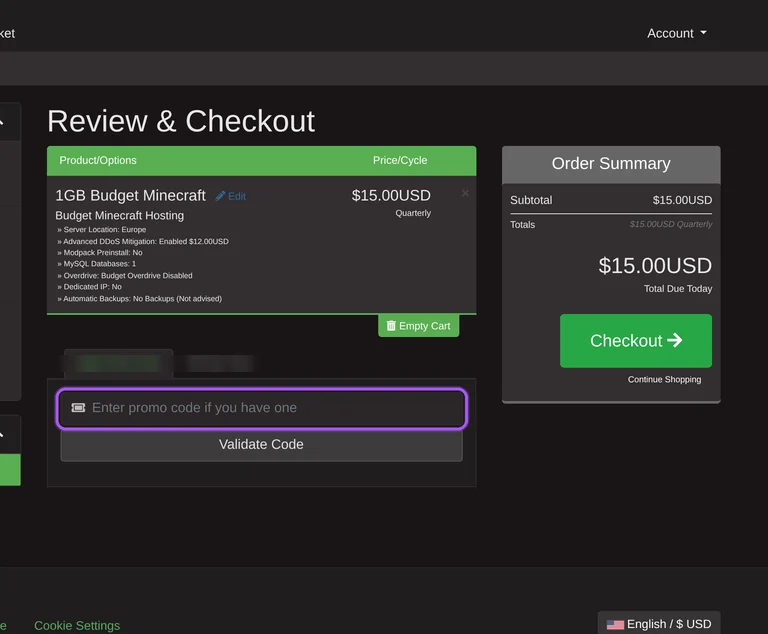
Now head over to Pebblehost's site. Pick your Minecraft Hosting plan. Checkout page has a "Promo Code" field. Paste what you copied there.
Pebblehost Promo Code FAQ
PayPal Balance and Credit/Debit Card are the instant ones. The billing system instantly provisions orders as soon as the payment receives, and with a payment method which works instantly you should receive the service within a few minutes. Both methods are the examples given for an instant start. The Order Summary shows a Subtotal, and Update Totals refreshes it before the Total Due Today line. PayPal also matters for refunds, because a refund appears in the PayPal account you paid with and nowhere else, and PayPal overpayments can be refunded in most circumstances. The cart ends with the Checkout button, which comes after the Apply Promo Code and Estimate Taxes boxes.
Six cycles. The cart totals name Monthly, Quarterly, Semi-Annually, Annually, Biennially and Triennially. The starting cycle depends on the plan. Budget Minecraft 1GB, 2GB and 3GB start at $3.00USD, $6.00USD and $9.00USD Quarterly, while the 4GB plan starts at $4.00USD Monthly. Premium Minecraft starts on Monthly billing, with 1GB at $2.25USD and 2GB at $4.50USD. The 5GB plan starts at $5.00USD Monthly and the 6GB plan at $6.00USD Monthly. For 1GB of RAM the start is $3/quarter, and the homepage advertises Minecraft Servers from $1.00 /month. Price/Cycle is the column in the cart that shows the cycle chosen for each item.
Yes, through the Partner program. Partners receive a promo code and affiliate access. The promo codes are custom codes that drive traffic and help track referrals. The program targets Content Creators and Plugin/Mod Developers, and the eligibility list starts with 1,000+ YouTube Subscribers or Twitch followers. Partners also benefit from a 70% one-time commission on first purchases, paid upfront, not monthly, so a user who cancels does not cost the partner the payout. The rewards table marks Promo Code, Affiliate Access and Discord Role as Yes for Partners, and Free Hosting as No. Applications go through the Apply as Partner button on the Partners page.
Open a billing ticket. Do not file a PayPal Dispute / Chargeback or a cancellation request, because that greatly slows down the refund process. The refund window is counted from the moment you open the ticket, not from the moment the team sees it, so the 72 hours run from the ticket. A member of the billing team handles the ticket. The refund returns to the PayPal account you paid with, and it cannot go to a different PayPal account than the one used for the purchase. The Open Ticket link sits in the menu of the billing store, the same menu that holds the cart.
Through Discord or a ticket. Support is Discord-based and runs around the clock, every day of the year, and the Open Ticket link sits in the billing store menu. Average reply times are under 30 minutes in the support description, while the homepage figures show 17 Min Average Support Response Time. The Dedicated Servers page promises an answer within 30 minutes, and a Discord Support Chat link sits in the top menu of the main site. Refund questions go to the billing team through a billing ticket. The Partners page is the place to ask for a custom promo code, and the Knowledge Base at help.pebblehost.com holds the refund article.
Eight categories, from Budget Minecraft to Max VPS Hosting. The View Cart link in that store leads to the page with the Apply Promo Code box. The homepage prices Minecraft Servers from $1.00 /month, Discord Bot Hosting from $3.00 /month and Dedicated Servers from $27.49 /month. The Minecraft FAQ puts a dedicated server at the top of its range, above 1GB of RAM at $3/quarter. The Premium Minecraft category lists 1GB at $2.25USD Monthly and the Budget category lists 1GB at $3.00USD Quarterly. Dedicated servers also sit outside the refund policy, so a discounted dedicated server comes without a 72 hour refund window. Dedicated Server prices appear in dollars and pounds, for example $99.99/month and £79.37/month.
Yes. The rewards table marks Promo Code as Yes for both Partner and Sponsor. Sponsors benefit from free hosting in exchange for exposure to their growing Minecraft communities, and the target audience is Minecraft Server Owners. Affiliate Access is No for Sponsors, so the commission belongs to the Partner path. Free Hosting is Yes and Discord Role is Yes for them. The eligibility list for sponsors includes an Active Playerbase of 50+ Peak Daily Players and being Active for at least 3 months. A server owner who wants a custom code and free hosting looks at the Sponsor column, while a creator who wants commission looks at the Partner column.
Premium carries the faster hardware, Budget the lower per-GB starting figure. Budget starts at $1/GB, and its 1GB plan is listed at $3.00USD Quarterly in the cart. Premium 1GB starts at $2.25USD Monthly, and Premium 2GB at $4.50USD Monthly against $6.00USD Quarterly for Budget 2GB. The Premium tier runs the AMD Ryzen 9 9900X CPU, which handles higher playercounts and more intensive servers than Budget. Its feature list names Free Daily Backups, Hourly Incremental Backups and a One-click Modpack Installer covering 12,000 Modpacks. Locations marked Premium are only available on Premium plans. Budget suits a private/community server, and the homepage shows Minecraft Servers from $1.00 /month.
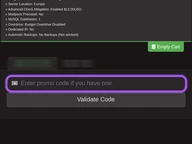
In the cart, in the box labelled Apply Promo Code. A Validate Code button goes with it. The cart belongs to the billing store at billing.pebblehost.com, and it lists every item under Product/Options and Price/Cycle. An empty cart reads Your Shopping Cart is Empty and shows a Subtotal of $0.00USD. The cart also holds an Estimate Taxes form that asks for a State and a Country, and Update Totals refreshes the Order Summary. That summary ends with a Total Due Today line and a Checkout button. Put the server in the cart first, choose the billing cycle, validate the code, and press Checkout under the Total Due Today line.
Yes, if the server is new and under 72 hours old. The refund policy applies to new servers purchased less than 72 hours ago, and Minecraft plans carry a 72 Hour Money Back Policy. It does not cover completed addons, service renewals, dedicated servers, or upgrades. A refund within the last 6 months also makes you not eligible for another one. PayPal overpayments can be refunded in most circumstances. A server older than 72 hours is outside the policy. A discounted dedicated server falls outside it too, and so does a discounted renewal. A billing ticket gets the team to check an order that falls in doubt.
Yes. Pebblehost uses one promo code field at checkout, so a coupon and a promo code work the same way: paste the code there before you pay.
Scroll up for the current Pebblehost offers.


