Skip to content

Hosthavoc Promo Codes & Coupons

Best verified offer: 10% off · 6 offers · last checked 30 Oct

Active Hosthavoc promo codes

10%OFF

Apply this special coupon to get 10% off your entire order site-wide at Host Havoc, your trusted hosting provider.

VerifiedUsed 4 times

Verified · Used

10%OFF

Unlock 10% off storewide at Host Havoc Sitewide with this code.

Verified

Verified

Get Hosthavoc coupons in your inbox

We'll notify you when new verified codes are added.

10%OFF

Save 10% off storewide on all Host Havoc services with this coupon, offering great value for your hosting needs.

VerifiedUsed 5 times

Verified · Used

10%OFF

Save 10% off storewide at Host Havoc using this promo code.

VerifiedUsed 2 times

Verified · Used

7%OFF

Score 7% off storewide at Host Havoc.com with this limited-time deal.

Verified

Verified

5%OFF

Save 5% storewide at Host Havoc on all sitewide purchases.

Verified

Verified

Recently Expired Hosthavoc Promo Codes

10%OFF

Save 10% on all storewide purchases at Host Havoc using this discount code. Offer valid on select items.

Expired Sep 28

Used

15%OFF

Apply this offer to get 15% off storewide purchases at Host Havoc and enjoy savings now.

Expired Sep 28

Used

20%OFF

Save 20% on Host Havoc storewide purchases when you apply this discount code at checkout.

Expired Sep 28

Used

About Hosthavoc & Latest Deals

HostHavoc provides game server hosting, Minecraft servers, and Ryzen VPS.

Learn more about Hosthavoc and their latest offers.

How to use a Hosthavoc promo code

Copy a Hosthavoc promo code or coupon, then paste it in the promo field at checkout.

  1. Choose a coupon

    Grab the Hosthavoc offer that works best for you. It's listed above.

  2. Reveal the code

    Hit "Get Code" or "Get Deal" depending on the offer type. Popup opens. Click the copy icon inside—code goes to your clipboard.

  3. Apply at checkout

    Now head over to Hosthavoc's site. Pick your Minecraft Hosting plan. Checkout page has a "Promo Code" field. Paste what you copied there.
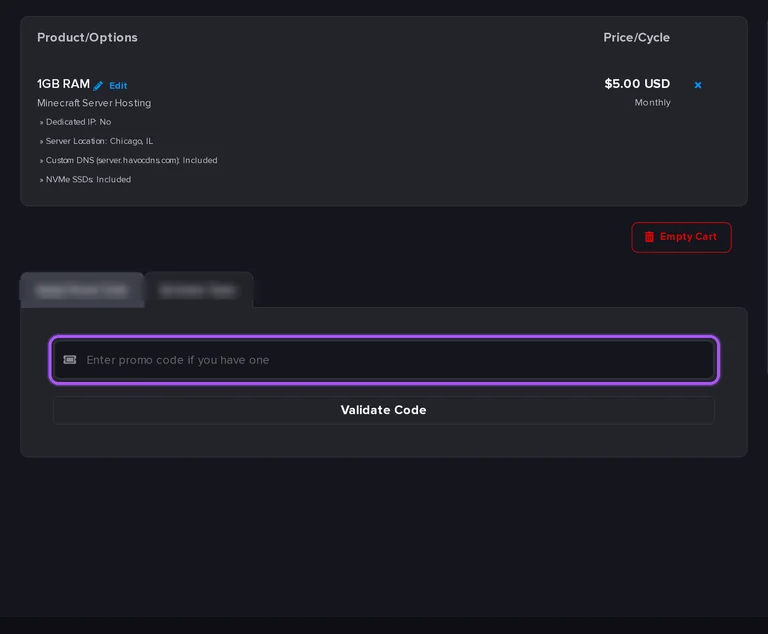
Where to enter a Hosthavoc promo code on the Hosthavoc checkout page

Hosthavoc Promo Code FAQ

Hosthavoc offers a 5% quarterly billing discount on the four-slot Palworld configuration. Under Billing Cycle, the monthly option is $12.00 per month, while 3 Months works out to $11.40 per month and bills $34.20 for the term. The same configuration lists 6 Months at an 8% reduction and 12 Months at a 12% reduction. These are billing-cycle savings selected in the configurator, with the term amount shown alongside the monthly equivalent. Player Slots, Select a Location and Upgrades & Add-ons let you set the server configuration before proceeding through Rent Game Server. For the quarterly option, read the Billed $34.20 amount beside 3 Months as the three-month payment.

Enter a Hosthavoc promotion in Apply Promo Code on the Review & Checkout cart, then select Validate Code. The cart shows Product/Options and Price/Cycle above an Order Summary containing Subtotal and Total Due Today. For a game server order, those are the purchase details to review alongside the promotion entry. Hosthavoc accepts US dollars, euros, British pounds and Canadian dollars, with pricing based on USD exchange rates. Your preferred currency can be selected at the top of the website before ordering. For an existing account, a currency change is requested through support and is not possible in every case. Select your preferred currency at the top of Hosthavoc's website before reviewing the offer's payment amount.

Hosthavoc stops future invoices when you select End of Billing Period in the cancellation form. Accounts with a saved credit card automatically attempt renewal until cancelled. To end a monthly subscription purchased through an offer, open the billing area, select Services, open the relevant service and choose Request Cancellation in the left-hand sidebar. End of Billing Period keeps that server active through the period already purchased. Immediate ends the service straight away and permanently deletes its files. Cancellation is available at any time without a cancellation fee. To finish using the paid period while stopping subsequent invoices, select End of Billing Period.

Hosthavoc does not guarantee that every promo code will work at all times. Its Review & Checkout cart provides Apply Promo Code and a Validate Code control for submitting a promotion. The cart separates Product/Options from Price/Cycle, with Subtotal and Total Due Today in Order Summary. Those labels let you review the selected hosting and its payment amount while resolving a promotion issue. Hosthavoc's ticket menu includes Sales and Pre Sales for sales inquiries and Billing/Payment Support for billing inquiries. A billing support request requires account login with Email Address and Password. For help with an order's promotion before purchase, select Sales and Pre Sales.

Request a Hosthavoc refund through the support ticket system, explaining the reason for the request. Eligible refunds require a team member's approval and are returned through the original payment gateway. The guarantee covers a new customer's first eligible monthly hosting order within 72 hours of server creation. To contact the payment team, open Create new Support Request and select Billing/Payment Support. That selection leads to the account login page, where Email Address and Password identify the purchasing account. Hosting technical support has separate departments for game servers, dedicated servers and VPS, web hosting, and TeamSpeak. Route your refund request to Billing/Payment Support rather than a hosting technical department.

Hosthavoc accepts major credit cards, PayPal and a range of cryptocurrencies for game server hosting. Its card gateway cannot process Discover or Diner's Club cards, and prepaid or gift cards are not reliably accepted. For a card payment, a standard debit or credit card is the recommended option. If your bank blocks an international or unfamiliar charge, contact the bank to authorize the transaction before retrying. A persistent decline or blank payment screen can be investigated through a billing-area support ticket. When submitting that ticket, include the last four digits of the card and the approximate time of the payment attempt.

Yes. Hosthavoc uses one promo code field at checkout, so a coupon and a promo code work the same way: paste the code there before you pay.