Used
ServaRica Coupon & Promo Codes
1 offer listed
Active ServaRica coupon codes
Expired Offers (May still work)
Used
About ServaRica & Latest Deals
ServaRica promo codes and deals for VPS plans.
Savings opportunities available through ServaRica promo codes
ServaRica sells VPS plans, and the offers on this page help you look for a lower purchase price. Annual billing already brings a saving on every plan. V3 KVM Slim Slice 2 costs $7 a month or $77 a year. That makes the billing term part of the deal, alongside any promo code you enter.
Service categories frequently on promotion
Annual savings cover any VPS plan. Two named options are V3 KVM Slim Slice 2 and V2 KVM Slim Slice 2, with different prices for each billing period. V2 KVM Slim Slice 2 costs $15 monthly or $165 annually. The annual saving belongs to the selected plan; the V3 and V2 prices are separate purchase options.
Services usually excluded from promo codes
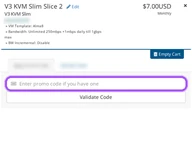
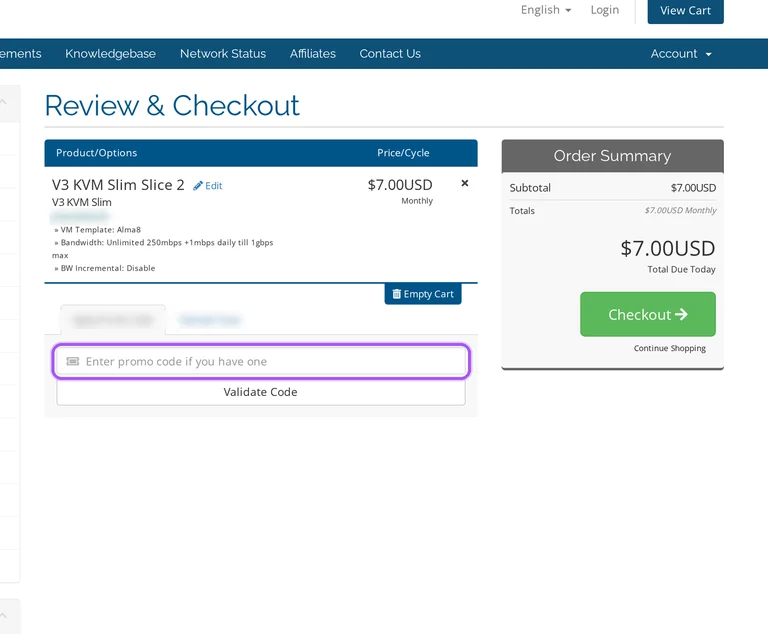
A typed promotion goes through the cart’s Validate Code step. That step sits with Apply Promo Code, so the code is entered and validated in the shopping cart.
Impact of billing cycle on promotional price
The annual payment is a full year’s price. Twelve $7 monthly payments for V3 KVM Slim Slice 2 total $84, against $77 for annual billing: a $7 difference. For V2 KVM Slim Slice 2, twelve $15 payments total $180, against $165 annually: a $15 difference. These are billing savings calculated from the plan prices, separate from a coupon’s value. The yearly difference between these two VPS options is $88: V3’s $77 annual payment sits below the $165 annual payment for V2.
Promo codes vs. automatically applied offers
Annual billing offers a saving through the plan’s billing term. A typed promo code uses Apply Promo Code and Validate Code instead. The order summary separates Subtotal from Total Due Today and displays USD amounts. Those cart labels identify the amount due for the order, rather than a monthly equivalent calculated from an annual price.
Accessing active codes for ServaRica
The ServaRica shopping cart contains Apply Promo Code followed by Validate Code. Have the intended VPS billing term selected: annual and monthly prices differ.
How to use ServaRica Discount Codes?
- Choose a coupon
Grab the ServaRica offer that works best for you. It's listed above.
- Reveal the code
Hit "Get Code" or "Get Deal" depending on the offer type. Popup opens. Click the copy icon inside—code goes to your clipboard.
- Apply at checkout
Now head over to ServaRica's site. Pick your Storage VPS plan. Checkout page has a "Promo Code" field. Paste what you copied there.
ServaRica Discount FAQs
What does ServaRica V3 KVM Slim Slice 2 cost before a promo code?
ServaRica V3 KVM Slim Slice 2 costs $7 per month or $77 per year before a separate promo code. The yearly figure is the annual payment, rather than a monthly charge. On monthly billing, twelve payments add up to $84. The $77 annual option is therefore $7 less over a year, with the saving coming from the billing choice itself rather than a typed coupon.
Does annual billing give a ServaRica discount?
Yes, annual billing provides savings on every ServaRica VPS plan. The size of that saving depends on the plan: V3 KVM Slim Slice 2 is $7 monthly or $77 annually, while V2 KVM Slim Slice 2 is $15 monthly or $165 annually. Twelve monthly payments therefore cost $84 for V3 and $180 for V2. Paying annually reduces those respective year-long totals by $7 and $15, before any separate promo-code calculation.
Is a ServaRica promotional discount guaranteed to remain available?
A ServaRica promotional offer depends on the company achieving and maintaining its service-cost goals. Those goals include the rates charged by its suppliers. That makes the offer conditional on service costs, rather than an unconditional promise of continued availability. Rates and charges can also change prospectively. The price attached to a promotion therefore needs to be considered alongside that cost condition, rather than treated as a permanent price commitment.
Where do I enter a ServaRica promo code?
Enter it under Apply Promo Code in the ServaRica shopping cart, then select Validate Code. The code controls sit in the cart alongside the order summary. That summary has separate Subtotal and Total Due Today labels, with amounts displayed in USD. For a VPS purchase, the chosen billing period matters too: V3 KVM Slim Slice 2 has a $7 monthly price and a $77 annual price.
Scroll up for the current ServaRica offers.


