Verified · Used
Social Snap Coupon & Promo Codes
Best verified offer: 30% off · 4 offers · last checked 11 Nov
Active Social Snap coupon codes
Expired Offers (May still work)
About Social Snap & Latest Deals
Get the latest Social Snap coupons, promo codes, and deals.
Service categories frequently on promotion
Pro covers three sites and includes add-ons. Agency covers fifteen sites and includes add-ons. Choose the tier that covers your site count before using a Social Snap deal.
Services usually excluded from promo codes
Plus covers one site and excludes add-ons. If you need add-ons, choose Pro or Agency.
Impact of billing cycle on promotional price
Social Snap plans are priced per year. Base your discount choice on the annual plan you intend to buy.
Promo codes vs. automatically applied offers
Subscription discounts apply to the first term only. Later terms renew at the regular price.
Accessing active codes for Social Snap
Applicable taxes and currency exchange costs may affect the USD charge.
How to use Social Snap Discount Codes?
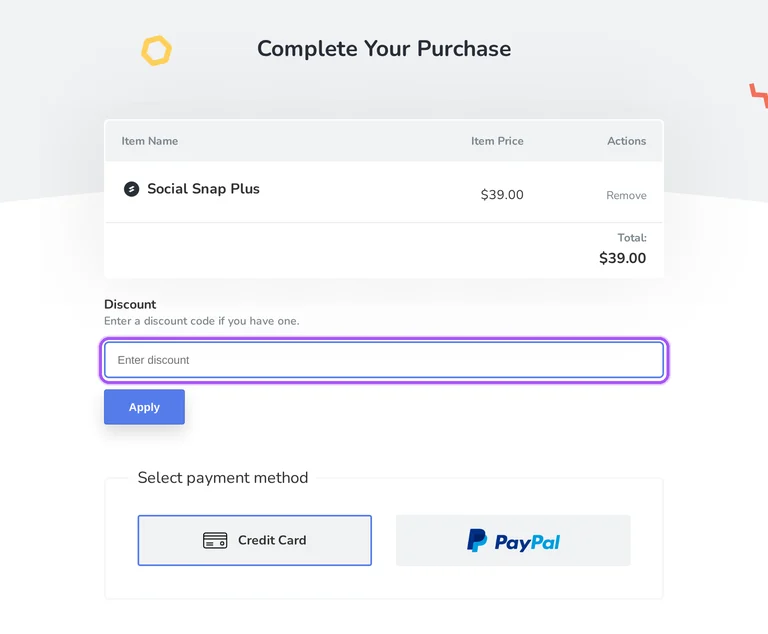
Copy a Social Snap coupon or promo code, then paste it in the promo field at checkout.
- Choose a coupon
Grab the Social Snap offer that works best for you. It's listed above.
- Reveal the code
Hit "Get Code" or "Get Deal" depending on the offer type. Popup opens. Click the copy icon inside—code goes to your clipboard.
- Apply at checkout
Now head over to Social Snap's site. Pick your Social Share plan. Checkout page has a "Promo Code" field. Paste what you copied there.
Social Snap Discount FAQs
Renewal is required to continue plugin downloads after the first year. Social Snap grants support, updates and access to plugin files for one year after the original purchase. The license you bought determines the items included in that access. Introductory discounts apply to the initial subscription term, and subsequent terms are charged at the regular price. To download the plugin during your licensed term, open your Social Snap account and go to Subscriptions. Expand the relevant subscription with the arrow icon if you have more than one, then select Download to save the plugin file. Automatic WordPress updates require an activated license. The downloaded file must remain zipped for installation through the WordPress plugin uploader.
A Social Snap refund credit can take 5–10 business days to appear on your card statement. The money-back guarantee applies during the first 30 days of your paid account. Your refund request goes through the Support page in your Social Snap account, where you describe the request and submit its form. Social Snap stops the subscription and issues the refund under that policy. Refunds are issued in US dollars, so the amount converted into another currency can vary with the exchange rate. Additional refunds or credits are not issued for exchange-rate differences. After submitting a support ticket, you receive an email confirming receipt; that message acknowledges the ticket. The card-statement timeframe to allow is 5–10 business days.
Social Snap Plus covers one website. The license includes one year of updates and support, while addons are reserved for Pro and Agency plans. Plus can be used on a client site, and Social Snap runs on self-hosted WordPress installations. After buying the license, download the plugin from the Subscriptions tab in your Social Snap account. Upload its zipped file in WordPress through Plugins > Add New > Upload Plugin, then click Install Now and Activate Plugin. The paid plugin's license must also be activated for updates and support. If you later need more website capacity, you can upgrade your license with a prorated charge. Pro supports three sites and Agency supports 15 sites.
Social Snap does not refund unused subscription periods outside its initial money-back guarantee. Its fees are billed in advance, with no refunds or credits for partial months or active periods when you do not use the service. The exception is the first 30 days, when a qualifying cancellation receives a subscription-fee refund. You can stop future automatic renewals while continuing to use the term already paid for. In your Social Snap account, open the Subscriptions tab and click Cancel beside the relevant license. That action ends automatic renewal, and you can manually renew the license afterward. For a refund during the initial guarantee window, submit your request through the account's Support page within those first 30 days.
Social Snap can change billing rates with 30 days of written notice. The introductory discount applies only to your first subscription term, while later terms are charged at the regular price. Social Snap bills subscription fees in advance for each period and can announce rate changes through its services or website. Annual licenses automatically renew by default, so a discounted first purchase leads to recurring annual billing unless you cancel automatic renewal. You can manage that setting in your account without ending the term you have already paid for. Cancellation lets you finish that paid term and renew manually afterward. The specific account control is the Cancel link beside your license in the Subscriptions tab.
Request your Social Snap refund within the first 30 days. The money-back guarantee covers a full refund when you decide the plugin is not a good fit during that initial window. To make the request, open your Social Snap account and navigate to the Support page. Describe that you want a refund and submit the form there. The refund policy requires the cancellation request to arrive within 24 business hours of the 30-day anniversary of opening your paid account. Sending the request during the first 30 days follows the timeframe in the refund help instructions. Cancelling automatic renewal is a separate account action that lets you finish your paid term. Refund requests go through Support, rather than the subscription's Cancel link alone.
Social Snap offers a money-back guarantee rather than a trial. You purchase a license before using the paid plugin, with a full refund available within the first 30 days if it is not a good fit. After purchasing, the plugin download is available through your Social Snap account's Subscriptions tab. The installation file is a zip archive uploaded through Plugins > Add New > Upload Plugin in WordPress. That gives you access to the purchased plugin during the refund window instead of a separate trial subscription. To request your money back, open the Support page in your Social Snap account, describe your request and submit the form within the 30-day window.
Social Snap allows plan upgrades at any time. Upgrade charges are prorated according to your current license level and the time remaining in your subscription. In your Social Snap account, locate the subscription you want to change and click Upgrade. The Upgrades page lists the available licenses and their associated upgrade costs. You pay the difference between license levels, adjusted for the remaining term, rather than a full year of the higher license. For example, the documented Plus-to-Pro difference is $60 for a full year, with half that upgrade cost when six months remain. Selecting Upgrade for the new license takes you to checkout. The Upgrades page gives the cost calculated for your particular subscription.
Social Snap Agency renews at the regular annual price of $299. Introductory discounts cover the first subscription term only, so the reduced purchase price does not continue throughout the subscription. Agency covers up to 15 websites, including client sites, and includes the addons. Its annual license also includes one year of updates and support. To start an Agency order, follow Get Started beneath Agency on the pricing screen. Social Snap lists its prices in US dollars, and applicable taxes are payable on purchases. Your subscription automatically renews each year unless you cancel automatic renewal. For manual renewal instead, open the Subscriptions tab in your Social Snap account and use the Cancel link for that license.
The Social Snap Pro plan includes addons. Addon access is available with Pro and Agency licenses, while Plus and Social Snap Lite do not include it. The addons require the main Social Snap plugin to be installed and activated; they are not standalone plugins. After buying Pro and activating your license, open Social Snap > Addons in your WordPress dashboard. This screen displays the addons available for your license level. You can install them there or download their files from your Social Snap account and upload them as WordPress plugins. Installation and configuration are separate steps, with addon settings under Social Snap > Settings. If the addon list is empty, the documented button is Refresh Addons.
Yes. A Social Snap coupon and a promo code are the same thing: paste the code in the promo field at checkout before you pay.
Choose an offer for your plan, then Scroll up for the current Social Snap offers.


