AIOSEO sells the All in One SEO WordPress plugin in Basic, Plus, Pro and Elite plans, with a 14-day money-back guarantee.
Savings opportunities available through AIOSEO discount codes
The offers on this page cut what you pay for All in One SEO Pro, a WordPress SEO plugin that AIOSEO sells under an annual recurring license in four plans: Basic, Plus, Pro and Elite. Plans carry special introductory pricing, and all renewals are at full price.
Service categories frequently on promotion
The coupon page on AIOSEO's own site covers any plan: Basic, Plus, Pro or Elite. Search Statistics and keyword rank tracking are Elite-only.
Services usually excluded from promo codes
A code lowers the price of the first term of the subscription you pick. It does not last for the life of the subscription. Renewals are charged at the regular price.
Impact of billing cycle on promotional price
AIOSEO supports annual payments only. There are no lifetime or monthly plans. After the first year, the subscription is charged automatically to your credit card or PayPal account.
Promo codes vs. automatically applied offers
Coupon codes and sale pricing are separate things. Sale pricing is tied to specific promotional periods, and it is not a standing discount. Codes are purchase incentives that AIOSEO offers on occasion.
Accessing active codes for AIOSEO
Credit card and PayPal are accepted, and renewals are non-refundable. A 14-day money-back guarantee covers every plan.
How to use AIOSEO Discount Codes?
Copy an AIOSEO coupon or promo code, then paste it in the promo field at checkout.
Choose a coupon
Grab the AIOSEO offer that works best for you. It's listed above.
Reveal the code
Hit "Get Code" or "Get Deal" depending on the offer type. Popup opens. Click the copy icon inside—code goes to your clipboard.
Apply at checkout
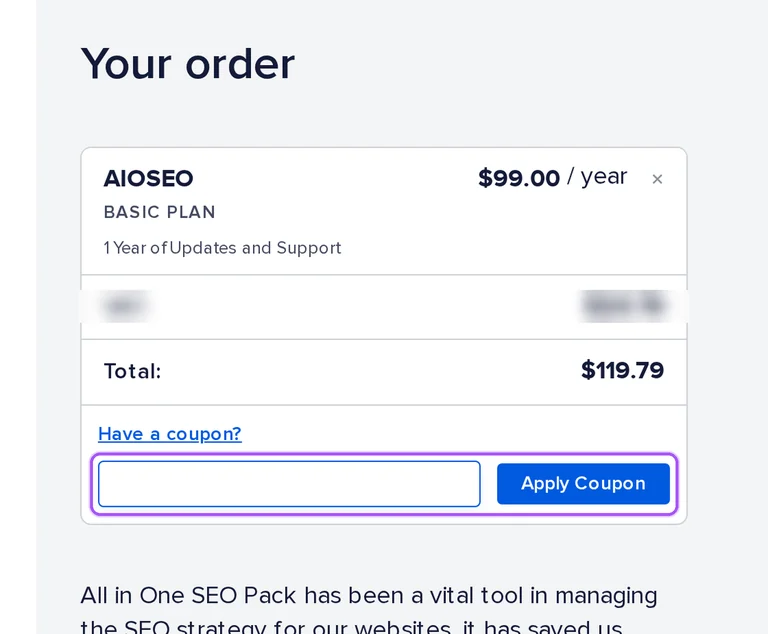
Now head over to AIOSEO's site. Pick your AIOSEO Basic plan. Checkout page has a "Promo Code" field. Paste what you copied there.
No. A discount code applies only to the first term of the subscription selected, and after that initial term the regular price is charged. The reduction does not follow the subscription through later years. The subscription renews automatically unless you notify AIOSEO before the end of the subscription period that you want to cancel your renewal. The renewal is charged each year to your credit card or PayPal account. A subscription can be cancelled at any time in the My Account and Billing section of your dashboard. Renewals are non-refundable, and it is not currently possible to renew a subscription before its renewal date.
What happens if my discounted AIOSEO plan expires after the first year?
The premium features stop. If you cancel your subscription or it expires, you can no longer access premium features, update the plugin or receive support. To renew an expired license, log into your account, open the Billing tab and click the Resubscribe link next to the subscription. Your SEO data and settings stay in your WordPress database. The first-year reduction stops with the initial term, because subscriptions are charged the regular price after it. If an auto-renewal cannot be processed, your license may expire until you have a chance to update your payment details. After one year the purchaser must renew the license to keep receiving support, updates and plugin downloads.
Which AIOSEO plans can I use a coupon code on?
Any of the four plans: Basic, Plus, Pro and Elite. The official AIOSEO coupon page tells buyers to use the coupon code at checkout and says it covers any of the plans. Basic is for 1 site, Plus for 3 sites, Pro for 10 sites and Elite for 100 sites. Plans differ mainly in site count and which advanced features you get. Each of the four plans comes with a 14-day money-back guarantee. Discount codes apply on an introductory basis, and codes do not perpetuate with the life of the subscription. You can purchase multiple plans, and you can change plans or cancel your account at any time.
Can I get a refund on an AIOSEO plan bought with a coupon code?
Yes, if you ask within the first 14 days of opening your paid account. Let the support team know, and AIOSEO will stop your subscription and issue a refund. The request must be received within 24 business hours of the 14 days, counted from the date and time you opened the paid account. To request a refund, select Account or Subscription question under What can we help you with. Refund credit can take up to 5 – 10 business days to show up in your credit card statement. The refund guarantee covers every plan. Renewals are non-refundable, and refunds are issued in USD.
Is there a standing AIOSEO discount, or only occasional coupons?
Mostly occasional, but the AIOSEO site contradicts itself. Sale pricing appears during specific promotional periods, not as a standing discount. Yet AIOSEO also publishes a coupon page that presents one coupon code for any of its plans, and on occasion AIOSEO may offer purchase incentives in the form of subscription discount codes. A coupon code is entered at checkout. Whatever reduces the first purchase, the plan stays an annual recurring license that is charged each year, and the subscription renews automatically unless you notify AIOSEO before the end of the period. Basic, Plus, Pro and Elite are the four plans on offer, and all renewals are at full price.
What does a discounted AIOSEO plan add over the free Lite version?
The free Lite version is available directly from WordPress.org, and the paid plans add the premium tools. Pro unlocks features like the Redirection Manager to stop 404 errors, advanced schema for rich snippets, the Link Assistant and the Local SEO module. Local SEO and Author SEO start on Plus, Internal Link Assistant and deeper redirect tools start on Pro, and Search Statistics with keyword rank tracking are Elite-only. It is built for anyone who wants to grow their traffic, from absolute beginners to seasoned SEO professionals. A code reduces only the first term of the paid plan, and a 14-day money-back guarantee backs the paid plans.
Can I get an AIOSEO discount on a monthly plan?
No. AIOSEO currently supports annual payments only and has no lifetime or monthly plans. The renewal clause of the Terms still refers to collecting the then-applicable annual or monthly subscription, which conflicts with the annual-only statement in the FAQ. If a sale or promotion is running, that price applies to the first year only. All in One SEO Pro is sold under an annual recurring license. The recurring subscription is automatically charged each year to your credit card or your PayPal account. Discount codes are applied on an introductory basis. Basic, Plus, Pro and Elite are all sold as annual licenses, and every plan comes with a 14-day money-back guarantee.
Can a discounted AIOSEO plan cover my client sites?
Yes. Use a Pro or Elite license, or purchase an appropriate license for each client site. Pro covers 10 sites and Elite covers 100 sites. Staging, test and development sites do not count toward your license activations. Sharing or reselling your license key is not allowed, and only a license holder is permitted to request support or access support resources. You can purchase multiple plans, so one plan per client site is also possible. The reduction covers the first term only, and the regular price is charged after that. Plans can be changed, or the account cancelled, at any time, and all renewals are at full price.
Which payment methods work for a discounted AIOSEO plan?
Credit card and PayPal. AIOSEO accepts both for purchases, and the annual subscription is charged each year to the same credit card or PayPal account. A sale or promotion price applies to the first year only, so the second charge is at the regular price. Fees, charges and refunds are issued in USD. AIOSEO charges a periodic fee based on the subscription you choose, billed in advance for each period. A credit card can be changed on the Billing tab of the Account area. If you purchased using PayPal, you change your payment source inside your PayPal account. Renewals can use any credit card or other payment medium on record.
How do I cancel a discounted AIOSEO plan before it renews?
Open the Billing tab of your account, click the Cancel link next to the subscription in the Subscriptions table and follow the prompts. Cancel before the end of the subscription period, because otherwise the subscription renews automatically and you authorize AIOSEO to collect the then-applicable annual or monthly subscription using the payment medium on record. You remain liable for all charges accrued up to the time you cancel, including the full annual fee for the year in which you cancelled. Cancelling inside the first 14 days is the exception, covered by the refund rules. Your SEO data and settings are saved in your WordPress database, but a cancelled subscription loses premium features, plugin updates and support.
Does AIOSEO accept promo codes as well as coupons?
Yes. An AIOSEO coupon and a promo code are the same thing: paste the code in the promo field at checkout before you pay.