Verified
Perfmatters Coupon & Promo Codes
Best verified offer: 25% off · 11 offers · last checked 28 Oct
Active Perfmatters coupon codes
Verified
Verified
Verified
25%OFF
Apply this coupon for 25% off storewide at Perfmatters, ideal for optimizing your website's performance.
Verified
Verified
Verified
Verified
Verified
Verified
Verified
Expired Offers (May still work)
About Perfmatters & Latest Deals
Get the latest Perfmatters coupons, promo codes, and deals.
Learn more about Perfmatters and their latest offers.
How to use Perfmatters Discount Codes?
Copy a Perfmatters coupon or promo code, then paste it in the promo field at checkout.
- Choose a coupon
Grab the Perfmatters offer that works best for you. It's listed above.
- Reveal the code
Hit "Get Code" or "Get Deal" depending on the offer type. Popup opens. Click the copy icon inside—code goes to your clipboard.
- Apply at checkout
Now head over to Perfmatters's site. Pick your Performance Plugin plan. Checkout page has a "Promo Code" field. Paste what you copied there.
Perfmatters Discount FAQs
Your Perfmatters invoice is available as a PDF through your receipt email or account. The initial purchase receipt includes a link for downloading the invoice, so the email address supplied during checkout is the destination for that purchase record. All invoices are also available within your Perfmatters account, giving you another route when you need a copy of an earlier order. Open the account's Order History area and select View Invoice for the relevant purchase. This account route provides the PDF without depending on access to the original receipt message. For a business purchase or another order requiring a retained invoice, the specific account action to use is View Invoice under Order History.
Perfmatters applies time-based proration when you upgrade an existing license. The charge is the difference between your current subscription and the subscription you are moving to, adjusted for the time remaining before renewal. In your account, the upgrade sequence starts with View Licenses and then View Upgrades. The final action is Upgrade License, which takes you through the change for the selected license. This makes an account upgrade a distinct purchase route from ordering another new license through the public pricing page. The refund policy excludes product upgrades, so that condition matters before completing the change. To locate the upgrade options for your existing subscription, start with the account's View Licenses link.
A sufficient PayPal balance does not guarantee payment approval for a Perfmatters subscription. Perfmatters documents cases where customers cannot use their balance despite having enough money available. Its troubleshooting guidance connects recurring-payment restrictions with the account's linked funding source and account verification status. A linked credit card or bank account and a verified PayPal account are the account details identified in that guidance. Location or additional PayPal verification can also affect the payment attempt. Perfmatters directs customers experiencing this issue to its support team or to PayPal for an explanation of the balance restriction. For help with the funding decision itself, open a PayPal ticket asking why your balance cannot fund the recurring purchase.
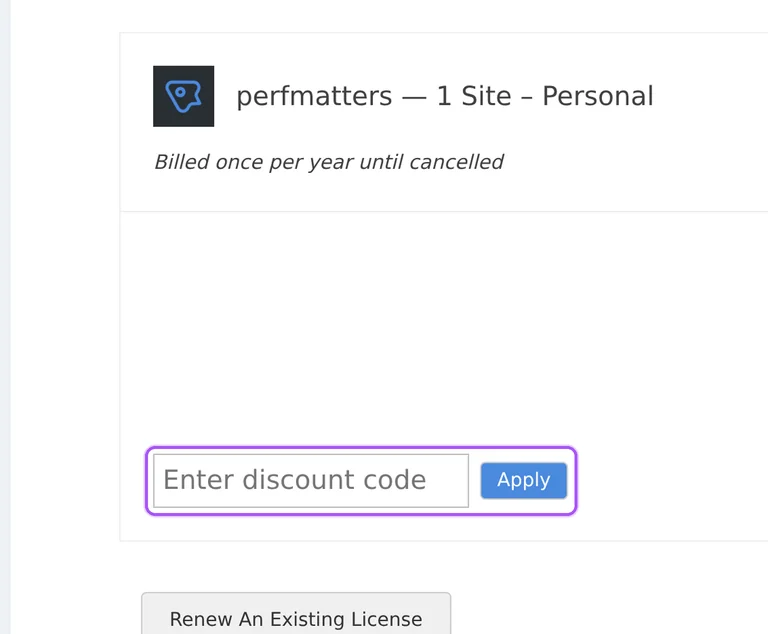
Enter your Perfmatters coupon in the checkout discount field. The cart identifies the license being purchased and shows its annual billing commitment before payment. The discount area is labeled Enter a discount code, alongside the order summary with Subtotal, Tax and Total. For a new purchase, the personal information area requires an email address and first name, and the billing area collects your country and address. The purchase receipt goes to the email address entered there. Existing customers whose email is already registered can log in or request a one-time login link. The checkout button for that account access option is labeled Email me a login link.
Perfmatters automatically applies a 15% discount to all renewals. A license includes one year of premium support and updates, and annual renewal maintains access to those benefits. Purchases renew automatically, with cancellation available at any time. This renewal discount is applied automatically rather than requiring a coupon entry for the renewal saving. The refund policy excludes annual renewals and product upgrades, which matters when deciding whether to keep the subscription active. Perfmatters sends a courtesy email reminder one week before the renewal payment, giving customers an opportunity to cancel beforehand. That one-week reminder is the concrete point to act on if you do not want the next annual payment processed.
Perfmatters considers refund requests within the first 30 days under its refund policy. Refunds are discretionary and require an installation problem or an inability to get the plugin's basic functions working. You must first attempt to resolve the problem with the support team. Problems caused by third-party plugins, themes or other software do not qualify under this policy. Product upgrades and annual renewals are also excluded, so the guarantee should not be treated as covering every later charge. Submit a refund request through Perfmatters' contact page after seeking support for the qualifying issue. The deadline runs from the plugin purchase, and refunds cannot be processed after 30 days.
Perfmatters charges VAT on consumer purchases in the EU and UK. The rate depends on the buyer's country, while qualifying business purchases use reverse-charge VAT. At checkout, an EU or UK business can enter a valid VAT number to receive the applicable exemption. The number must use the correct format, including its two-character country prefix. A billing address outside the EU and UK is not charged VAT, with the checkout country determining that treatment automatically. If a VAT number is returned as invalid, Perfmatters directs the buyer to their own tax authority for assistance. The VAT entry controls at checkout are labeled Add VAT number, VAT Number and Validate.
Perfmatters advertises an extra 10% off through a coupon offer. The offers on this page provide the place to start when buying the WordPress performance plugin. Its Personal, Business and Unlimited Sites licenses are sold on annual terms, so the purchase is a recurring subscription rather than a monthly plan. The purchase screen includes a discount entry area before the personal information and billing sections. Perfmatters also provides a separate renewal route within checkout for customers extending an existing license. That route asks for the license key being renewed instead of treating the order as an unidentified new license. The renewal action is labeled Add Renewal to Cart.
Perfmatters accepts major credit cards and PayPal for purchases. Its accepted-payment list includes Mastercard, Visa, American Express and Discover, alongside Amazon Pay, Apple Pay, Cash App and Google Pay. The checkout presents Credit Card and PayPal under the payment method area after the billing details. Payment data is processed through Stripe and PayPal, and Perfmatters does not store credit card data in its database. If a card transaction is declined, the payment help instructions direct you to the bank or card provider for the reason. Give that provider the charge amount and transaction time when requesting assistance. The merchant company name to supply for that enquiry is forgemedia LLC.
Perfmatters allows qualifying staging and development installations without increasing your activation count. The exception depends on the environment's address matching a supported format, rather than simply calling a live installation a staging site. Supported examples include localhost, addresses ending in .local or .dev, and development subdomains beginning with dev. Perfmatters also recognizes staging formats such as stage. and stg.* alongside its listed staging patterns. These rules let you install and activate the plugin in a supported development environment while retaining the activation capacity for the live website. Requests for additional URL formats can be sent to Perfmatters, which considers them individually. For a local development setup, localhost is explicitly included in the supported list.
Yes. A Perfmatters coupon and a promo code are the same thing: paste the code in the promo field at checkout before you pay.


