Verified
Ninja Forms Coupon & Promo Codes
Best verified offer: 40% off · 4 offers · last checked 29 Oct
Active Ninja Forms coupon codes
About Ninja Forms & Latest Deals
Get the latest Ninja Forms coupons, promo codes, and deals.
Savings opportunities available through Ninja Forms discount codes
Ninja Forms sells a WordPress forms plugin, and this page helps you find a lower price on its paid plans. The core includes 28+ form fields and data calculations.
Service categories frequently on promotion
Paid add-ons cover conditional logic, multi-page forms, payments, CRM integrations, email marketing and automation. Pick the features you need before choosing a package.
Services usually excluded from promo codes
The free core includes email notifications and submission management. Paid add-ons extend that core, so choose a package for the extensions you need.
Impact of billing cycle on promotional price
Paid subscriptions last one year. An active license is required for updates and support for purchased extensions, so include that ongoing cost in your plan choice.
Promo codes vs. automatically applied offers
Plus, Pro and Elite already show reduced first-year prices as of October 2026. The displayed first-year price is the starting point for any coupon comparison.
Accessing active codes for Ninja Forms
Premium add-ons can be bought individually or in packages. Use any applicable offer above when ordering.
How to use Ninja Forms Discount Codes?
Copy a Ninja Forms coupon or promo code, then paste it in the promo field at checkout.
- Choose a coupon
Grab the Ninja Forms offer that works best for you. It's listed above.
- Reveal the code
Hit "Get Code" or "Get Deal" depending on the offer type. Popup opens. Click the copy icon inside—code goes to your clipboard.
- Apply at checkout
Now head over to Ninja Forms's site. Pick your Ninja Forms plan. Checkout page has a "Promo Code" field. Paste what you copied there.
Ninja Forms Discount FAQs
Refund eligibility depends on the type of Ninja Forms purchase. Ninja Forms advertises a 14-day money-back guarantee, but its terms place refunds at its discretion and exclude subscriptions, bundles and product upgrades. Those exclusions matter when the discounted purchase is a membership rather than an individual extension. A discounted order should therefore be considered alongside its purchase category before relying on the guarantee. The purchase invoice identifies the products bought, any discount applied, tax and the total paid. Customer support is available through the paid-customer route on the contact page, which requires account sign-in. For the order details needed in a refund enquiry, open Orders and Billing and select View Invoice beside the purchase.
You can use the free Ninja Forms Core plugin before purchasing a discounted membership. Core is free forever and includes unlimited submissions, email notifications, calculations and prebuilt form templates. It provides a way to build forms before paying for additional extensions. Paid memberships bundle add-ons, while individual add-ons are also sold separately. Core is therefore a separate free product tier rather than a temporary discounted subscription that becomes paid after a trial. For a paid membership, the first-year offer ends before renewal at full price. The pricing page separates Core from Plus, Pro and Elite, with a Download link beneath Core instead of the Buy Now button used for paid memberships.
A discounted Ninja Forms add-on license covers automatic updates for one year. This license period applies both to individually purchased add-ons and to extensions included in a membership. Automatic updates require the license key to be entered for the add-on on your WordPress website. Your Ninja Forms account stores the key under Products; a membership key covers its included extensions, while individually purchased add-ons each have their own key. On your WordPress website, open Ninja Forms, then Settings, then the Licenses tab. Enter the relevant key beside the extension and select Activate to enable update notifications from WordPress. The Activations number in your account shows which websites already use that license key.
You can upgrade a Ninja Forms membership purchased with a discount. Membership upgrade paths include Plus to Pro, Plus to Elite and Pro to Elite. The upgrade charge is prorated: the value of the remaining time on the current license is subtracted from the price of the higher license. This credit is based on remaining license value rather than simply charging the full price for another membership. In your Ninja Forms account, open Products, locate the license and select Upgrade. Select the available upgrade path, then select Upgrade for that option. Individual add-on licenses also have upgrades from one site to five or twenty sites. The prorated charge appears beside the upgrade option before proceeding.
You can cancel automatic renewal after buying a discounted Ninja Forms membership. The subscription created with the purchase renews the license at the end of its one-year period while active. In your Ninja Forms account, the Products tab lists subscriptions and their status. Selecting Cancel stops the subscription from automatically renewing; the license then expires on its expiration date unless you renew manually. Cancellation also ends eligibility for subscription-related discounts or benefits under the terms. Once the license expires, support and updates end, although the extensions remain usable. The Products table distinguishes Active subscriptions from Cancelled subscriptions, so the concrete status to look for after cancellation is Cancelled.
You can pay for a discounted Ninja Forms purchase by credit card or PayPal. The payment method also matters for managing the subscription attached to your purchase. At checkout, the Payment Method section offers Credit Card and PayPal beneath your personal information and billing details. For card purchases, saved payment details are managed through Orders and Billing in your Ninja Forms account. The Payment Methods section lets you update, delete or add a card for future charges. For PayPal purchases, updates to the funding method for subscription renewals take place inside your PayPal account. To add a replacement card for a card-based subscription, the account button is called Add New Card.
A discounted paid Ninja Forms license includes support during its active license period. Support for purchased extensions covers their existing features rather than custom development or code review. The supported scope includes questions about advertised features, documentation clarification and reproducible bugs affecting built-in functionality. Support for purchased extensions requires a current subscription, with renewal or a new license needed to continue after the first year. Customer enquiries go through the paid-customer option on the contact page and require sign-in. Customer support responses are listed as the same or next business day, while free support can take up to three business days. The stated support hours are Monday through Friday, 9am to 4pm EST.
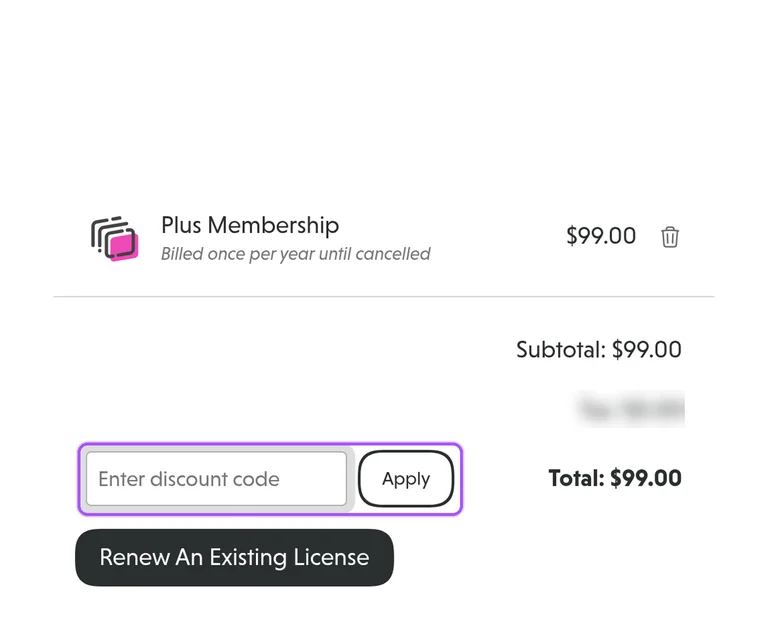
You enter a Ninja Forms coupon in the checkout discount field. The order page shows the selected membership, its annual billing arrangement and the subtotal before the personal-information section. The field is labelled Enter a discount code, with Discount as the action beside it. An applied offer produces a separate discount line above the total rather than replacing the membership name. In the Plus first-year offer, the subtotal is $99 and the discount is $39.60, producing $59.40 before applicable tax. The checkout also includes billing-country, address and VAT-number fields before the credit-card or PayPal choice. The Remove discount control appears beside an applied reduction in the order summary.
Ninja Forms offers 40% off the first year of its paid memberships. The introductory reduction applies to the first year, with subscriptions renewing at full price afterward. Plus, Pro and Elite are the paid membership options alongside the free Core plugin. For Plus, the introductory offer reduces the $99 annual membership to $59.40 before any applicable tax. Selecting the offer from the pricing page takes you to checkout with the membership in your cart. The order summary separates the subtotal, discount, tax and total, so the reduction has its own line before payment. For Plus, the first-year discount line shows a $39.60 reduction against the $99 subtotal.
Yes. A Ninja Forms coupon and a promo code are the same thing: paste the code in the promo field at checkout before you pay.
Scroll up for Ninja Forms offers.


