Verified
NextGEN Gallery Coupon & Promo Codes
Best verified offer: 60% off · 5 offers · last checked 13 Nov
Active NextGEN Gallery coupon codes
Verified · Used
Verified
About NextGEN Gallery & Latest Deals
Get the latest Nextgen coupons, promo codes, and deals.
Savings opportunities available through NextGEN Gallery discount codes
NextGEN Gallery is Imagely’s WordPress gallery plugin; the offers on this page help you pay less for an annual package. Starter covers 1 website. Plus covers 3 websites, Pro covers 5, and Ultra covers 25.
Service categories frequently on promotion
Starter, Plus, Pro and Ultra have introductory annual pricing. Pro and Ultra include ecommerce; Starter and Plus do not include print sales or digital downloads. A discount on the smaller packages therefore buys gallery tools rather than photo-selling tools.
Services usually excluded from promo codes
Renewals are excluded from subscription discount codes. The introductory discount ends after the first subscription term.
Impact of billing cycle on promotional price
Annual billing, paid in advance. Each package includes one year of plugin updates and support. Regular annual prices are $139 for Starter, $199 for Plus, $279 for Pro, and $399 for Ultra, in USD.
Promo codes vs. automatically applied offers
Imagely offers introductory package pricing and subscription discount codes. A subscription code reduces the first term only; later terms charge the regular price.
Accessing active codes for NextGEN Gallery
The offers fit annual subscriptions, with the package determining the number of supported websites. Recurring subscription fees charge the credit card on file.
How to use NextGEN Gallery Discount Codes?
Copy a NextGEN Gallery coupon or promo code, then paste it in the promo field at checkout.
- Choose a coupon
Grab the NextGEN Gallery offer that works best for you. It's listed above.
- Reveal the code
Hit "Get Code" or "Get Deal" depending on the offer type. Popup opens. Click the copy icon inside—code goes to your clipboard.
- Apply at checkout
Now head over to NextGEN Gallery's site. Pick your NextGEN Gallery plan. Checkout page has a "Promo Code" field. Paste what you copied there.
NextGEN Gallery Discount FAQs
Can I upgrade a NextGEN Gallery plan bought with a discount?
You can upgrade a NextGEN Gallery paid license through your Imagely account. Imagely prorates upgrades using the difference between the two license levels and the time remaining in the current subscription. In the account, open Billings and select Upgrade beside the license, then choose the required level and select Buy Now. The upgrade flow then lets you select a payment method and complete the purchase. Upgrading does not change the renewal date, which remains tied to the original subscription. This matters when moving from a discounted first term to a tier with additional sites or ecommerce tools. If the new features do not appear afterward, Imagely’s upgrade guide directs you to install the paid version for the upgraded license level.
Does a discounted NextGEN Gallery plan include lifetime updates?
Discounted paid plans include one year of updates. NextGEN Gallery is sold through Imagely, whose paid subscriptions renew annually rather than providing lifetime updates with the introductory purchase. Theme and plugin packages include support and updates for one year, and continued access to support, updates and plugin downloads requires renewal. Imagely applies subscription discounts to the first term only, so the lower initial payment does not carry forward to later years. The checkout presents the annual renewal condition before you complete the purchase, using the payment method supplied for the order. For the duration of update access, the plan comparison gives a concrete figure: every paid tier lists Updates as 1 Year.
Where do I apply a NextGEN Gallery discount code?
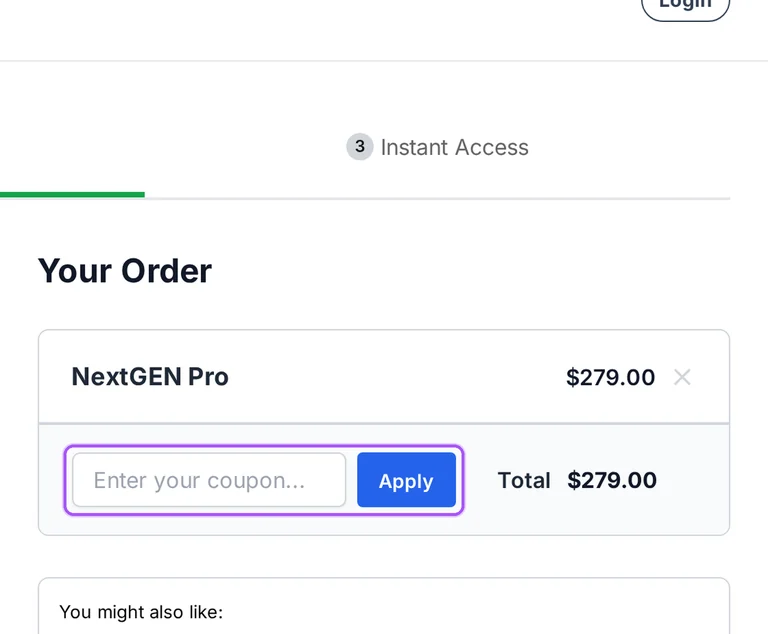
NextGEN Gallery discount codes are entered in Imagely’s checkout. Subscription discounts apply to the first term only, and the paid plans automatically renew annually at the regular price. Under Your Order, checkout provides Have a coupon?, an Apply control and a Total for the purchase. After choosing the plan, enter the offer in that coupon area and apply it before completing the order. The form also collects new account information, including an email address, name, username and password. The payment method supplied for the purchase is used for annual renewal unless changed or the plan is cancelled. The final purchase action is labeled Complete Purchase, after the introductory-price and renewal notice.
Which discounted NextGEN Gallery plan includes ecommerce?
Pro and Ultra include ecommerce tools for selling photographs. These NextGEN Gallery paid tiers include print sales, digital downloads, client proofing, price lists and automated print fulfillment. Starter and Plus focus on gallery presentation, so a discount on either lower tier does not add the Pro ecommerce package. On Imagely’s pricing page, Get Started beneath Pro or Ultra begins the purchase for a tier with selling tools. Pro covers five websites, while Ultra covers 25 and adds multisite support. The introductory discount applies to the initial subscription term, and yearly renewals use the regular price. For selling downloadable images, the feature to identify in the Pro package is Free & Paid Digital Downloads.
Can I try NextGEN Gallery before buying a discounted plan?
You can use the free NextGEN Gallery plugin before purchasing a discounted paid plan. Imagely Lite has no time limit, requires no payment card and can run on a live WordPress site. In WordPress, Plugins > Add Plugin lets you find NextGEN Gallery, then install and activate the free plugin. The free edition includes gallery and album layouts, a lightbox, watermarking and original-image backups. Paid settings appear greyed out, with upgrade prompts identifying the features they add. Starter and Plus expand display options, while Pro adds selling tools and client proofing. The free plugin’s Upgrade to Pro link leads to an upgrade offer with a discount applied at checkout.
What money-back guarantee covers a discounted NextGEN Gallery purchase?
Imagely offers a 14-day money-back guarantee for an initial paid NextGEN Gallery purchase. The refund policy measures that window from opening the paid account and requires contacting support to request the refund. Cancelling the subscription through the account stops renewal but does not automatically process a refund, even within the guarantee period. Renewals and free trial accounts are excluded from refund eligibility. For eligible credit-card refunds, the credit can take five to ten business days to appear on the statement. Customers outside the United States also have a processing-fee condition: Stripe does not return those fees on refunds. For a refund rather than cancellation alone, contact support within the first 14 days of purchase.
How many sites does a discounted NextGEN Gallery license cover?
A discounted license covers the number of websites included in its selected plan. Imagely sells NextGEN Gallery paid plans with different site allowances, so the introductory discount and the website limit are separate parts of the purchase. Starter covers one website, Plus covers three, Pro covers five and Ultra covers 25. Ultra also includes multisite support, which matters when the sites belong to a WordPress multisite installation. From the pricing page, the Get Started button beneath the required tier takes you toward that plan’s purchase. Subscription discounts apply to the first term, with annual renewals at the regular price. For a purchase covering a multisite installation, Ultra is the tier explicitly listing Multisite Support.
Can I stop automatic renewal after buying a discounted NextGEN Gallery plan?
You can cancel automatic renewal after purchasing a discounted NextGEN Gallery plan. Imagely subscriptions renew annually at the regular price after the introductory term, using the payment method supplied at checkout. In your Imagely account, open Billing and select Cancel beside the license you want to stop renewing. The following screens let you continue cancellation, select a reason and acknowledge the benefits that end when the plan expires. Support and updates remain available through the term already paid for, and cancelling renewal does not stop existing galleries or albums from working. This cancellation is separate from requesting a refund under the initial guarantee. The cancellation flow includes a final acknowledgement box before Continue Cancelling.
Which NextGEN Gallery plans qualify for the advertised introductory offer?
Imagely advertises introductory discounts on Starter, Plus, Pro and Ultra. These NextGEN Gallery paid plans differ in site allowance and included tools, so the offer needs to match the tier you intend to purchase. Starter covers one website, Plus covers three, Pro covers five and Ultra covers 25. The pricing cards show an introductory annual amount alongside the regular amount, and their Get Started buttons lead to the corresponding purchase. Imagely’s discount policy limits subscription discounts to the first term; subsequent terms are charged at the regular price. For a gallery that needs image protection and frontend search, Plus is the first tier listing both features in its package.
Does NextGEN Gallery accept promo codes as well as coupons?
Yes. A NextGEN Gallery coupon and a promo code are the same thing: paste the code in the promo field at checkout before you pay.
Scroll up for the current NextGEN Gallery offers.


