Verified · Used
MemberMouse Coupon & Promo Codes
Best verified offer: 50% off · 1 offer · last checked 12 Nov
Active MemberMouse coupon codes
Expired Offers (May still work)
Used
About MemberMouse & Latest Deals
Get the latest Membermouse coupons, promo codes, and deals.
Savings opportunities available through MemberMouse discount codes
MemberMouse sells a WordPress membership plugin. The offers on this page help shoppers pay less for a plan.
Service categories frequently on promotion
Basic, Plus and Pro are MemberMouse plan choices for selling products and subscriptions. Each has an introductory price.
Services usually excluded from promo codes
Payment gateway access changes with the plan. Basic includes Stripe, while higher tiers add more processors.
Impact of billing cycle on promotional price
MemberMouse lists prices in USD for annual billing. The promotional price covers the first year; later annual renewals use the regular price.
Promo codes vs. automatically applied offers
MemberMouse publishes introductory prices for all three plans alongside their regular prices. The listed introductory prices already reflect its special offer.
Accessing active codes for MemberMouse
MemberMouse subscriptions renew automatically unless canceled before the subscription period ends. Cancellation is available in My Account and Billing.
How to use MemberMouse Discount Codes?
Copy a MemberMouse coupon or promo code, then paste it in the promo field at checkout.
- Choose a coupon
Grab the MemberMouse offer that works best for you. It's listed above.
- Reveal the code
Hit "Get Code" or "Get Deal" depending on the offer type. Popup opens. Click the copy icon inside—code goes to your clipboard.
- Apply at checkout
Now head over to MemberMouse's site. Pick your Membership Management plan. Checkout page has a "Promo Code" field. Paste what you copied there.
MemberMouse Discount FAQs
Is drip content included with MemberMouse's discounted Basic plan?
Yes, drip content scheduling is included in MemberMouse Basic, which has an introductory annual offer. MemberMouse can release content according to each user's purchase date, such as making one module available per week. It can also deliver all the content at once, so scheduled access is a configuration choice within the plugin. Content protection supports pages, posts, membership levels, and bundles. The Basic plan includes Courses for MemberMouse and bulk content protection alongside its drip scheduling. Select Basic at the MemberMouse checkout before applying the offer. When configuring your purchased plugin, use the purchase-date-based schedule to control when each member receives access to a module.
Will my MemberMouse coupon discount continue at renewal?
No, MemberMouse coupon discounts apply only to the first subscription term, and renewal is charged at the regular price. The introductory discount does not continue for the lifetime of the subscription. Annual introductory offers therefore reduce the initial annual payment rather than every subsequent annual payment. MemberMouse subscriptions renew automatically unless you cancel before the applicable period ends. Support, updates, and plugin downloads are granted for one year after purchase, and license renewal is required to continue receiving them afterward. The Pro checkout lists its annual Plan Price separately from Discount and Total Today. Use that annual Plan Price when assessing the cost after the introductory discount ends.
Can I request a refund after a discounted MemberMouse purchase?
MemberMouse's money-back guarantee covers the first 14 days of your paid account, including a purchase made at an introductory price. Contact MemberMouse support within that period to request cancellation and a refund. Refund credit can take 5 to 10 business days to appear on a credit card statement. The refund is issued in USD, and exchange-rate changes do not qualify for an additional refund or credit. MemberMouse's support form asks for your name, email, brief subject, and a description of the request. Use that form to identify the paid account and request the refund within the 14-day guarantee window rather than waiting for the subscription to renew.
Does MemberMouse's Basic introductory offer include one-click upsells?
Yes, MemberMouse Basic includes one-click purchases and upsells alongside its introductory annual offer. Basic also includes Stripe payments, Courses for MemberMouse, standard reporting and analytics, email support, and a staging license. These are features of the Basic plan, so your purchase starts with selecting Basic rather than adding a separate upsell package. The Basic checkout identifies the plan above the order summary and provides a Change Plan selector. Its summary separates Plan Price, Discount, and Total Today. The introductory saving applies to the initial annual term; annual renewals are at full price. Confirm that Basic appears above the summary before applying the offer.
How can I get help applying a MemberMouse discount?
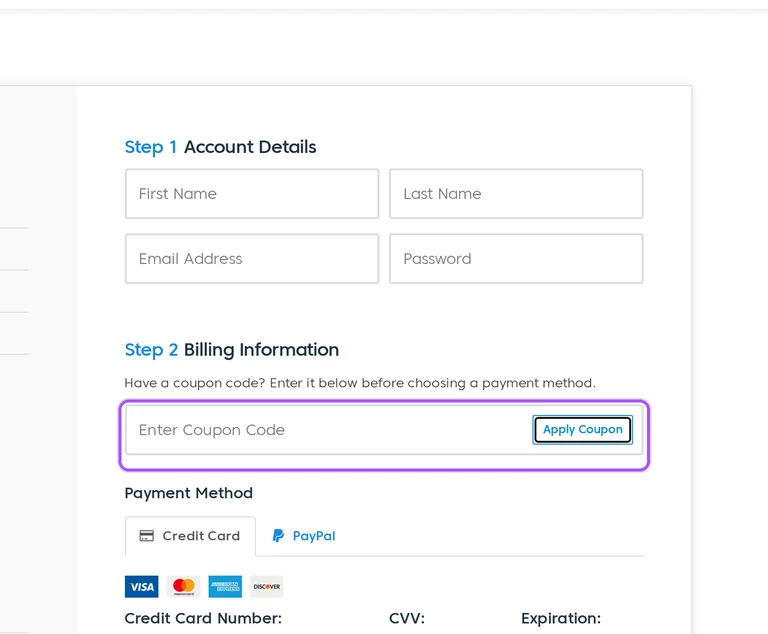
MemberMouse accepts purchase questions through its support ticket form. Enter your name and email, add a brief subject, and describe the discount issue in the Description field. The form also accepts an optional image or file, so a screenshot of the checkout message can accompany your inquiry. Attachments are limited to three files, with a maximum file size of 10 MB. The Customer Success Team is available Monday through Friday, from 9 AM to 5 PM EST. At checkout, the coupon entry sits in Step 2 Billing Information before the payment method selection. Include the selected MemberMouse plan and the checkout message in your ticket description.
Do MemberMouse discounted plans cover selling physical products?
Yes, MemberMouse's plan comparison includes physical products for Basic, Plus, and Pro, which each have introductory annual pricing. Physical goods sit alongside memberships, digital products, and services in the plans' selling capabilities. MemberMouse also supports one-time purchase products, recurring subscriptions, and payment plans, so the product you sell can determine how you configure billing. Buying the plugin through an introductory offer is separate from setting prices for customers on your own site. Select the MemberMouse license plan at checkout and apply the offer before choosing payment. For setup after purchase, the StartUp Guide's Guided Setup Videos include walkthroughs for configuring a site that sells physical products.
What MemberMouse introductory discount can I compare with the offers on this page?
MemberMouse advertises introductory annual prices of $149.50 for Basic, $249.50 for Plus, and $349.50 for Pro. Those offers represent half of the listed regular annual prices: $299, $499, and $699 respectively. All amounts are in USD, and annual renewals are at full price. The advertised introductory amount needs to be reflected in your checkout total before you purchase. Basic checkout displays a $299 annual Plan Price with separate Discount and Total Today lines, so the plan price alone is not the discounted amount due. Apply the offer in Step 2 Billing Information and confirm its effect in Total Today before submitting payment.
Which MemberMouse discounted plan includes developer tools?
MemberMouse Basic includes developer tools, and Plus and Pro include the Basic features through their plan tiers. MemberMouse's developer tools include SmartTags, hooks and filters, customizable core page layouts, push notifications, and an API. SmartTags customize the user experience, while hooks and filters extend functionality without changing core files. Core page templates can be customized with HTML and CSS, and push notifications can trigger emails or custom scripts. These tools let you assess the plan's technical fit before buying through an introductory offer. Select your plan using the checkout's Change Plan control, then apply the offer in Step 2 Billing Information before choosing a payment method.
Where do I enter a MemberMouse coupon at checkout?
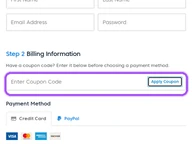
Enter a MemberMouse coupon in Step 2 Billing Information, before selecting your payment method. The checkout labels the entry area Have a coupon code? and provides an Enter Coupon Code field followed by Apply Coupon. Step 1 Account Details contains your first name, last name, email address, and password. The order summary above these steps has separate Plan Price, Discount, and Total Today lines. Apply the offer before proceeding to the Credit Card or PayPal option. Card checkout asks for the card number, CVV, expiration, and billing zip code. Review the Discount and Total Today lines before selecting Place Order or Checkout with PayPal.
Can I cancel MemberMouse before my promotional subscription renews?
Yes, you can cancel MemberMouse before the subscription period ends to stop its automatic renewal. Cancellation is available in the My Account and Billing section of your dashboard. The subscription otherwise renews automatically using the payment method on record, and introductory discounts end after the first subscription term. Cancellation and a refund request are separate purchase considerations: the money-back guarantee covers the first 14 days of a paid account. MemberMouse support can assist if you cannot find the cancellation option in the billing section. For questions about the cancellation process, submit your account email, a brief subject, and a description through MemberMouse's support ticket form.
Does MemberMouse accept promo codes as well as coupons?
Yes. A MemberMouse coupon and a promo code are the same thing: paste the code in the promo field at checkout before you pay.
Scroll up for the current MemberMouse offers.


