Used
Themify Coupon & Promo Codes
8 offers listed
Active Themify coupon codes
Expired Offers (May still work)
About Themify & Latest Deals
Themify sells WordPress themes and plugins, including Ultra, Shoppe and Builder Pro.
Savings opportunities available through Themify discount codes
Themify sells WordPress themes and plugins; use the offers on this page to pay less for your purchase. One licence covers unlimited personal or commercial projects, so extra sites do not require extra licences.
Service categories frequently on promotion
Club access includes Ultra, Shoppe and Builder Pro. A membership offer can cover themes and plugins together rather than separate product purchases.
Services usually excluded from promo codes
Third-party products are outside Lifetime Club coverage. Choose a Themify membership offer for Themify products, not third-party purchases.
Impact of billing cycle on promotional price
Choose the access term you need. Master Club provides one year of access and support; Lifetime Club provides lifetime access and support. Lifetime means the duration of the product or company.
Promo codes vs. automatically applied offers
Builder is already included in every Themify theme. A theme purchase does not require buying the Builder plugin separately.
Accessing active codes for Themify
Use the Themify offers for themes and plugins designed for self-hosted WordPress.org. Select the product or membership you intend to purchase. Hosted WordPress.com requires a Business plan to install custom themes and plugins.
How to use Themify Discount Codes?
Copy a Themify coupon or promo code, then paste it in the promo field at checkout.
- Choose a coupon
Grab the Themify offer that works best for you. It's listed above.
- Reveal the code
Hit "Get Code" or "Get Deal" depending on the offer type. Popup opens. Click the copy icon inside—code goes to your clipboard.
- Apply at checkout
Now head over to Themify's site. Pick your Ultra Theme plan. Checkout page has a "Promo Code" field. Paste what you copied there.
Themify Discount FAQs
Is a trial available before buying Themify with an offer?
Themify offers a 30-day refund policy instead of a trial period. You purchase the membership first and receive access to downloadable files after payment is complete. The products can then be used on your sites during the refund window, with a refund request available within 30 days if they do not suit your needs. Master Club provides one year of access and support, while Lifetime Club provides lifetime access and support. Both memberships include Themify's themes, addons and plugins, so the access period is the main difference between them. A refund request must be sent by email with your Themify ID username. The deadline is 30 days from the day of purchase.
When will I receive the Themify renewal discount?
Themify sends its renewal discount 30 days before your membership expires. The renewal discount is 30%, and the membership payment itself does not automatically repeat. To continue yearly access, you purchase another year rather than wait for an automatic charge. Renewal maintains access to file downloads, product updates and the support forum; the themes and plugins you already purchased remain usable even if you let membership expire. Themify's updates include changes for compatibility with WordPress and major third-party plugins, making renewal relevant to ongoing site maintenance. Your active membership status is available in the Member Area. Themify also sends a second renewal reminder 15 days before expiry, after the first notice at 30 days.
Which payment methods can I use for a discounted Themify purchase?
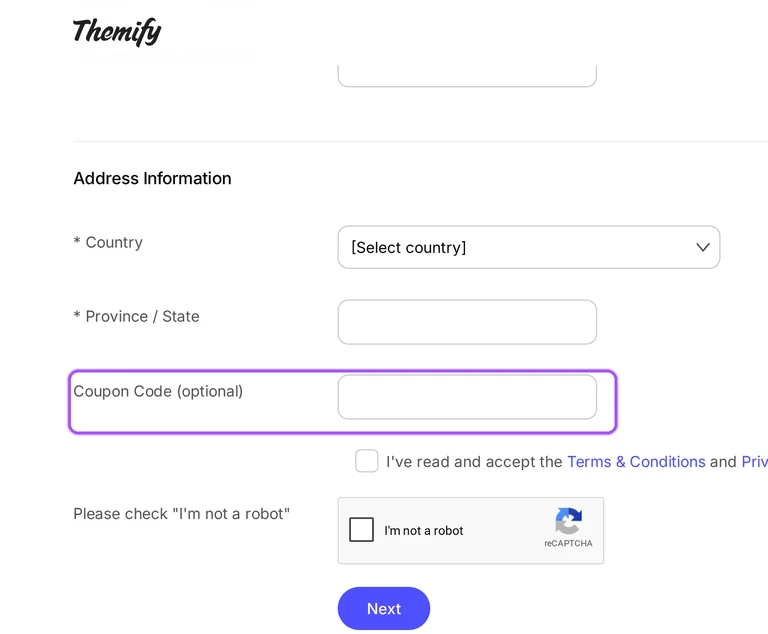
Themify accepts PayPal and major credit cards for purchases. A PayPal account is not required to pay by card, and the signup form routes payment securely through PayPal. The form includes Membership Type and Coupon Code (optional), followed by the Next button that takes you to payment. On the payment form, the card option is labelled Pay with an online bank account, debit or credit card, or PayPal Credit. Listed prices are in USD, and downloadable files become available immediately after payment is complete. If a credit card does not work, Themify directs buyers to contact its team about other payment options. The signup page's Contact us link handles signup and payment issues.
Will my discounted Themify membership renew automatically?
A Themify membership does not automatically renew or charge you again. The payment is processed once, and another year of membership requires a separate purchase. Master Club includes one year of access and support for all Themify products, rather than an automatically renewing subscription. If you decide against renewal, no action is required and you can keep using the themes you downloaded during your membership. File downloads, updates and support end when that membership expires. Renewing provides access to product updates and the support forum again, and Themify offers a 30% renewal discount. Renewal reminders are sent 30 days and 15 days before expiry, giving you two notices before your yearly access ends.
What access does a discounted Themify Lifetime Club purchase include?
Themify Lifetime Club includes lifetime access and support for all Themify products. It is listed at $249 as a single payment, covering current and future Themify products with lifetime product updates. Third-party products are excluded from the membership. Under Themify's definition, lifetime means the duration of the product's or company's existence, and product releases are not guaranteed. The membership permits use on unlimited personal or commercial projects, including access to themes, addons and plugins. The Get Lifetime button opens the purchase form, which includes Membership Type and Coupon Code (optional). The 30-day refund period applies before Lifetime Club becomes non-refundable and non-exchangeable; a refund request must include your Themify ID username.
Can I keep using discounted Themify themes after my membership expires?
You can keep using purchased Themify themes after your membership expires. A standard purchased licence includes one year of product updates, support and downloads, while Lifetime Club provides lifetime access and support. When a yearly membership ends, the themes and plugins you already purchased remain usable, but access to file downloads, updates and support ends. Renewing restores access to updates and the support forum, including product updates for compatibility with WordPress and major third-party plugins. Themify offers a 30% renewal discount, so continued access is a separate purchase rather than an automatic charge. Your membership status is available in the Member Area; the renewal discount arrives 30 days before the expiry date.
Are taxes included in Themify prices when I shop for a discount?
Themify's listed prices include all applicable taxes and charges. Those prices are in United States dollars, so the Master Club and Lifetime Club amounts are USD amounts. Master Club is listed at $89 for one year of access and support, while Lifetime Club is listed at $249 for a single payment. The signup form includes a Membership Type selector for the product you want to purchase and a Coupon Code (optional) field for the offers on this page. Payment follows the signup form through PayPal, with major credit cards accepted without a PayPal account. The form's Next button takes you to payment; the purchase currency remains USD.
How quickly does Themify process a refund after a discounted purchase?
Themify can take up to three business days to complete a refund request. The refund window runs for 30 days from the day of purchase, and the request must include your Themify ID username. The Contact page has an Account & Billing form for existing members that handles refunds, exchanges and other purchase enquiries. Its required fields include your name, email, Themify username and subject, with a Message field for the request. Themify also allows exchanges within the same 30-day purchase window. Lifetime Club purchases become non-refundable and non-exchangeable after that refund period. Send the request within 30 days of purchase; the processing allowance is up to three business days after you request it.
What does Themify Master Club cost before a coupon discount?
Themify Master Club is listed at $89 for one year. The membership covers all Themify themes, addons and plugins, with one year of access and support. Its included products span Ultra and Shoppe themes, Builder Pro, Post Type Builder and Builder addons, and the licence permits unlimited personal or commercial sites. The Get Master button opens signup, where Membership Type identifies your purchase and Coupon Code (optional) accepts the offers on this page. Listed prices are in USD and include applicable taxes and charges. Membership does not automatically renew; another year requires another purchase. For that later purchase, Themify sends a 30% renewal discount 30 days before your membership expires.
How should I request a refund for a discounted Themify order?
Send Themify an email refund request with your Themify ID username within 30 days of purchase. The purchase day starts the refund window, and Themify allows up to three business days to complete the request. On the Contact page, Account & Billing is the form for existing members seeking refunds, exchanges and other purchase assistance. Enter your name, email, required Themify username and subject, then describe the refund request in Message. The same 30-day window also covers exchanges, while Lifetime Club purchases are non-refundable and non-exchangeable after the refund period. The form includes a Send a copy to myself option, which lets you receive a copy of the message you submit to Themify.
Does Themify accept promo codes as well as coupons?
Yes. A Themify coupon and a promo code are the same thing: paste the code in the promo field at checkout before you pay.
Scroll up for the current Themify offers.


