Where should I enter a MyPrivateProxy coupon before paying?
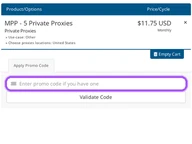
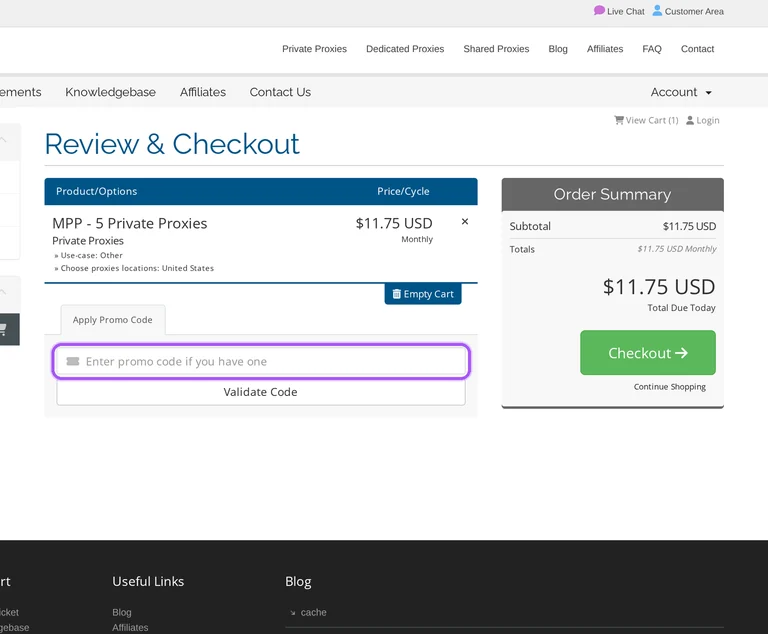
MyPrivateProxy accepts coupons in the shopping cart before checkout. Start with a proxy package from the private, shared or dedicated category so the order contains the service you want to buy. The cart's Review & Checkout screen includes Apply Promo Code and the Validate Code control. Enter the offer there and validate it before proceeding to payment. The same screen separates Product/Options from Price/Cycle, so the selected service and its billing period sit alongside the charge. Its Order Summary lists the subtotal and the amount payable today in USD. The amount to review before selecting Checkout is the figure labelled Total Due Today, which distinguishes the immediate payment from the billing-cycle information.
How do I request a MyPrivateProxy refund after a discounted order?
Eligible new MyPrivateProxy orders qualify for a full refund within 72 hours. The guarantee covers MSP 50 and the private MPP 1, MPP 5, MPP 10, MPP 20 and MPP 50 packages. In the member area, open Services, then My Services, and select the proxy plan. On Manage Product, select Request Cancellation and set Cancellation Type to Immediate. Submit a support ticket containing your proxy username and the reason for cancelling. Eligibility also requires that your account has not been suspended for a service-terms breach and that you have not previously claimed a refund under this policy. Renewals, custom plans and upgraded plans are non-refundable. Submit both the cancellation request and ticket within the three-day transaction window.
Which MyPrivateProxy private-proxy offers include bonus IPs?
MyPrivateProxy includes bonus IPs with several private-proxy packages. The offer increases the number of proxies supplied rather than reducing the package's monthly charge by the bonus percentage. MPP 10 includes 10 plus 1 bonus proxy, MPP 20 includes 20 plus 2, and MPP 50 includes 50 plus 5. Larger listed packages also include extra IPs, including 100 additional proxies with MPP 1000 and 200 with MPP 2000. The private-proxy order list displays those quantities alongside each package's monthly USD amount and Order Now button. These regular private packages are separate from the dedicated products required for sneaker and ticketing services. For an eleven-proxy allocation, the named package is MPP 10.
Are MyPrivateProxy sneaker proxies refundable after a discounted purchase?
MyPrivateProxy sneaker proxies are non-refundable. These dedicated plans are intended for immediate or short-term use and fall outside the three-day money-back guarantee offered on specific new private and shared packages. The dedicated catalogue separates sneaker proxies from PokemonGo and ticketing products, so the service selected for the purchase matters. Sneaker proxies are checked at allocation and guaranteed to work only for the purchased service at that time. The listed sneaker packages include MPP Sneakers 20, MPP Sneakers 50 and MPP Sneakers 100, with instant setup and no setup fee. Technical difficulties should go to support before a refund claim or payment dispute. The purchase detail to settle before ordering is the specific sneaker service the proxies must support.
Can a MyPrivateProxy discounted purchase start with one proxy?
MyPrivateProxy sells a one-proxy package called MPP 1. This is the smallest listed private package and is included among the new plans eligible for the three-day money-back guarantee. The private-proxy catalogue links to the billing store, where MPP - 1 Private Proxy has its own Order Now button. The package has instant setup, no setup fee and monthly randomization, while multiple locations and multiple subnets are not included. Regular private proxies are intended for different uses from the dedicated sneaker, PokemonGo and ticketing products. That distinction matters when choosing the package for an offer on this page. For a single regular private IP, select MPP - 1 Private Proxy in the billing store.
Can I keep using a discounted MyPrivateProxy plan after cancelling renewal?
MyPrivateProxy lets you retain service through the paid period by choosing cancellation at the billing period's end. This cancellation type stops the next renewal while keeping the current subscription available until its due date. In the billing panel, open Services, select the active plan and press Request Cancellation. Enter a reason and select At the end of billing period before submitting the request. The alternative Immediate option cancels the plan within 24 hours. MyPrivateProxy does not issue prorated refunds for unused subscription time, and renewals are non-refundable. A confirmation page and email acknowledge the cancellation request. For continued access to the time already purchased, the cancellation option to select is At the end of billing period.
Can I refresh proxies on a discounted MyPrivateProxy subscription?
MyPrivateProxy allows proxy refreshes starting from the second subscription month. A new batch can be requested once per billing cycle without a replacement charge. In the My Proxies dashboard, the Proxies Refresh section contains the plan-level replacement controls. Select the relevant subscription and use Refresh all proxies in this plan when that subscription is eligible for its next refresh. Auto Refresh provides a separate way to receive fresh proxies every month, with the setting configured individually for each plan. It is disabled by default, so a subscription needs that setting enabled for automatic monthly replacement. The control for that option is Enable Auto Refresh for this proxy plan in the same Proxies Refresh section.
How can I get a MyPrivateProxy bulk discount on dedicated proxies?
MyPrivateProxy accepts direct enquiries for bulk discounts on dedicated proxies. The dedicated-proxy catalogue provides a contact link for buyers who need more proxies than its listed packages supply. That route appears alongside the sneaker, PokemonGo and ticketing ranges, as well as the custom-plan option. It lets you discuss the required quantity and service with MyPrivateProxy before placing the purchase. Dedicated proxies are allocated for the purchased service, and the refund policy excludes dedicated, custom and upgraded plans. The custom option lists the proxy quantity as ANY and directs the buyer to Contact us rather than giving a fixed package charge. For a bulk-discount enquiry, the dedicated catalogue's Contact us link is the relevant next step.
Which payment methods can I use for a discounted MyPrivateProxy order?
MyPrivateProxy accepts PayPal, cards and supported digital wallets. Payment options include PayPal direct payments and credit or debit cards processed through PayPal. Through Stripe, MyPrivateProxy accepts MasterCard, VISA, AMEX, Google Pay and Apple Pay. The billing agreement also permits an available in-store credit balance to be applied to future purchases within the same account. That balance is non-transferable and non-refundable, and credit issued to one account can only be used there. Subscription charges follow the selected billing cycle, with services set to renew automatically unless renewal is cancelled. For PayPal payments, the linked funding source must remain current and funded. An existing in-store credit balance can be viewed in the account's Notifications area.
Does MyPrivateProxy offer trial proxies before a discounted purchase?
MyPrivateProxy offers a paid purchase with a refund window instead of trial proxies. Eligible new orders include the MSP 50 shared package and the MPP 1, MPP 5, MPP 10, MPP 20 and MPP 50 private packages. These plans let you assess the service under the three-day money-back guarantee after buying. A full refund requires a request within 72 hours of the transaction, an account without a suspension for breaching the service terms, and no previous refund claimed under this policy. The request goes through the ticketing system with your proxy username and cancellation reason. The smallest private package in the eligible list is MPP 1, providing one proxy.
Does MyPrivateProxy accept promo codes as well as coupons?
Yes. A MyPrivateProxy coupon and a promo code are the same thing: paste the code in the promo field at checkout before you pay.
Similar Proxies Coupons
Valid discounts from brands similar to MyPrivateProxy.