Verified · Used
Zoogvpn Coupon & Promo Codes
Best verified offer: 66% off · 7 offers · last checked 13 Nov
Active Zoogvpn coupon codes
15%OFF
Get 15% off all Zoogvpn pricing plans, offering secure and reliable VPN services at a reduced cost.
Verified · Used
15%OFF
Apply this code to get 15% off select items at ZoogVPN.com. Enhance your online privacy and security with this deal.
Verified · Used
90%OFF
Save 90% on Zoogvpn 2-year VPN plans. This offer provides significant savings on your subscription.
Used
Used
Used
Used
Expired Offers (May still work)
About Zoogvpn & Latest Deals
Zoogvpn coupons and deals for VPN services, with monthly, annual and two-year subscription options.
Zoogvpn VPN savings start with the prepaid subscription
Zoogvpn sells VPN services, and the offers on this page help you explore discounts on a VPN subscription. The main price choice is how much access you buy upfront. Monthly VPN subscription access costs $9.99 for one month. The annual option costs $39.99 for 12 months. The two-year option includes three additional months, with $59.99 billed for 27 months. These are subscription charges for different lengths of access, rather than three versions of a coupon. A lower advertised monthly figure comes with a larger upfront payment. The total charge and the access period belong together when assessing a Zoogvpn deal.
Zoogvpn annual and two-year billing change the upfront cost
Zoogvpn advertises the annual subscription at $3.39 a month and the two-year option at $2.49 a month. The billed amounts remain $39.99 for 12 months and $59.99 for 27 months, respectively. Those upfront totals matter more to your immediate budget than the monthly headline. The longer option includes the three extra months in its stated access period. These purchase prices are not a separate promise about the next subscription charge. Zoogvpn reserves the right to change prices for new subscriptions through promotions or inflationary increases. Existing recurring subscriptions are unaffected by those changes. That distinction matters when weighing a new-customer price against an existing recurring subscription.
Where the Zoogvpn promo field sits during account creation
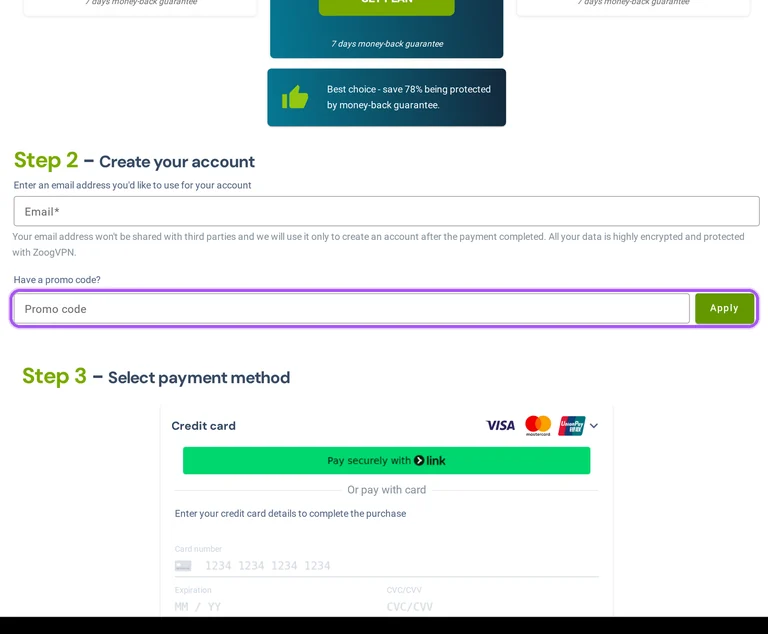
Zoogvpn places the promo-code entry in Step 2, alongside account creation. The prompt reads “Have a promo code?” and the entry field is labelled “Promo code”. Enter an offer there and select Apply. Step 3 is payment selection. The order summary separates the subscription amount, a Discount entry and the final order amount, so the reduction has its own place in the purchase breakdown. The selected subscription also appears in that summary. The code field is part of the purchase flow, rather than the pricing comparison.
How to use Zoogvpn Discount Codes?
- Choose a coupon
Grab the Zoogvpn offer that works best for you. It's listed above.
- Reveal the code
Hit "Get Code" or "Get Deal" depending on the offer type. Popup opens. Click the copy icon inside—code goes to your clipboard.
- Apply at checkout
Now head over to Zoogvpn's site. Pick your 2 Years plan. Checkout page has a "Promo Code" field. Paste what you copied there.
Zoogvpn Discount FAQs
Zoogvpn advertises a discounted two-year VPN subscription with three additional months included. The stated upfront charge is $59.99 for 27 months of access. Its advertised monthly figure is $2.49, alongside a $9.99 monthly reference. These figures describe the subscription offer itself, rather than a saving promised for any particular typed coupon. The included three months extend the stated access period beyond the two-year subscription label.
Yes. Zoogvpn attaches different advertised savings and upfront charges to its one-year and two-year terms. Annual billing is USD 39.99 for 12 months, alongside a displayed USD 3.39 monthly rate and a 66% saving. The two-year offer is USD 59.99 for 27 months, including three free months, with a 75% saving. These amounts describe the prepaid subscription periods, rather than separate monthly instalments at the displayed rates.
Yes, Zoogvpn can modify or discontinue special promotional offers at its discretion. A special promotion therefore carries a different status from an ongoing promise that the same discount will remain available. The rule applies to special promotional offers themselves. The merchant retains control over changes to a special promotion and over its discontinuation. The offers on this page are a starting point for selecting a promotion for your purchase.
Zoogvpn charges $9.99 for its one-month VPN subscription before any separate coupon reduction. The monthly option is billed at $9.99 for one month of access. That makes the stated monthly figure and the upfront subscription charge the same amount for this option. It is the one-month purchase price, rather than a price requiring an annual commitment or the purchase of a two-year access period.
Zoogvpn displays the discount separately from the final order amount in its checkout summary. The breakdown identifies the selected subscription first. A distinct Discount entry then shows the reduction, followed by the final amount under “Your order”. This layout separates the subscription amount from the reduction and the amount due. It also lets you identify the selected VPN subscription within the same purchase breakdown.
Yes, Zoogvpn advertises annual VPN access at $39.99 for 12 months. The displayed monthly figure is $3.39, alongside a $9.99 monthly reference. Annual billing means the stated twelve-month charge is collected as one subscription payment, rather than twelve separate payments at that headline figure. This is an advertised subscription price, so it should not be treated as the result of applying a particular promo code.
Enter your Zoogvpn promo code in Step 2, during account creation. The prompt is “Have a promo code?” and the field itself is labelled “Promo code”. Select Apply after entering it. This step comes before Step 3, where you select payment. The offer entry therefore belongs to the account-creation stage of the purchase, with its own Apply control beside the promo field.
Scroll up for the Zoogvpn offers on this page.


