Verified
Hide My Ip Coupons & Promo Codes
Best verified offer: 40% off · 4 offers · last checked 11 Nov
Active Hide My Ip coupon codes
Recently Expired Hide My Ip Coupons
About Hide My Ip & Latest Deals
Get the latest Hide My Ip coupons, promo codes, and deals.
Learn more about Hide My Ip and their latest offers.
How to use a Hide My Ip coupon code
Copy a Hide My Ip coupon or promo code, then paste it in the promo field at checkout.
- Choose a coupon
Grab the Hide My Ip offer that works best for you. It's listed above.
- Reveal the code
Hit "Get Code" or "Get Deal" depending on the offer type. Popup opens. Click the copy icon inside—code goes to your clipboard.
- Apply at checkout
Now head over to Hide My Ip's site. Pick your Hide My IP (Windows/Mac) plan. Checkout page has a "Promo Code" field. Paste what you copied there.
Hide My Ip Coupon FAQ
You can cancel a discounted Hide My Ip subscription before its renewal date. Renewable services continue with automatic billing while the subscription remains active and the payment method supports recurring charges. The checkout includes Cancel anytime from your account, and the terms also allow cancellation by contacting Hide My Ip or using the cancellation form on its website. Card payments save the card for automatic renewals, while PayPal payments require approval of payment and automatic renewals through PayPal. The terms make you responsible for managing or cancelling subscriptions in your own PayPal account. A refund request follows the separate 30-day refund policy and requires your order number. For a PayPal-funded subscription, manage the subscription in PayPal before the renewal date.
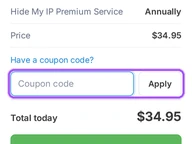
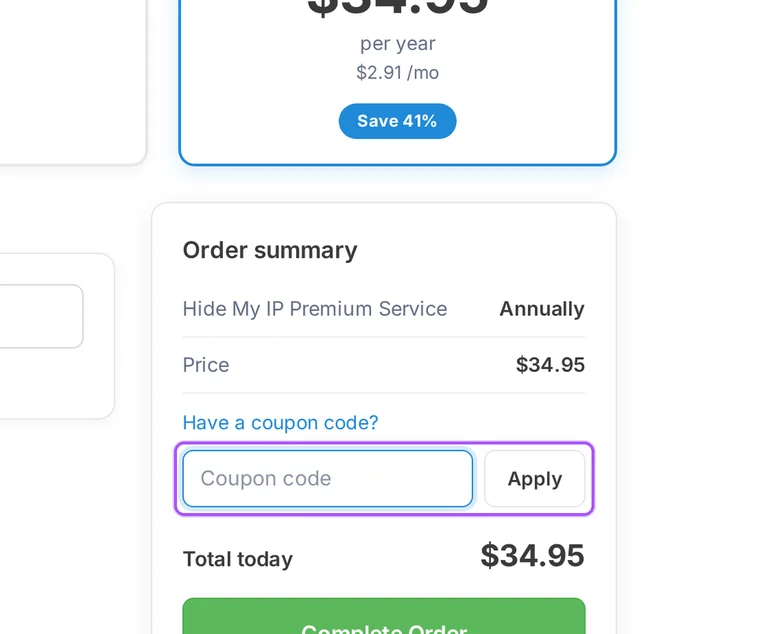
Hide My Ip offers lower monthly equivalents with quarterly and annual billing. These subscriptions require payment for the selected term, rather than separate payments at the advertised monthly equivalent. In Choose your plan, Quarterly is $8.79 per quarter, displayed as $2.93 per month, and Annually is $34.95 per year, displayed as $2.91 per month. Monthly billing is $4.95 per month. Both longer terms carry a Save 41% label in the checkout. The annual order summary shows $34.95 due before any additional coupon reduction. The same summary contains the coupon field and the final amount payable. These are renewable subscriptions, with automatic charging when the payment method supports it. For annual billing, the payment to budget for is $34.95 for the year.
Your Hide My Ip subscription renews automatically when your payment method supports recurring billing. The renewable-services terms keep automatic billing active until the subscription is cancelled. During checkout, card payment charges your card immediately and saves it for automatic renewals. The PayPal route sends you to PayPal to approve both the payment and automatic renewals. Hide My Ip also offers crypto checkout, where activation follows the first payment confirmation. To stop a future renewal, cancellation must take place before the renewal date through the website cancellation form or by contacting Hide My Ip. The checkout also provides cancellation from your account. If you pay through PayPal, the terms specifically assign management and cancellation of the PayPal subscription to you through your PayPal account.
Hide My Ip offers a 30-day money-back guarantee for services that do not meet your expectations. The refund window runs from the purchase date, and the policy provides for a full refund within that period. The checkout links to the 30 Day Refund Policy alongside the terms you accept when placing an order. To request your refund, contact Hide My Ip by email or through its support ticket system and include the order number. Refunds return through the original payment method used for the purchase. Hide My Ip reviews the request and sends an email acknowledgment, with written confirmation making the request officially valid. The terms exclude refunds for accounts terminated because of agreement violations. Submit your order number with the request within 30 days of purchase.
Hide My Ip accepts credit cards, PayPal and crypto through its checkout. Each payment route has its own completion steps after you select the subscription term and provide your email address. Under Payment method, the checkout lists Credit Card, PayPal and Crypto. Card purchases require cardholder and billing details, and the card is charged immediately and saved for automatic renewals. PayPal sends you to PayPal to approve payment and set up automatic renewals. Crypto sends you to a separate payment page, with activation following the first confirmation. The order summary includes the coupon entry, a Discount line and Total today before Complete Order. Your license key goes to the email address entered at checkout, so that field needs the address where you want to receive it.
You can contact Hide My Ip through its contact form for help with a coupon problem. The form accepts your email address and a message, and the support options also include a knowledgebase and telephone support. Before describing the issue, identify the term selected for Hide My Ip Premium Service: monthly, quarterly or annual. The checkout places Have a coupon code? inside Order summary, with a Coupon code field and an Apply button. That summary separates Price, Discount and Total today, giving you specific amounts to describe in your message. The contact form labels its fields Your E-mail Address and Enter your message, followed by Submit. Telephone support is available from 9:00 AM to 4:00 PM PST, Monday to Friday.
You enter a Hide My Ip coupon in the order summary before submitting payment. The checkout offers monthly, quarterly and annual subscriptions to Hide My Ip Premium Service. After selecting a term, open Have a coupon code?, enter the offer in Coupon code and select Apply. The summary separates Price, Discount and Total today, so the amount due appears alongside the discount entry. Enter your email address in the email section because Hide My Ip sends the license key there. Payment choices include Credit Card, PayPal and Crypto, with Complete Order below the summary. The coupon entry sits inside Order summary, beneath the selected service and its billing term. Use Total today as the amount due for the order you are submitting.
You can request a Hide My Ip refund within 30 days if the service does not meet your expectations. The guarantee provides a full refund when the service does not meet your expectations during that purchase window. Contact Hide My Ip by email or through the support ticket system to start the request. Include your order number so support can identify the purchase, and describe the problem as feedback about your experience. The policy provides for a full refund to the original payment method. Hide My Ip reviews refund requests and sends an acknowledgment by email; the request becomes officially valid with its written confirmation. Accounts terminated for violations of the service agreement are excluded from refunds. The deadline is 30 days from your purchase date.
Hide My Ip makes your refund request officially valid through written confirmation. After receiving the request, the team reviews it and sends an acknowledgment by email. The refund policy asks you to initiate the process by email or through the support ticket system, including your order number. Its money-back guarantee provides a full refund within 30 days of purchase when the service does not meet your expectations. The refunded payment returns through the same method used for the original order. Hide My Ip also welcomes feedback about your experience when you request a refund. For help with the process, its contact form has fields for Your E-mail Address and Enter your message. Include your order number in that message when asking about your refund request.
Hide My Ip returns refunds through the original payment method used for the purchase. Its 30-day guarantee provides a full refund when the service does not meet your expectations within the purchase window. The checkout offers Credit Card, PayPal and Crypto, with crypto activation following the first payment confirmation. To begin a refund request, email Hide My Ip or use its support ticket system and supply your order number. Support reviews the request and sends an acknowledgment by email. Your request becomes officially valid once Hide My Ip provides written confirmation. The terms also exclude refunds for accounts terminated because of agreement violations. For the refund request itself, the identifying detail Hide My Ip asks you to include is your order number.
Yes. A Hide My Ip coupon and a promo code are the same thing: paste the code in the promo field at checkout before you pay.


