Used
PhotonVPS Coupon & Promo Codes
2 offers listed
Active PhotonVPS coupon codes
Used
Expired Offers (May still work)
About PhotonVPS & Latest Deals
Get the latest Photonvps coupons, promo codes, and deals.
Savings opportunities available through PhotonVPS discount codes
PhotonVPS sells VPS hosting, and this page helps you assess offers and discounts against the hosting cost. Los Angeles Forex 1 starts at $15.95 USD monthly; Forex 2 starts at $25.95 USD monthly. These are starting plan prices, not a promised coupon saving.
Service categories frequently on promotion
The free cPanel/Plesk offer covers VPS package 3 or higher. Linux packages include free 10 Gbps DDoS mitigation, reducing the extras you need to price separately.
Impact of billing cycle on promotional price
The initial term is selected in the order form. Los Angeles Forex 3 starts at $35.95 USD monthly, and Forex 4 starts at $65.95 USD monthly. Service payments are due at the start of each billing cycle.
Accessing active codes for PhotonVPS
Your initial service term is selected in the PhotonVPS order form. Full payment is required before account activation.
How to use PhotonVPS Discount Codes?
Copy a PhotonVPS coupon or promo code, then paste it in the promo field at checkout.
- Choose a coupon
Grab the PhotonVPS offer that works best for you. It's listed above.
- Reveal the code
Hit "Get Code" or "Get Deal" depending on the offer type. Popup opens. Click the copy icon inside—code goes to your clipboard.
- Apply at checkout
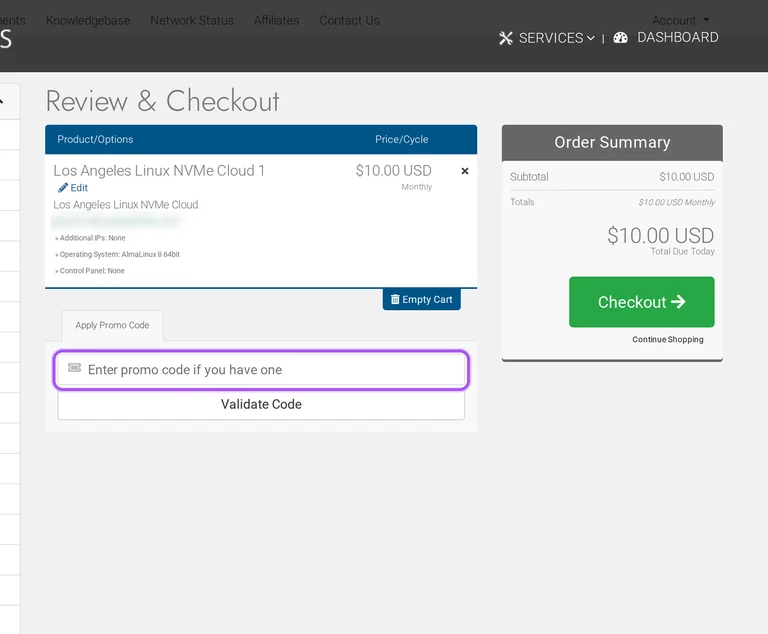
Now head over to PhotonVPS's site. Pick your Linux VPS plan. Checkout page has a "Promo Code" field. Paste what you copied there.
PhotonVPS Discount FAQs
PhotonVPS accepts PayPal, Alipay and major credit cards for service payments. Supported cards are Visa, Mastercard, American Express and Discover. The client-area payment instructions direct PayPal buyers to Due Invoices and then View Invoice. From the invoice, Pay Now with PayPal makes a one-time payment rather than establishing automatic monthly payments. A separate PayPal Subscribe button creates recurring payments and requires an open invoice. PhotonVPS requires payment in full before activating the account, so the invoice amount must be funded before service begins. For a buyer paying an invoice after applying an offer, the distinction between a single payment and a subscription matters at renewal. The one-time payment button is labeled Pay Now with PayPal.
PhotonVPS provides fully managed service with the purchase of cPanel or Plesk. For Linux VPS hosting, either control panel qualifies the service for management of server tasks and configuration requests. Windows VPS management is available with Plesk. Covered work includes load, network and hardware issues, so the control-panel choice matters alongside the hosting offer. The Linux cPanel licence described with the plans is the Solo package for one account. Software licence fees are excluded from the money-back policy, which matters when adding a panel to a discounted order. The cart separates the selected product and options from the amount due today. For a Linux cPanel purchase, the stated Solo licence limit is one account.
PhotonVPS provides an upgrade process for existing cloud servers. The change is ordered through the client area and paid for before the server configuration is updated. Under Services, open My Services and then View Details for the VPS being changed. Management Actions contains the Upgrade/Downgrade link, followed by Choose Product and the payment step. After placing the upgrade order, return to the service details and open Virtual Machine Settings, then Reboot Virtual Machine. The changes to memory, CPU priority and CPU cores appear after pending tasks finish. This makes the upgrade a separate paid order when planning beyond the initial hosting offer. PhotonVPS directs customers to contact support if the process remains stuck for more than one hour.
PhotonVPS provides a conditional 30-day money-back guarantee for eligible hosting purchases. A refund requires a service problem, a valid reason and proof of a prior support ticket seeking help. Cancellation must fall within 30 days of activation or before the next due date. Domain services, software licence fees, add-ons, credit-card processing fees and setup fees are excluded. Prior hosting customers are ineligible, and the guarantee applies to only one account when a customer has multiple accounts. Accounts terminated for terms or acceptable-use violations do not qualify. Approval must come from staff through a support ticket or email. For an eligible refund request, retain the earlier support ticket documenting the hardware, network, connection or support problem.
PhotonVPS includes free 10 Gbps DDoS protection with its VPS packages. Both the Linux and Windows plan tables list 10 Gbps protection alongside the server resources and price. The protection covers attacks at Layers 3, 4 and 7, with continuous monitoring for up to 750,000 packets per second. These are package features to include when assessing the hosting offer and any additional options. For protection beyond the included level, PhotonVPS directs buyers to contact the company about higher capacity. The cart separately lists the server options and the amount due today before payment. For a purchase needing greater protection, the homepage names protection up to 500 Gbps as an option to discuss with PhotonVPS.
Yes, applicable taxes remain payable on PhotonVPS orders. Service prices exclude applicable taxes, and customers are responsible for sales, use, value-added and other assessed taxes. The cart provides Country and State fields alongside an Update Totals button, so the billing location belongs in the order calculation. After configuring the VPS, the review screen separates Subtotal from Total Due Today and lists the billing cycle. A promotional reduction and the amount payable today are therefore different figures to consider when budgeting for the purchase. Payment must be received in full before account activation. For the amount due on the order, use the cart figure labeled Total Due Today after updating the location.
PhotonVPS sells Windows VPS plans through its Windows cloud server ordering options. The Windows range lists NVMe and SSD packages, and the billing store separates Windows categories by server location. A Windows purchase includes Remote Desktop access, while fully managed Windows service is available with the purchase of Plesk. This makes the operating-system category and any control-panel purchase relevant when comparing an offer with the order. The cart lists the selected Product/Options and Price/Cycle before the Order Summary and Total Due Today. Payment is required before activation, and software licence fees are excluded from the refund policy. For the Windows management option, the control panel named by PhotonVPS is Plesk.
PhotonVPS offers a lower monthly equivalent on the annual Los Angeles Linux NVMe Cloud X term. That server configuration lists a one-month price of $5.00 USD and a twelve-month price of $4.17 USD per month. The term is selected under Choose Billing Cycle before the server details and operating system. Additional IP addresses are separate configurable options, so a comparison between terms needs the same server configuration. After configuration, the cart lists Price/Cycle and separates Subtotal from Total Due Today. The annual monthly equivalent describes the term rate; the cart supplies the amount due for the order. For this specific plan, the two billing choices are labeled 1 Month Price and 12 Month Price.
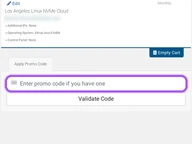
Enter a PhotonVPS coupon in the cart before proceeding to payment. First configure the server and billing cycle for the VPS you want to buy. The Review & Checkout screen contains an Apply Promo Code area with a Validate Code button. This places the coupon step after server configuration and before the Checkout button. The same screen lists Product/Options and Price/Cycle, followed by an Order Summary with Subtotal and Total Due Today. Those labels distinguish the selected service and term from the amount payable immediately. PhotonVPS requires full payment before activating the account, so the promotion belongs in the order review stage. The button beside the promotion entry is labeled Validate Code.
PhotonVPS offers a paid evaluation period through its conditional 30-day money-back policy. Full payment is required before account activation, and the terms count the initial refund period from the first payment. The refund policy requires a service problem, a valid cancellation reason and proof of a prior support ticket requesting assistance. It excludes purchases made simply to test a program or script and cancel after testing. Software licences, domain services and add-ons are excluded from the refund policy, and prior hosting customers do not qualify. At purchase, the cart separates the billing cycle from Total Due Today. For a service problem during the evaluation period, the concrete first step is a support ticket requesting assistance before a refund request.
Yes. A PhotonVPS coupon and a promo code are the same thing: paste the code in the promo field at checkout before you pay.
Scroll up for the current PhotonVPS offers.


