WordPress table builder plugin with yearly and lifetime Pro licenses.
Savings opportunities available through WP Table Builder coupon codes
WP Table Builder sells a WordPress table plugin, and the offers on this page help you pay less for Pro. The free plugin costs nothing; Pro starts at $39 yearly for one site as of October 2026. Pick the license for the number of sites you actually use.
Service categories frequently on promotion
One Site or Unlimited Sites. Starter covers one site; Agency covers unlimited sites. Both have yearly and lifetime prices, so compare the WP Table Builder deal against the term you want before buying.
Services usually excluded from promo codes
The Site Limit Matters. A Starter discount still buys a single-site license, not Agency's unlimited-site license. Subscription discounts apply to the first term under WP Table Builder's terms; annual renewals are outside its stated refund policy.
Impact of billing cycle on promotional price
Yearly or Lifetime. WP Table Builder lists Starter at $39 per year and Agency at $99 per year as of October 2026. Lifetime costs $99 for Starter or $249 for Agency, paid once with no renewal. If you expect to keep using Pro, compare the one-time price with repeated yearly payments.
Promo codes vs. automatically applied offers
Start With the Listed Price. WP Table Builder says its displayed subscription prices may be introductory and renewals are at full price. A promo code discounts only the first subscription term under its terms. Use the best applicable offer on this page for today's purchase, then look at the renewal amount in checkout.
How to use WP Table Builder Discount Codes?
Copy a WP Table Builder coupon or promo code, then paste it in the promo field at checkout.
Choose a coupon
Grab the WP Table Builder offer that works best for you. It's listed above.
Reveal the code
Hit "Get Code" or "Get Deal" depending on the offer type. Popup opens. Click the copy icon inside—code goes to your clipboard.
Apply at checkout
Now head over to WP Table Builder's site. Pick your Free Plugin plan. Checkout page has a "Promo Code" field. Paste what you copied there.
Does a WP Table Builder lifetime deal remove annual renewal payments?
WP Table Builder lifetime licenses are one-time purchases without annual renewals. Starter Lifetime covers a single site, while Agency Lifetime covers unlimited sites, including client sites. The purchase buttons identify the lifetime options with Go Lifetime and state that payment is made once. Both lifetime plans include lifetime updates and priority support, so the term changes how long those services are included. The yearly versions instead include one year of updates and priority support, with subsequent renewals charged at full price after introductory pricing. When comparing the offers on this page, the relevant distinction is the one-time lifetime purchase against the initial annual payment and later renewals. For a lifetime purchase across client websites, Agency Lifetime is the option with unlimited site coverage.
Which payment methods can I use for a discounted WP Table Builder purchase?
WP Table Builder checkout offers credit or debit cards and PayPal. Purchases use Freemius checkout, which handles payment, licensing and fulfillment for the plugin. The payment choices appear under Billing information, after the account details requested for the order. Card payment asks for the card number, expiry and security code, while the billing area also includes Country, Postal code and VAT number fields. WP Table Builder lists prices in US dollars and requires payment of applicable taxes; currency conversion costs can also affect a purchase paid from another currency. The checkout separates VAT from the subtotal rather than presenting tax as part of the license price alone. For the amount payable on a discounted order, Today's total is the checkout line that includes applicable VAT.
Can I request a WP Table Builder refund after a discounted Pro purchase?
WP Table Builder offers refunds within 30 days of the original purchase or upgrade. The dedicated refund policy applies to the initial plugin purchase and excludes annual subscription renewal payments. Refund requests go through the contact form, where Email, Subject and Your Message fields let you describe the purchase you want refunded. Gateway fees are not refunded, so the refund conditions matter alongside the discount on the original license charge. WP Table Builder issues charges and refunds in US dollars, and currency exchange costs remain your responsibility. A subscription's introductory discount also ends after the first term, making a later renewal a separate payment with different refund eligibility. Submit the request through Contact Us within the 30-day purchase or upgrade window.
Does a WP Table Builder coupon carry over into later subscription terms?
A WP Table Builder subscription coupon ends after the first term. The introductory reduction does not continue for the life of the subscription, and subsequent terms are charged at the regular price. At purchase, Starter and Agency each have a yearly option with one year of updates and priority support. The checkout presents the license charge as an annual payment and separates applicable VAT from the subtotal. This makes the first payment a different consideration from the cost of keeping the annual license renewed. You can cancel automatic renewal through your account dashboard while retaining the license, updates and support until the paid period ends. For ongoing access without annual renewal payments, Starter Lifetime and Agency Lifetime are listed as one-time purchases.
Can I upgrade a discounted WP Table Builder license with an adjusted charge?
WP Table Builder adjusts a mid-cycle upgrade charge for the remaining billing period. The upgrade uses your existing license rather than starting with an unrelated new purchase. On the pricing page, open checkout for the higher plan and select Enter license key in the popup. Enter your existing license key, click APPLY, and fill in the billing details requested for the order. The Review Order button takes you to the next step, and completing payment upgrades the license immediately. This route is relevant when a discounted Starter license needs the unlimited site coverage of Agency. The adjustment is based on the remaining period in the current billing cycle; subscription coupons themselves cover only the first term. Have your existing license key ready for the Enter license key option.
Can I start free before buying WP Table Builder Pro with an offer?
You can use WP Table Builder Free before purchasing Pro. The free plugin lets you create unlimited tables and includes basic styling, content elements and the Gutenberg block. A later Pro purchase adds features such as search, sorting, pagination and sticky headers, with Starter covering one site and Agency covering unlimited sites. Pro is purchased through the Starter or Agency buttons, and yearly subscription discounts apply only to the first term. Moving from Free to Pro preserves your existing tables and settings, so the discounted purchase does not require rebuilding the tables you already created. The installation step is to add and activate Pro alongside the free plugin. Keep the free plugin installed when activating Pro, because the two versions run alongside each other.
Why won't a WP Table Builder promo code reduce my renewal payment?
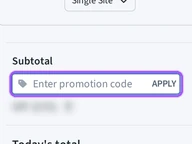
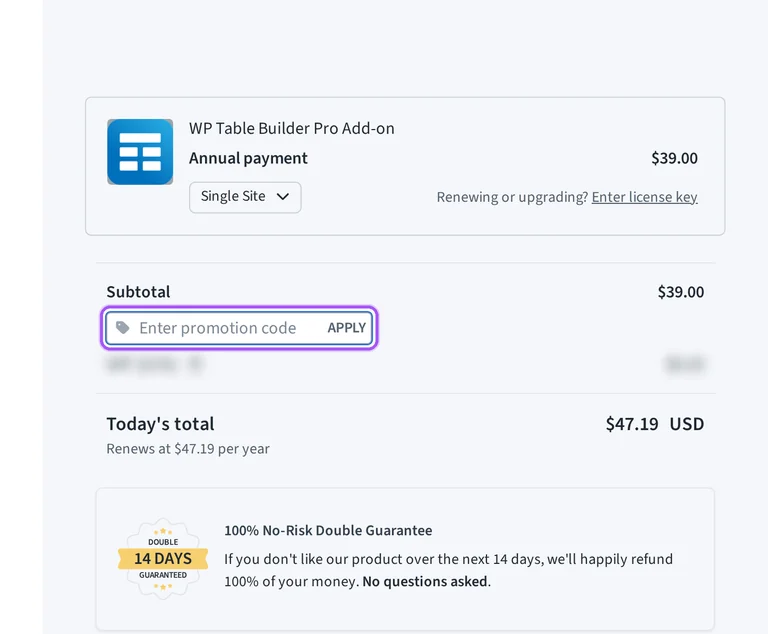
WP Table Builder subscription discounts apply only to the first term. After that initial period, your subscription renews at the regular price, so the original discount does not reduce a renewal payment. For a new purchase, the checkout opens from the Starter or Agency purchase button, with a Have a promotional code? control beneath the subtotal. Opening that control reveals the Enter promotion code field and an APPLY button. The order separates the subtotal, applicable VAT and Today's total, so the payable amount can include tax alongside the license charge. WP Table Builder support can help with purchase questions through its contact form. For a code-entry issue on an initial order, the exact field label is Enter promotion code.
Which yearly WP Table Builder license suits a discounted purchase for client sites?
WP Table Builder Agency Yearly covers unlimited sites, including client websites. Starter Yearly covers a single site, so the license scope matters when matching the offers on this page to your purchase. The yearly purchase buttons are labeled Get Starter and Get Agency, and both annual plans include one year of updates and priority support. Every Pro plan includes the Pro elements, templates and controls; Agency changes the number of sites you can cover. Subscription coupons reduce the first term only, with the regular price applying to later renewals. A client-site purchase therefore involves both the site allowance and the annual renewal commitment, rather than the introductory discount alone. For multiple client installations, the Agency plan's concrete allowance is Unlimited Sites.
How do I cancel renewal after buying WP Table Builder with a discount?
You can stop automatic renewal from your WP Table Builder account dashboard. Cancellation leaves your license, updates and support active until the end of the billing period you have already paid for. In your account, the cancellation option is in the billing section; WP Table Builder support can also cancel the subscription for you. An introductory discount covers the first subscription term, while another annual term renews at full price. Stopping renewal therefore lets you finish the discounted period without continuing into another paid year. A refund request is a separate action, and annual subscription renewal payments are excluded from the dedicated refund policy. WP Table Builder sends reminder emails before subscription renewals, giving you a concrete prompt to manage the next charge.
What renewal rate follows a WP Table Builder introductory offer?
WP Table Builder yearly subscriptions renew at full price after introductory pricing. A subscription discount reduces the initial term, and the regular rate applies when that term ends. Starter and Agency annual purchases include one year of updates and priority support, which makes the next renewal relevant to continued access to those services. Your initial order opens through the yearly purchase button and identifies the charge as an annual payment in checkout. Applicable taxes are separate from the license subtotal, and purchases are priced in US dollars. If you decide to stop renewal, cancellation is available through your account dashboard or support, with paid benefits lasting until the billing period ends. Renewal reminder emails arrive before the charge, and annual renewal payments are excluded from the refund window.
Does WP Table Builder accept promo codes as well as coupons?
Yes. A WP Table Builder coupon and a promo code are the same thing: paste the code in the promo field at checkout before you pay.
Similar WordPress Plugins Coupons
Valid discounts from brands similar to WP Table Builder.