Used
AmazingRDP Coupon & Promo Codes
5 offers listed
Active AmazingRDP coupon codes
Expired Offers (May still work)
About AmazingRDP & Latest Deals
Remote desktop protocol servers and solutions.
Savings opportunities available through Amazingrdp discount codes
AmazingRDP provides the brute force of Admin RDP access without the KYC headache. They charge for the anonymity and the root access. Don't share a lagging server. Get your own admin credentials for less.
Service categories frequently on promotion
USA and UK Admin RDP plans are the hot sellers. We frequently find flat 15% off codes (AMAZINGRDP15) and specific 20% discounts for quarterly billing. Our deals help you secure a dedicated 2-core or 4-core slice. Validate your latency. Work remotely on a fast US connection for under $20.
Services usually excluded from promo codes
Specific 'Promo' plans are already floored in price. Setup times (15-30 mins) are standard. Quality costs money. The uptime is the key; use our code to shave a few dollars off the monthly fee, but prioritize the admin access.
Impact of billing cycle on promotional price
Quarterly/Semi-Annual + Coupon = Real Savings. Codes often give 20-25% off for longer terms. Monthly is okay for testing, but if you need the RDP long-term, pay quarterly.
Promo codes vs. automatically applied offers
Bitcoin payments save 50% on annual plans. Be careful. This is a massive hidden discount. If you have crypto, paying annually via BTC is cheaper than any coupon code.
How to use AmazingRDP Discount Codes?
Copy an AmazingRDP coupon or promo code, then paste it in the promo field at checkout.
- Choose a coupon
Grab the AmazingRDP offer that works best for you. It's listed above.
- Reveal the code
Hit "Get Code" or "Get Deal" depending on the offer type. Popup opens. Click the copy icon inside—code goes to your clipboard.
- Apply at checkout
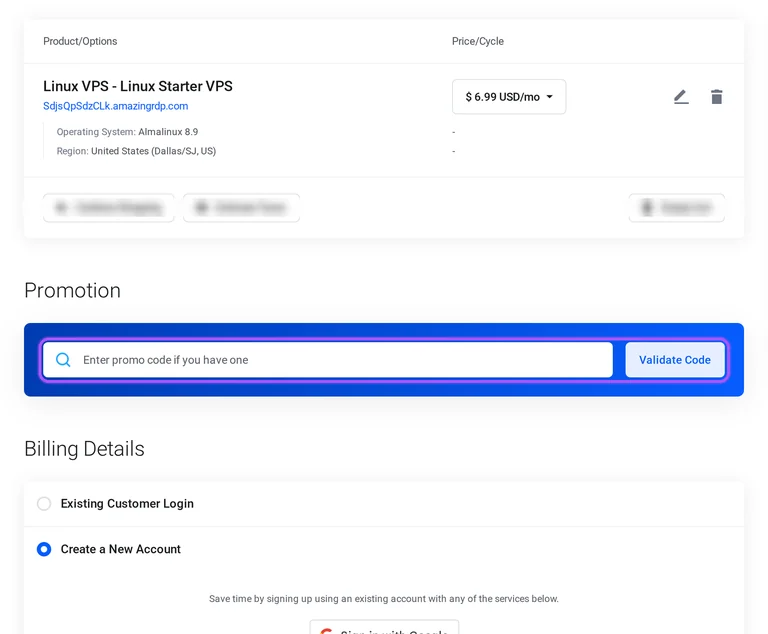
Now head over to AmazingRDP's site. Pick your Cheap RDP plan. Checkout page has a "Promo Code" field. Paste what you copied there.
AmazingRDP Discount FAQs
What is AmazingRDP's refund policy for a discounted shared plan?
AmazingRDP offers a 24-hour refund window for eligible shared plans, subject to a valid service-related reason and its refund conditions. Technical support investigates the reported issue and attempts to resolve it before a refund is initiated. Client-side hardware incompatibility, configuration errors and problems with third-party software are excluded grounds for a refund. The policy also excludes private, botting, residential and dedicated plans, along with USA RDP and Admin Access categories. A purchase through the offers on this page therefore needs to be assessed by its actual service category. Before payment, Review & Checkout identifies the selected product under Product/Options. For a shared-plan issue, contact technical support within the 24-hour window and explain the specific service problem.
What deductions apply to an AmazingRDP refund after a discounted purchase?
AmazingRDP deducts 2.5% of the transaction amount plus $2.14 from eligible refunds processed through Fastspring or PayPal. Transaction charges, setup fees and other non-recurring costs are also non-refundable. Those deductions matter when considering the amount returned from a purchase made through the offers on this page. Refund eligibility still depends on the service category and the 24-hour window for eligible plans. The purchase checkout separates the product charge from tax in Order Summary, with Total Due Today showing the payment amount. For a service-related refund request, provide the reason so technical support can investigate and attempt a resolution. Review the payment gateway before purchase because the named processing deduction applies specifically to Fastspring and PayPal refunds.
Who qualifies for AmazingRDP's money-back offer as a new customer?
AmazingRDP's 24-hour money-back guarantee is limited to first-time customers purchasing eligible hosting services. Returning customers who previously held, cancelled and reopened an account are excluded, and multiple accounts do not create additional refund eligibility. The eligible categories in the terms are shared, reseller, WordPress and email hosting. Cloud servers, VPS and dedicated servers are excluded from that guarantee. When purchasing through the offers on this page, the account history and service category therefore matter alongside the discount. Review & Checkout separates Existing Customer Login from the new-account billing form. Cancellation requests must be submitted through the client area; for a purchase relying on this guarantee, confirm that the selected service belongs to one of the four eligible hosting categories.
Can I try AmazingRDP Private RDP before using an offer?
AmazingRDP provides a trial or demo for private plans, allowing you to assess the service before purchasing through an offer. Trials and demos are also available for shared plans, while dedicated and residential plans are excluded from that trial provision. Private RDP includes full root or administrator access, Linux or Windows Server operating system options, OpenVNC access and a free control panel. The Private RDP selection is organised by location, including Australia, Canada, France, Germany, the United Kingdom and the USA. Each regional listing has a See All Plans link for its available configurations. For a private-server purchase using the offers on this page, request the private-plan trial through AmazingRDP support before selecting the regional plan.
Is an AmazingRDP discounted purchase refundable if I use it for cryptocurrency mining?
AmazingRDP excludes refunds for services used in violation of its terms, which prohibit cryptocurrency and Bitcoin mining. The restriction applies to the server's use, so a discounted purchase still needs to comply with those service rules. AmazingRDP can suspend or terminate services for prohibited activities, and its refund policy excludes accounts that violate the Terms of Service. Before purchasing through the offers on this page, identify the server category shown under Product/Options in Review & Checkout. That checkout also requires agreement to the Terms of Service before payment. For a mining-related purchase decision, read the Cryptocurrency or Bitcoin mining entry under Prohibited Activities and Content before committing to an AmazingRDP server.
How does AmazingRDP's Linux Starter VPS billing term change the discount?
AmazingRDP's Linux Starter VPS offers billing-cycle savings of 2% quarterly, 4% semi-annually and 6% annually against monthly billing. The configuration screen lists monthly billing at $6.99 per month, quarterly at $6.85 per month, semi-annual at $6.71 per month and annual at $6.57 per month. These are rates per month for the named billing cycles. Under Choose Billing Cycle, select the term before continuing with the operating system, region and server configuration. The same screen includes Hostname, Root Password, NS1 Prefix and NS2 Prefix fields, followed by Order Summary and Continue. Regional options include additional charges, so the selected location also affects the order. For the annual billing saving, select Annually under Choose Billing Cycle before proceeding to the order summary.
Does an AmazingRDP Windows VPS offer include a free service trial?
AmazingRDP's Windows VPS includes an evaluation Windows operating system; its service trial provision covers shared and private plans. These are separate benefits: Windows OS (Eval.) describes the operating system supplied with the VPS, while a service demo concerns trying the hosting plan. Windows Starter VPS, Windows Basic VPS and Windows Advance VPS all list full administrator access and a free control panel. The panel includes reboot, reinstall and VNC functions for managing the purchased server. Each Windows VPS plan has its own Order Now button and specified resource allocation. Before purchasing through the offers on this page, ask AmazingRDP support about the shared or private-plan demo rather than treating the Windows evaluation label as a free hosting period.
How do I validate an AmazingRDP promo code before paying?
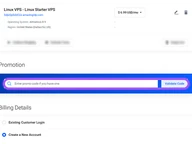
AmazingRDP provides a Promotion field and Validate Code button on Review & Checkout so you can submit a promo before payment. The field is labelled Enter promo code if you have one and sits above Billing Details. The selected server is listed under Product/Options with its Price/Cycle, which identifies the item being ordered. Order Summary shows Subtotal, tax, billing-cycle totals and Total Due Today separately. The same checkout includes Continue Shopping and Update controls for the order, plus an Estimate Taxes option with Country and State fields. For the offers on this page, submit the promotion through Validate Code, then read Total Due Today in Order Summary before moving to the payment and Complete Order steps.
Can I pay for an AmazingRDP discounted order with cryptocurrency?
AmazingRDP accepts cryptocurrency through its checkout options for Bitcoin and alternative coins, with a separate USDT-TRC20 payment option. The Payment Method section also includes PayPal, Fastspring credit or debit card payments, Skrill, WebMoney and Wise. Instamojo is marked for Indian customers only. A purchase starts with the selected server or VPS, followed by Review & Checkout, where the product and its billing cycle are listed together. The Promotion field and Validate Code button sit above Billing Details, while Order Summary separates Subtotal, tax and Total Due Today. For a cryptocurrency purchase using the offers on this page, select the named cryptocurrency payment option in Payment Method before completing the order.
Does AmazingRDP offer bulk discounts on Admin RDP purchases?
AmazingRDP advertises bulk-order discounts for RDP and dedicated servers, with a Contact Us route on its Admin RDP page. This gives buyers ordering multiple servers a direct way to discuss a purchase discount. Admin RDP includes full administrator access, a preinstalled Windows Server trial operating system and a free control panel. The control panel provides reboot, reinstall and VNC functions, while the plans have their own vCPU, RAM, storage and bandwidth allocations. Available plans have an Order Now button; other configurations are labelled Out of Stock. When discussing a bulk offer, name the Admin RDP configuration and quantity you need through the bulk-order Contact Us route before placing the individual server orders.
Does AmazingRDP accept promo codes as well as coupons?
Yes. An AmazingRDP coupon and a promo code are the same thing: paste the code in the promo field at checkout before you pay.


